Best Node.js Websites of 2026 (20 Real-World Examples)
Node.js-associated websites, original design reviews, and practical application-planning decisions
Explore 20 public website references with scoped Node.js engineering, runtime or project evidence. Study the visible design and the documented implementation as separate subjects: a Node.js application elsewhere in a company does not identify its marketing homepage’s current backend.
Node.js is a JavaScript runtime, not a design style. A site can publish with one CMS, render through another framework and use Node.js for a particular API, build tool or application. Before borrowing an architecture, identify the responsibility that the cited source actually describes. The visual pattern may be valuable even when the same runtime is not justified for your project.
Netflix, NASA, PayPal, Uber and LinkedIn open the collection with recognizable organizational context. Their source scopes differ, and several accounts are historical. The LinkedIn source concerns an earlier mobile-web experience, not the pictured Learning page. The open-source product examples later in the list provide more direct implementation references without proving the stack of every application built with them.
Before the examples
What makes good Node.js website development in 2026?
Begin with an actual interaction
Choose a request, integration or editorial task and describe it completely. A contact form, a content API and a collaborative product have different operational requirements even when all can involve JavaScript. Do not commission an application server merely to reproduce a layout that a simpler publishing system already supports.
Protect the shared execution path
Node’s official event-loop guidance explains why long-running callbacks and blocked work affect other clients. Inspect the actual work performed by a request, including parsing, transformations and external calls. Treat resource limits and a strategy for expensive jobs as part of the design brief, not a later performance cleanup.
Separate what the framework handles from what your application must enforce. Authentication, authorization, validation, state changes and error recovery need explicit decisions. A dependency can provide a useful primitive without understanding the business rule that determines whether a person is allowed to perform a particular action.
The collection · 20 examples
20 Node.js website examples worth studying
Use each review to compare the visible public journey, then follow its primary source for the named Node.js association. A repository demonstrates a project implementation; a dated engineering article demonstrates its stated historical workload, not every present-day service at the company.
We start with five recognizable brands or organizations: Netflix, NASA, PayPal, Uber, LinkedIn Learning. Each attribution applies to the named website property, not every product or website belonging to its organization. This is a curated reading sequence, not a measured ranking.
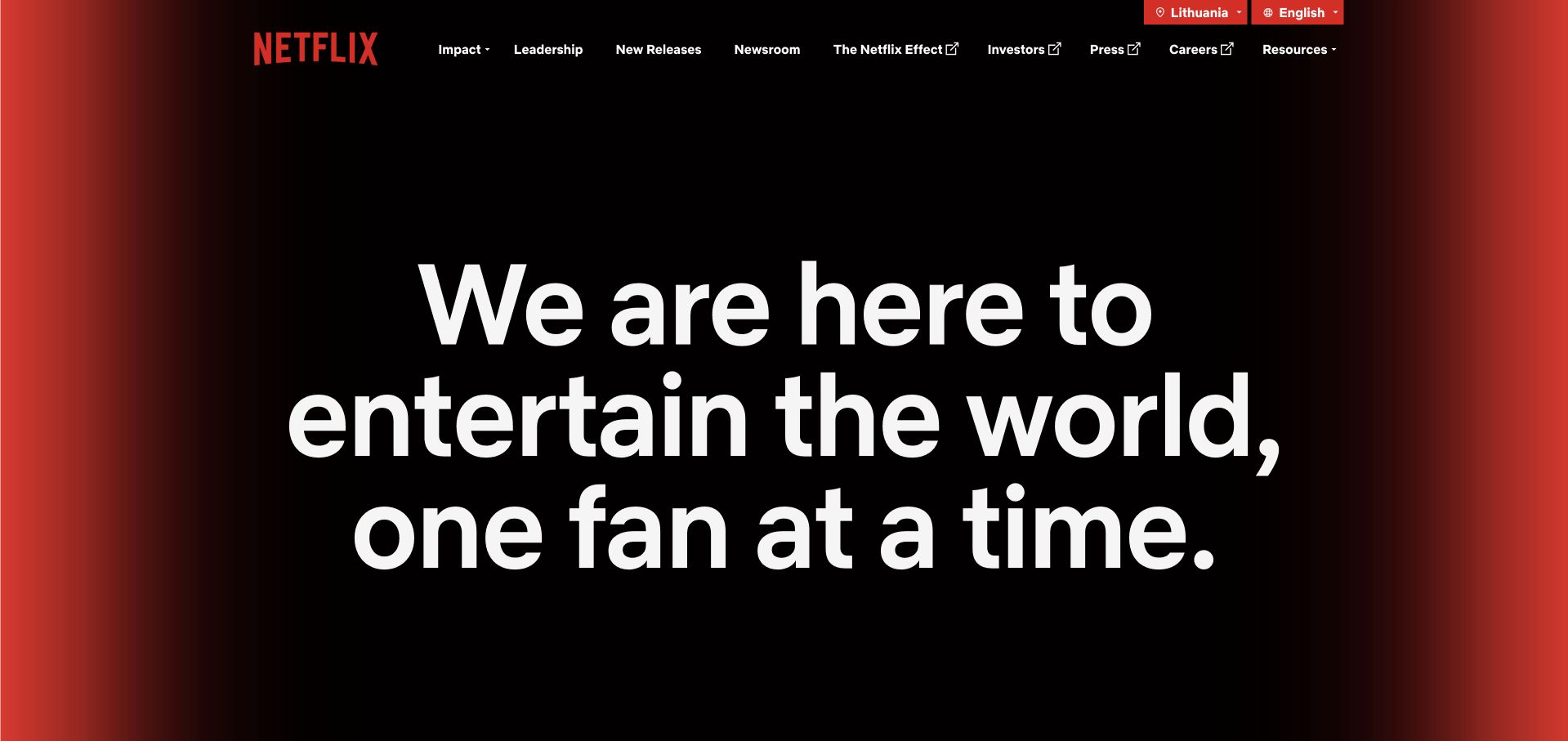
Netflix’s public company site is deliberately different from its subscription storefront. A large typographic statement dominates the opening, while leadership, newsroom, careers and other organizational subjects remain in the compact header. The black and red treatment creates continuity with the consumer brand without asking a press visitor to choose a subscription. The OpenJS Foundation’s Node.js profile describes streaming and studio work historically; this separate corporate page is an example of audience organization, not proof of the server runtime behind its current presentation.
What you can learn
Give professional audiences an entrance designed around their actual questions. A company page can share the consumer brand’s visual language while using a different information architecture. Make those practical destinations available immediately rather than burying them after a cinematic product campaign.
Pros
Corporate destinations are visible beside the opening story instead of being restricted to an oversized footer.
The restrained color system lets a short statement carry the brand without several competing visual effects.
Cons & considerations
The broad opening does not answer specific product, pricing or subscription questions.
Very large text requires responsive and zoom testing to avoid excessive scrolling before useful navigation appears.
Platform source: Official Node.js engineering or project evidence. Streaming and studio platform profiles, described in a 2020 foundation account. The cited engineering, project or customer source establishes only the named language association. It does not establish the marketing page runtime, every company system, current deployment continuity or independent performance results. Platform evidence is separate from the direct website screenshot and is not a complete current infrastructure audit.
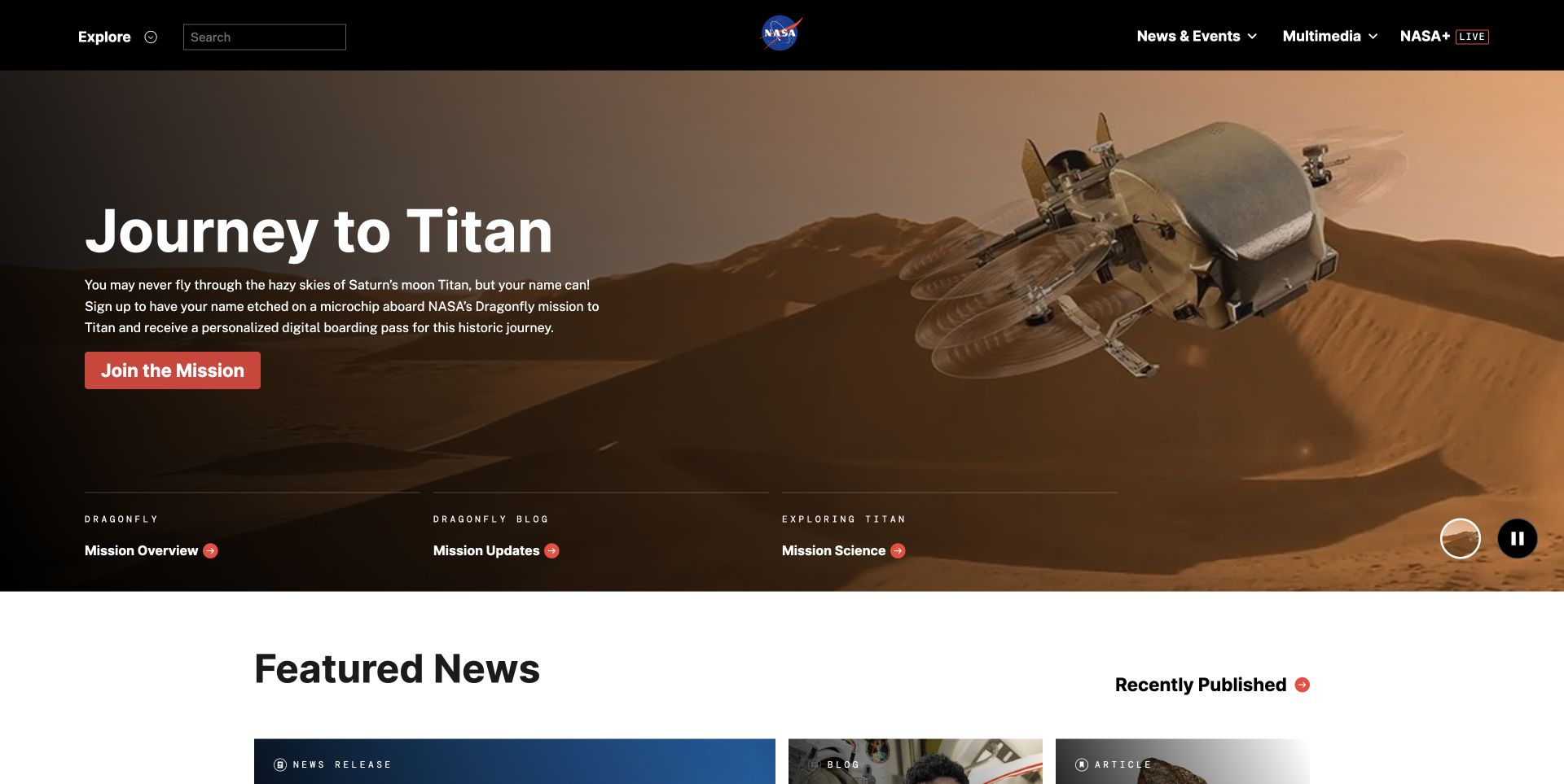
NASA’s captured homepage introduces a mission with a large illustrative scene and a short invitation, then moves into featured news. The subject is concrete enough for a general audience, while mission overview, updates and science routes create more specialized entrances. A dark header keeps the institution recognizable without competing with the visual story. The foundation’s Node.js account concerns a spacesuit-data application, not the runtime of this pictured institutional homepage or every NASA mission system.
What you can learn
Use a current project to make a large institution approachable, but provide several depths of information beside the story. An introductory action, a technical route and an updates route serve different intentions better than one vague Learn More button leading everyone into the same long page.
Pros
The mission image and short headline create an understandable subject before the broader news collection begins.
Multiple labeled mission routes acknowledge the difference between curiosity, project detail and ongoing updates.
Cons & considerations
An image-led feature can push other institutional priorities below the first screen.
A static capture cannot establish the accessibility of the animated hero, playback controls or changing mission content.
Platform source: Official Node.js engineering or project evidence. Spacesuit-data application discussed by the OpenJS Foundation in 2020. The cited engineering, project or customer source establishes only the named language association. It does not establish the marketing page runtime, every company system, current deployment continuity or independent performance results. Platform evidence is separate from the direct website screenshot and is not a complete current infrastructure audit.
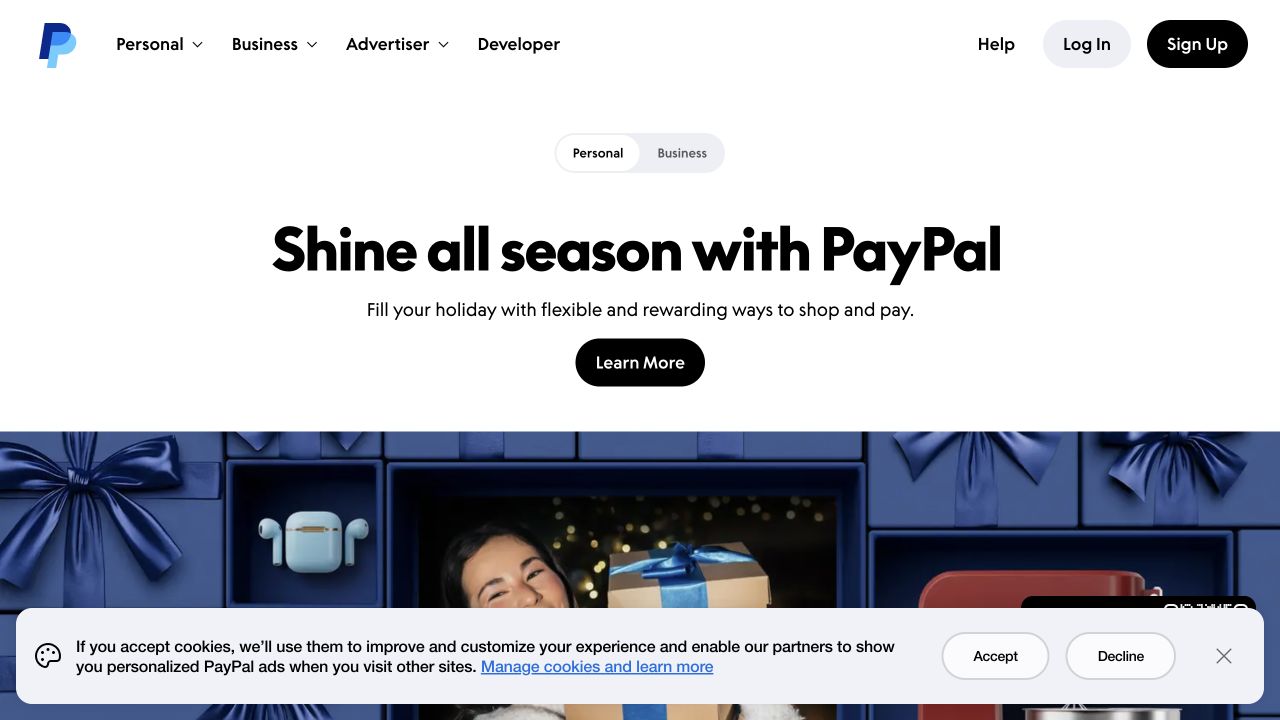
PayPal leaves its account actions in the header while the main page introduces a seasonal shopping use case. A Personal and Business selector makes the current audience explicit, and a short dark button gives the promotional copy a clear destination. The large image begins below that simple introduction instead of becoming a background for several paragraphs. Node is named as a first-class application language in a published PayPal platform case; it should not be read as a complete current inventory of this campaign page.
What you can learn
Keep familiar account controls stable while changing acquisition content around them. Returning users should be able to act without interpreting a seasonal campaign, and new visitors should be able to understand the service without first opening an account. Treat those as related but separate journeys.
Pros
The header distinguishes login from registration without making either dominate the new-visitor introduction.
The audience selector reduces ambiguity about whether the page is explaining personal shopping or business services.
Cons & considerations
A campaign-led opening needs a reliable route to evergreen product information and current terms.
The captured consent notice covers part of the lower image and increases the number of immediate decisions.
Platform source: Official Node.js engineering or project evidence. Node identified as a first-class application language in the 2020 case. The cited engineering, project or customer source establishes only the named language association. It does not establish the marketing page runtime, every company system, current deployment continuity or independent performance results. Platform evidence is separate from the direct website screenshot and is not a complete current infrastructure audit.
Uber’s About page uses a warm human photograph above a short statement about movement. The composition gives the company story a clear beginning without exposing a private trip dashboard or making the visitor start a booking. That separation is useful for a business whose consumer, driver and corporate audiences ask different questions. Uber’s 2016 engineering article describes Node in trip execution and frontline APIs; it is historical service evidence, not a claim that this About page shares that implementation.
What you can learn
Design the institutional introduction as its own task. A product platform can explain its wider purpose through people and situations, then route visitors toward the appropriate service. The same brand does not require the same interface for a rider, an applicant and someone reading about the organization.
Pros
A real-world scene makes the service’s human context easier to grasp than an infrastructure diagram would.
The short text beneath the image creates a clear transition from atmosphere into the company narrative.
Cons & considerations
The mission language remains broad until supported by more concrete information further down the page.
An About-page example cannot establish the quality, speed or accessibility of an actual booking workflow.
Platform source: Official Node.js engineering or project evidence. Historical trip execution and frontline API implementation, documented in 2016. The cited engineering, project or customer source establishes only the named language association. It does not establish the marketing page runtime, every company system, current deployment continuity or independent performance results. Platform evidence is separate from the direct website screenshot and is not a complete current infrastructure audit.
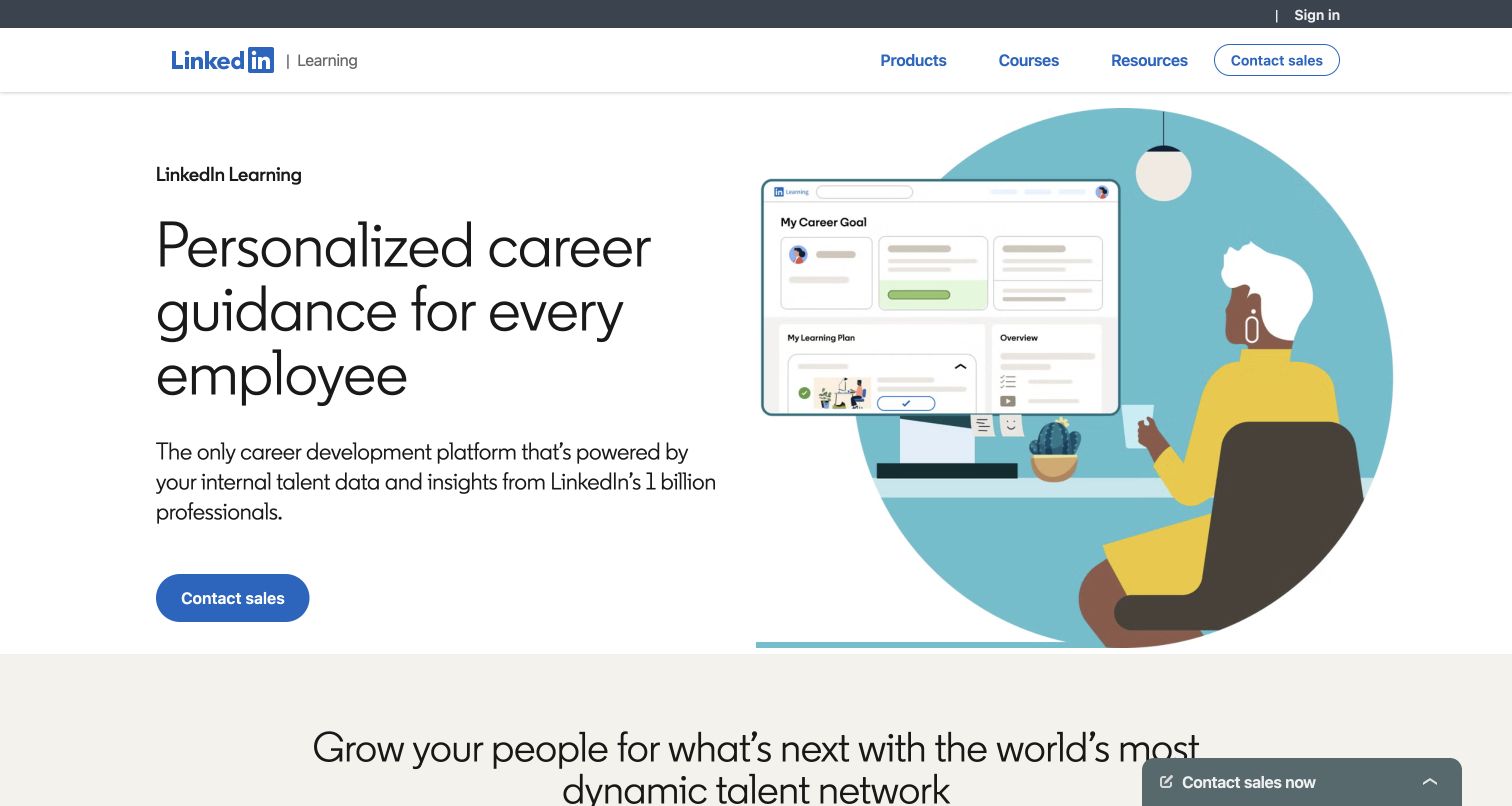
LinkedIn Learning’s business page combines a career-development proposition with an illustrated learning interface. The restrained blue and white palette makes the primary sales action easy to identify, while the navigation separates products, courses and resources. It speaks to an organization evaluating a learning program rather than immediately presenting an individual course catalog. The cited Node.js account is about an earlier LinkedIn mobile-web experience; it does not identify the technology behind this particular Learning page or the current platform as a whole.
What you can learn
Name the buyer’s intended outcome before exposing the breadth of a learning catalog. A small interface preview can connect that outcome to a believable product surface, but it should lead to useful detail about content, administration and implementation rather than replace those evaluation materials.
Pros
The headline identifies an organizational purpose instead of opening with an undifferentiated list of courses.
A visible interface illustration gives a broad career promise a more concrete product context.
Cons & considerations
A contact-sales-first journey can frustrate visitors who only need a quick understanding of pricing or scope.
The illustration cannot demonstrate the real learner experience, content quality or administrative workflow.
Platform source: Official Node.js engineering or project evidence. Historical LinkedIn mobile-web Node.js stack, not the pictured Learning page runtime. The cited engineering, project or customer source establishes only the named language association. It does not establish the marketing page runtime, every company system, current deployment continuity or independent performance results. Platform evidence is separate from the direct website screenshot and is not a complete current infrastructure audit.
Bloomberg’s company page leads with a city-and-office photograph and an introductory statement connecting data, people and ideas. A prominent jobs action turns the opening into a specific invitation rather than a purely decorative brand film. The darker supporting section begins to explain career possibilities immediately below. The OpenJS Foundation names Bloomberg among Node.js adopters in a historical training announcement, but does not specify a workload there; this collection preserves that limitation instead of attributing its pictured corporate page to Node.
What you can learn
Choose a useful action for the audience a corporate campaign actually addresses. If the opening is about people and careers, a direct jobs route is more coherent than a generic sales button. Keep a broader company navigation available for visitors arriving with other professional questions.
Pros
The office photograph and jobs action reinforce the same people-focused introductory story.
The dark follow-on section creates a clear visual transition into more specific career information.
Cons & considerations
A recruitment-oriented opening can be less useful to someone trying to compare Bloomberg’s business products.
Several narrow corporate navigation strips demand careful contrast, focus and mobile testing beyond a static screenshot.
Platform source: Official Node.js engineering or project evidence. Node.js adoption named by the OpenJS Foundation in 2021; workload not specified. The cited engineering, project or customer source establishes only the named language association. It does not establish the marketing page runtime, every company system, current deployment continuity or independent performance results. Platform evidence is separate from the direct website screenshot and is not a complete current infrastructure audit.
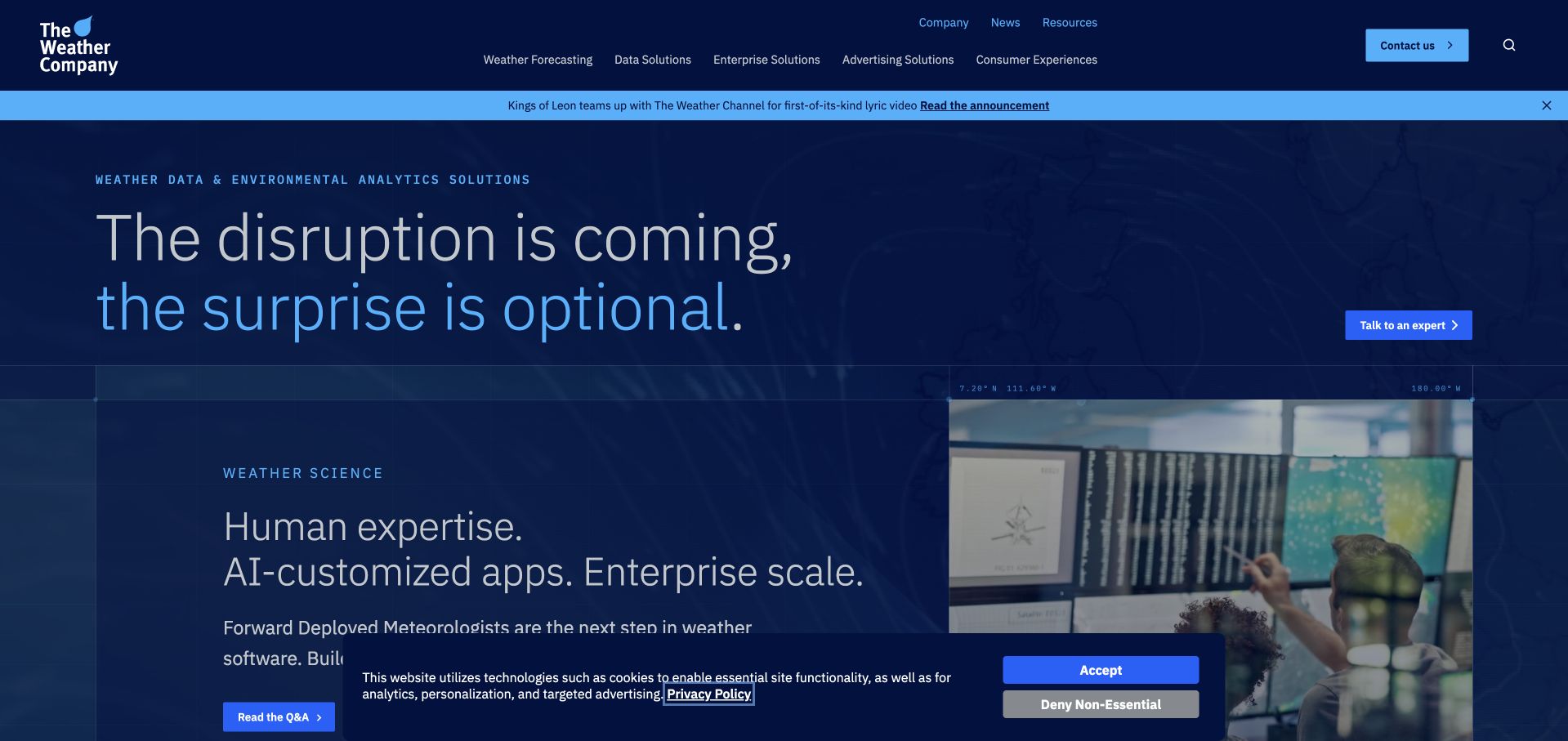
The Weather Company pairs a large disruption-focused statement with a second panel connecting weather science, human expertise and enterprise applications. The blue-on-blue visual treatment keeps the two subjects related, while a visible report action offers a concrete next step. This is a business-oriented presentation rather than a local weather forecast. The Node.js association comes from an OpenJS Foundation discussion of weather-platform work; it is not an independent measurement of the forecast quality or the runtime of the marketing page.
What you can learn
Explain a data product through the decision it supports, then expose a credible next layer of evidence. Distinguish the service’s information from the customer’s resulting action. Supporting reports, methodology and product detail are more useful than allowing a dramatic headline to imply an outcome the product cannot guarantee.
Pros
The business-oriented message helps distinguish an enterprise data offer from a familiar consumer forecast service.
Adjacent explanatory panels connect the broad opening to more specific expertise and applications.
Cons & considerations
The dark blue text treatment and background imagery need careful contrast checks in all responsive states.
The captured consent strip competes with the report action near the bottom of the opening.
Platform source: Official Node.js engineering or project evidence. Weather-platform Node.js case discussed by the foundation in 2020. The cited engineering, project or customer source establishes only the named language association. It does not establish the marketing page runtime, every company system, current deployment continuity or independent performance results. Platform evidence is separate from the direct website screenshot and is not a complete current infrastructure audit.
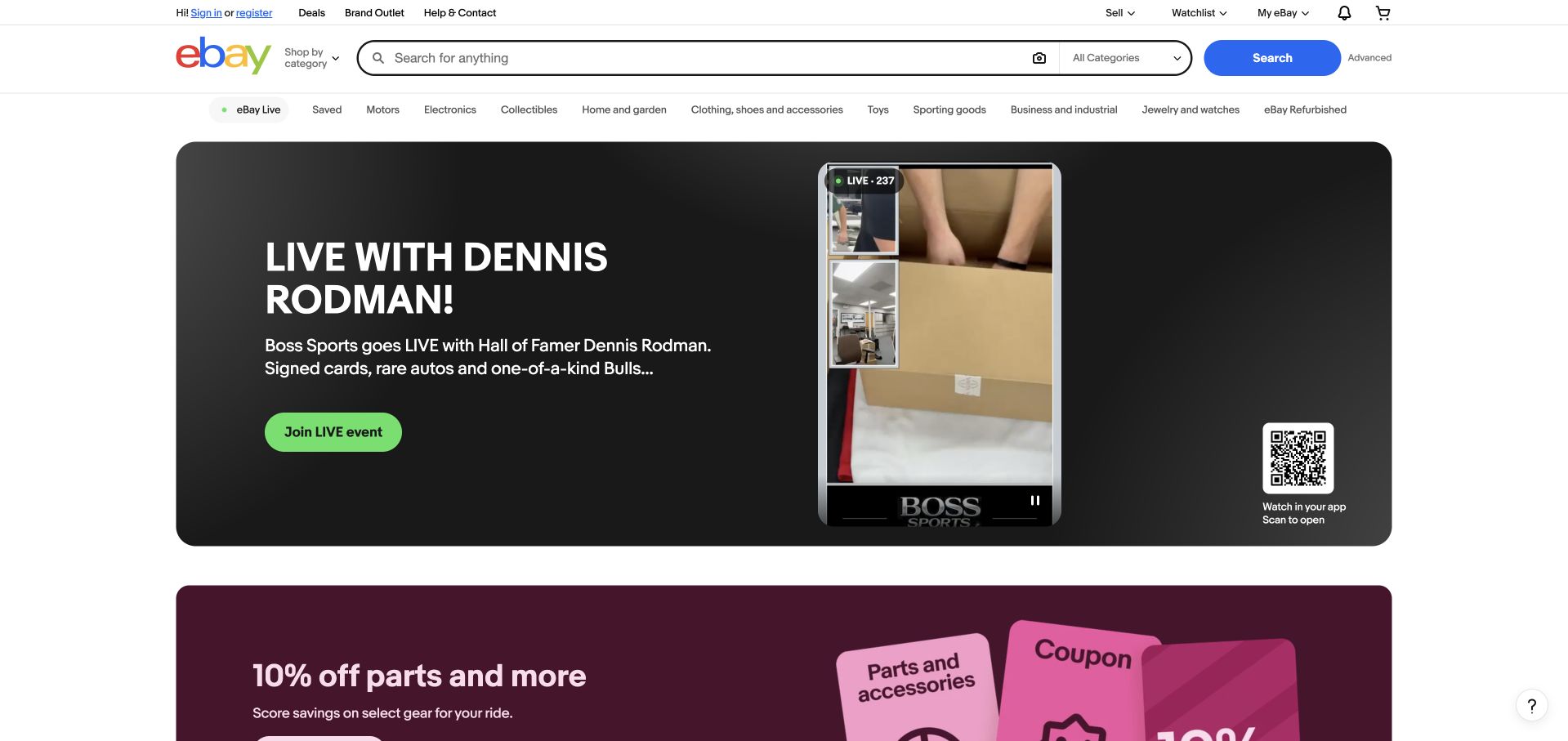
eBay keeps search, category browsing and account controls above a large live-shopping promotion. The campaign is visually assertive, but it does not remove the familiar route for someone who already knows what they want to buy. Additional offer cards begin beneath it, creating a transition from one featured event into a wider catalog. eBay’s 2021 Marko article documents server rendering and Node.js adoption at that time; it does not establish the complete current runtime of every marketplace page.
What you can learn
Let promotional discovery coexist with the primary utility of a marketplace. A campaign should be easy to bypass through search or categories, especially for repeat visitors. Keep event-specific language and visual urgency inside the campaign rather than allowing it to make the whole navigation harder to understand.
Pros
The search field remains prominent before the visitor encounters the featured live event.
A bounded campaign panel separates temporary editorial content from the stable marketplace controls.
Cons & considerations
The dense utility navigation and several offer rows can create a busy first impression.
Event-specific promotions need prompt maintenance so an expired campaign does not become the main entrance.
Platform source: Official Node.js engineering or project evidence. Marko server rendering and Node.js adoption, documented by eBay in 2021. The cited engineering, project or customer source establishes only the named language association. It does not establish the marketing page runtime, every company system, current deployment continuity or independent performance results. Platform evidence is separate from the direct website screenshot and is not a complete current infrastructure audit.
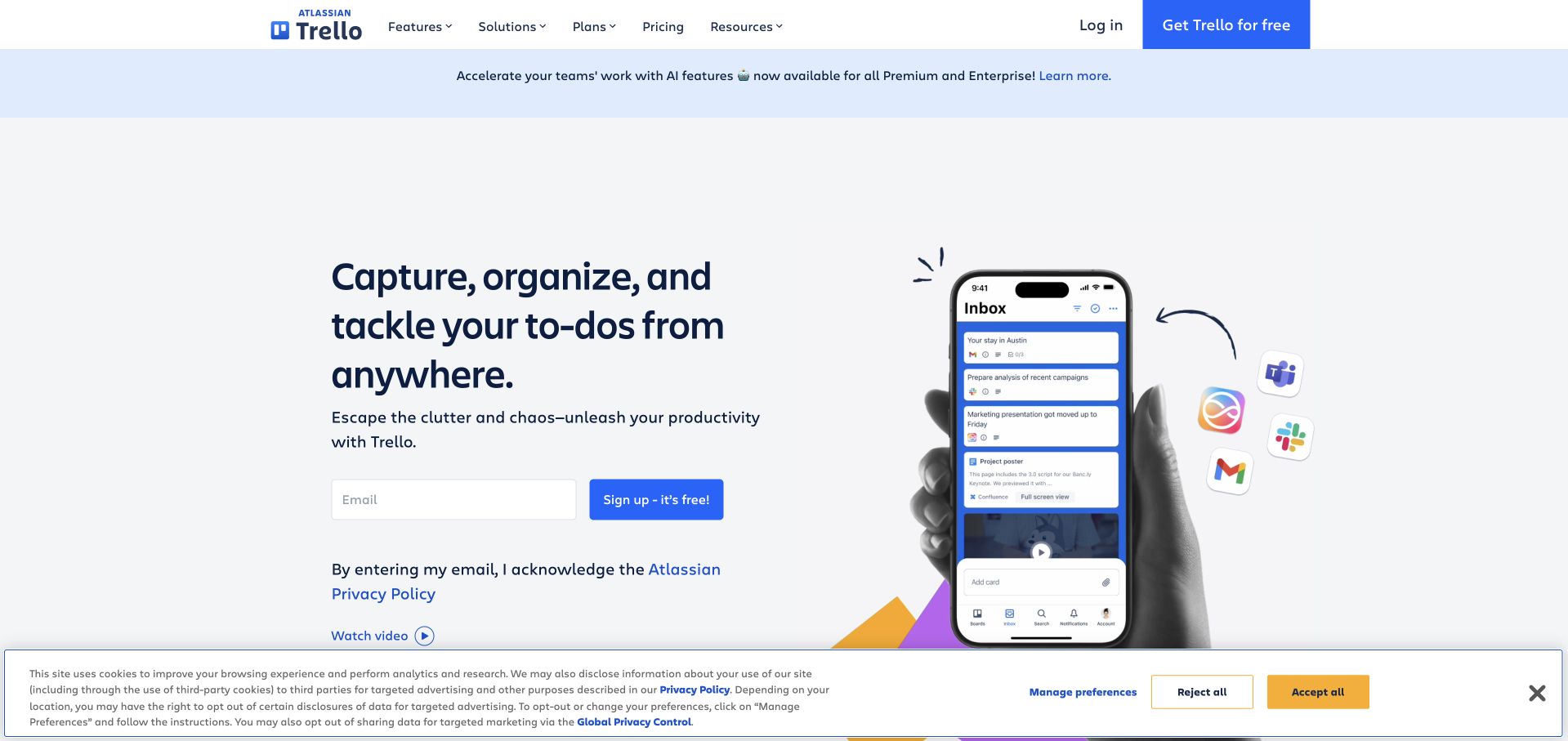
Trello’s opening describes capturing and organizing tasks beside a phone-centered product illustration. A short email field and signup action sit below the explanation, while navigation offers features, solutions and pricing for visitors who are not ready to register. The pale background and modest amount of text give the page a calmer tone than a feature-heavy dashboard tour. Trello’s own historical architecture article describes a Node.js server; this current marketing image is not a benchmark or a complete production stack census.
What you can learn
Introduce a productivity tool with the everyday task it helps someone complete, then show a recognizable interface context. Keep the exploration route visible beside signup. A clear first task is more useful than asking an unfamiliar visitor to understand every board type, automation and enterprise feature at once.
Pros
The phone illustration makes the task-capture use case tangible without a long explanatory video.
Exploration links remain available before visitors commit to supplying an email address.
Cons & considerations
The signup field arrives before a visitor has seen much evidence about the broader product workflow.
A promotional strip and cookie notice add layers around an otherwise restrained opening composition.
Platform source: Official Node.js engineering or project evidence. Historical Trello application architecture account. The cited engineering, project or customer source establishes only the named language association. It does not establish the marketing page runtime, every company system, current deployment continuity or independent performance results. Platform evidence is separate from the direct website screenshot and is not a complete current infrastructure audit.
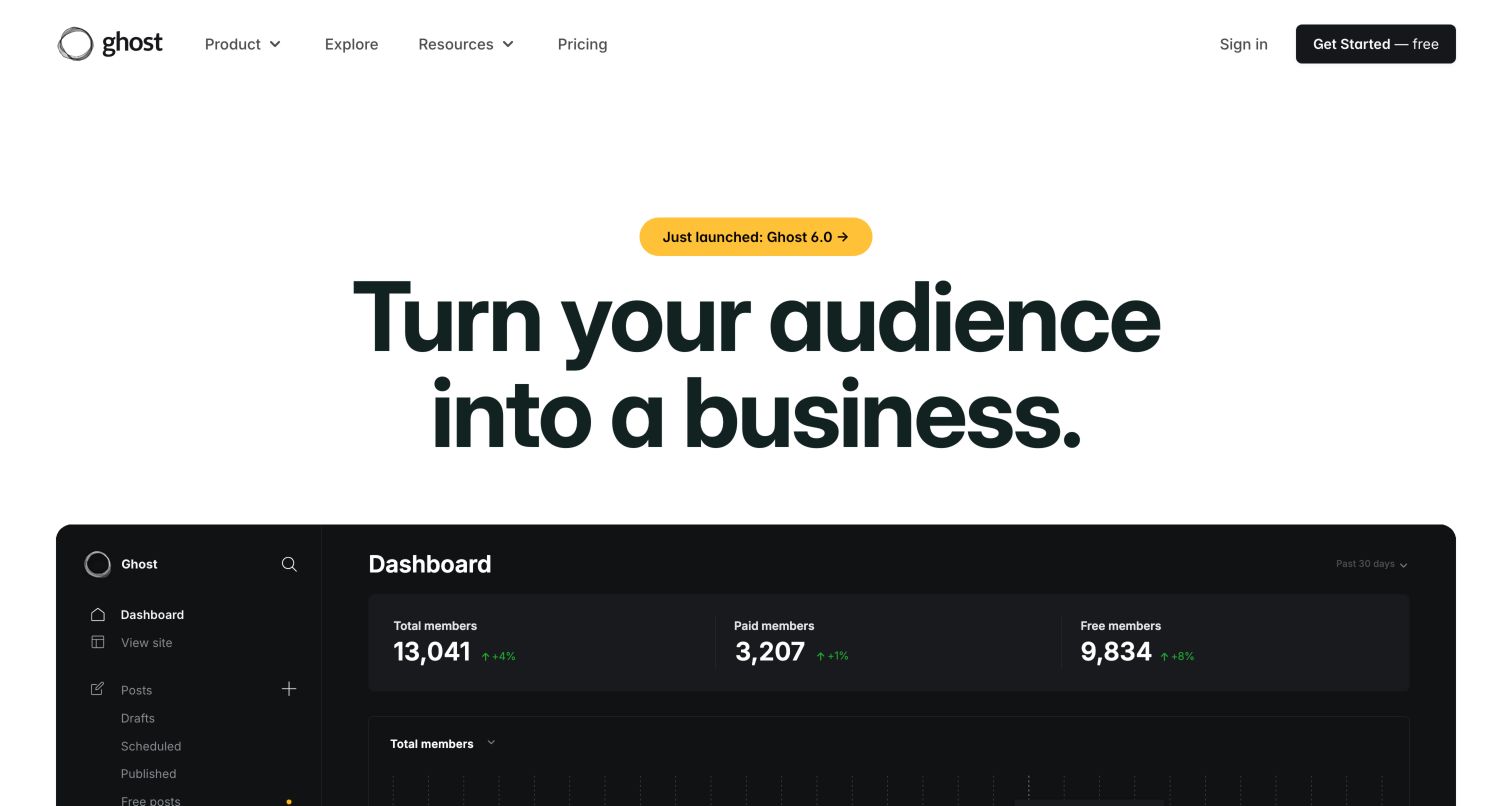
Ghost gives a broad audience-building statement an immediate visual anchor: a large publishing dashboard begins directly below the headline. The screenshot suggests that the service is not only a public blog theme, but also an operational tool for managing a publication. A sparse header keeps the first decision manageable, with pricing and resources available beside the main registration action. Ghost’s official source establishes its Node.js application association; it does not establish the backend of every publication made with the software.
What you can learn
Show the working surface behind a public-facing result. Prospective publishers need to understand the editorial and business workflow, not only admire the appearance of a finished homepage. A concise proposition becomes more credible when it is followed by an appropriately labeled, representative interface rather than unrelated lifestyle imagery.
Pros
The dashboard preview gives the audience-business statement a concrete operational context.
A short navigation keeps the main publishing proposition from being diluted by dozens of equal-weight product categories.
Cons & considerations
Dashboard figures in a marketing image should not be interpreted as typical customer outcomes.
The cropped interface cannot establish the difficulty of configuring memberships, moving content or operating a publication.
Platform source: Official Node.js engineering or project evidence. Open-source publishing application implemented for a Node.js runtime. The cited engineering, project or customer source establishes only the named language association. It does not establish the marketing page runtime, every company system, current deployment continuity or independent performance results. Platform evidence is separate from the direct website screenshot and is not a complete current infrastructure audit.
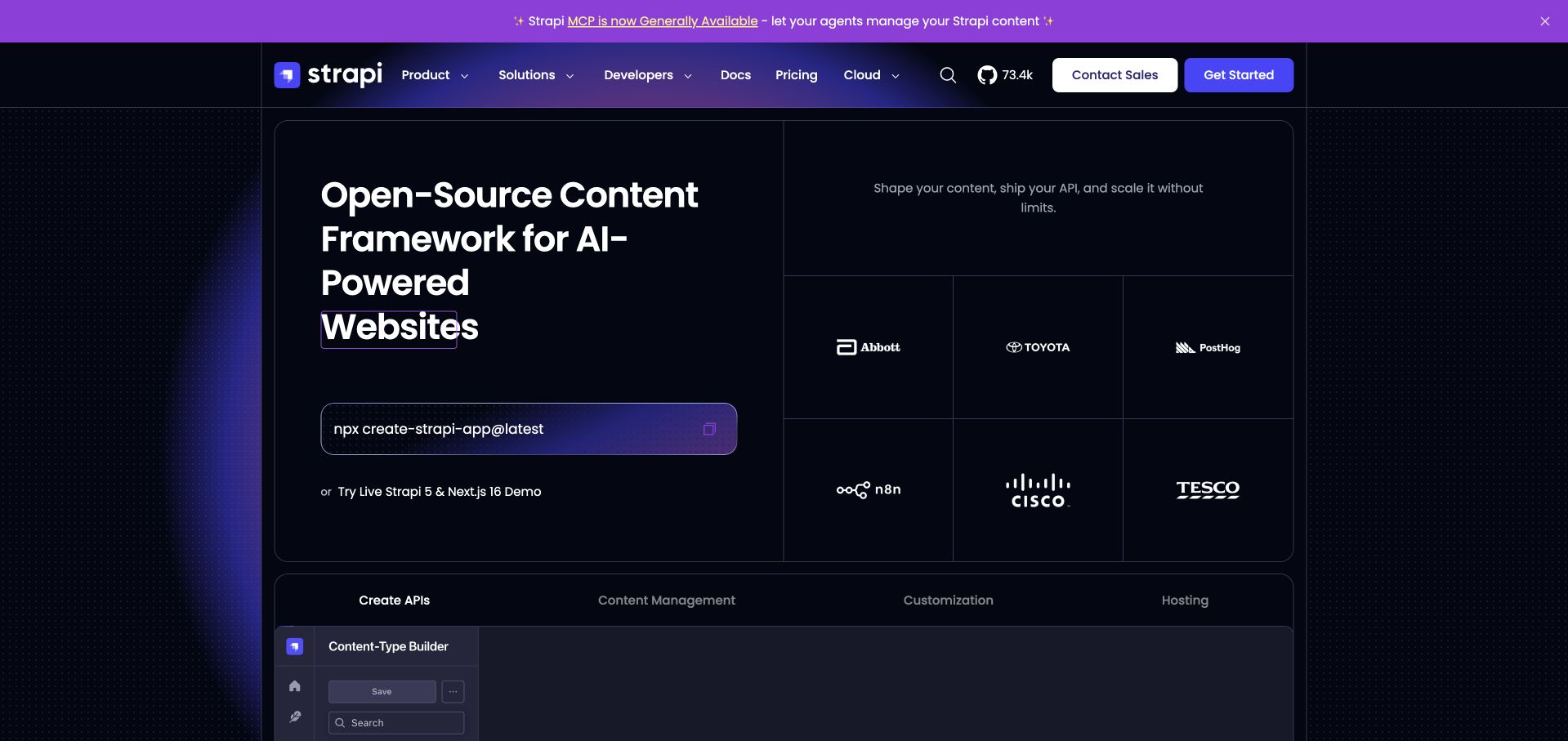
Strapi’s captured opening uses a dark grid to separate a developer command, a platform statement and recognizable customer context. The terminal-style starting line makes the technical route visible, while contact and documentation links acknowledge more deliberate evaluation. A product interface begins below, helping turn an abstract content-platform description into something concrete. The official repository establishes the Node.js application association; that is not permission to infer the runtime of every Strapi customer or every component shown on this marketing page.
What you can learn
Give developers a credible first step while preserving an explanation for non-developer buyers. A command snippet is useful only when its prerequisites and documentation are easy to find. Explain the distinction between the content system, hosting option and frontend rather than treating them as one automatically chosen stack.
Pros
A visible starting command makes the builder-oriented route clear without hiding it inside a sales flow.
The grid provides separate homes for the product explanation, customer context and interface preview.
Cons & considerations
Broad AI-focused wording can obscure the more concrete editorial and content-modeling jobs the product performs.
A dark, densely bordered opening needs careful text sizing and contrast work on smaller displays.
Platform source: Official Node.js engineering or project evidence. Open-source Node.js headless-CMS application. The cited engineering, project or customer source establishes only the named language association. It does not establish the marketing page runtime, every company system, current deployment continuity or independent performance results. Platform evidence is separate from the direct website screenshot and is not a complete current infrastructure audit.
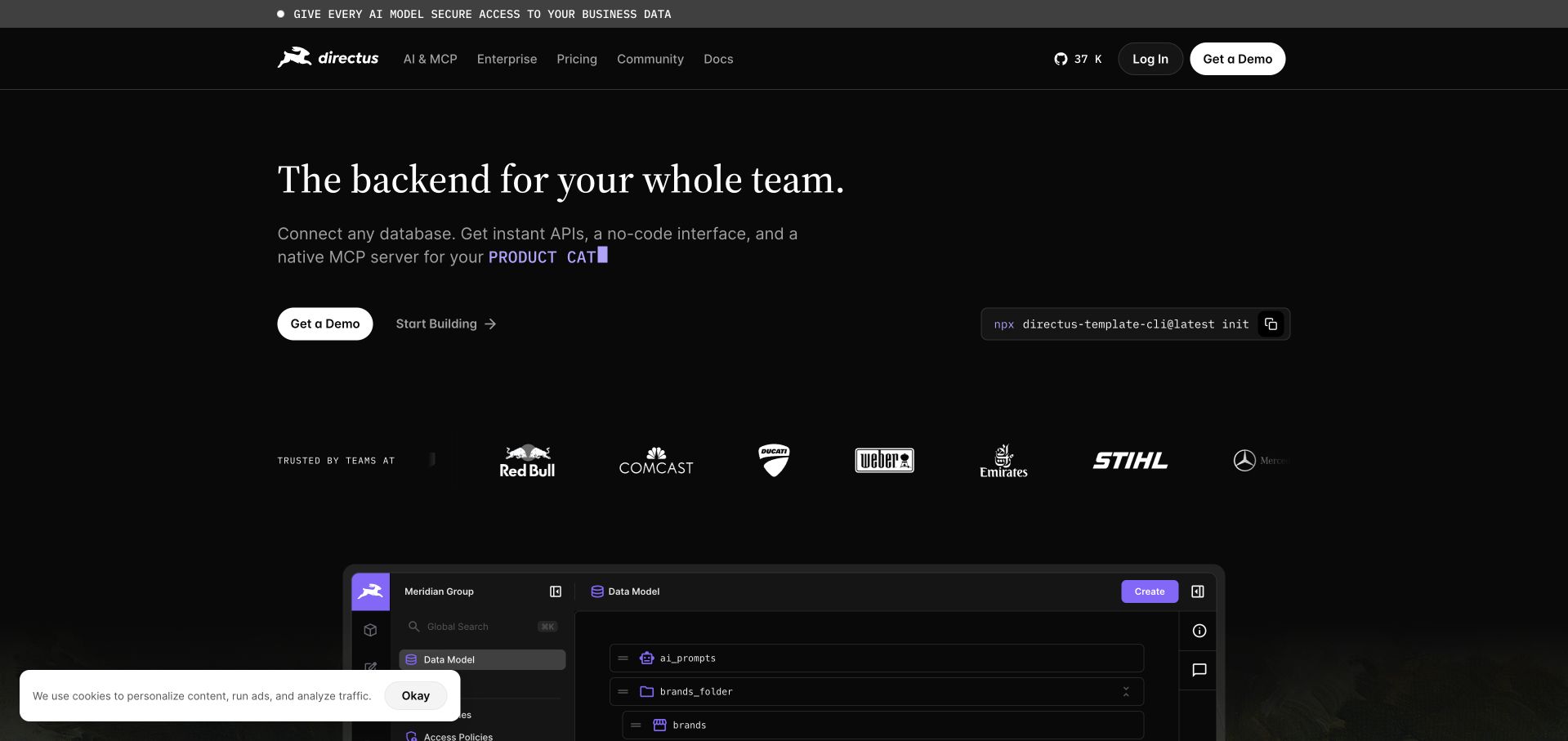
Directus opens with a short whole-team proposition on a nearly black background. A compact description connects databases, APIs and a no-code interface, with separate demonstration and builder actions beneath it. The lower interface preview makes the collaboration claim less abstract than a decorative database icon would. The official package manifest declares a Node.js engine for the application; that specific source does not identify the runtime of the public marketing page or imply that a visitor’s database is hosted by Directus.
What you can learn
Explain how technical and non-technical collaborators meet in the product, not just the list of systems it connects. Offer distinct evaluation and implementation routes. The interface preview should help a team imagine a real shared task while documentation handles data ownership, permissions and deployment choices.
Pros
The short opening connects an infrastructure-oriented backend to the people expected to work with it.
Separate demonstration and building actions support visitors with different levels of technical readiness.
Cons & considerations
Several broad backend and AI claims need deeper product detail to become an actionable implementation brief.
Customer logos alone cannot establish which deployment, feature set or version each organization uses.
Platform source: Official Node.js engineering or project evidence. Node.js application engine declared in the official package manifest; marketing-page runtime not established. The cited engineering, project or customer source establishes only the named language association. It does not establish the marketing page runtime, every company system, current deployment continuity or independent performance results. Platform evidence is separate from the direct website screenshot and is not a complete current infrastructure audit.
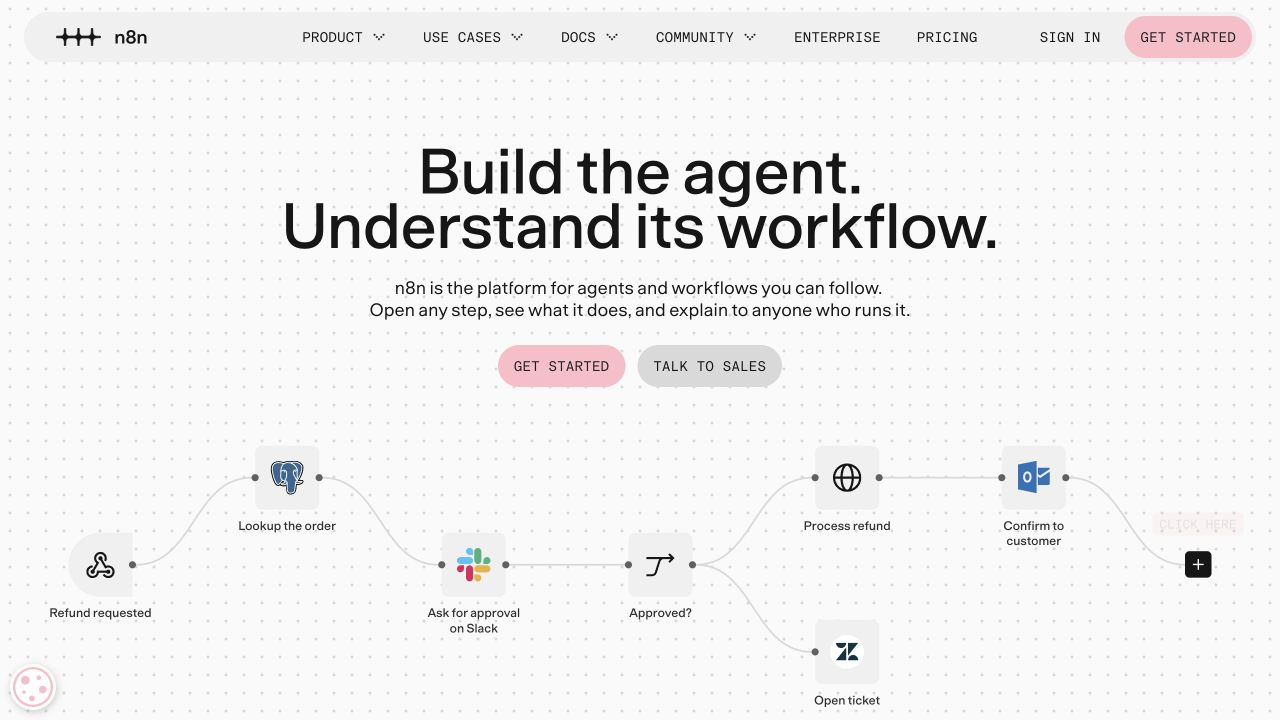
n8n places a visible workflow beneath a concise explanation of agents and understandable automation. The dotted canvas and connected steps make the product’s underlying model part of the page’s visual identity. Documentation and product routes remain in the header, with a distinct primary action for someone ready to start. The project’s public source establishes its Node.js application association; the diagram is a marketing example rather than proof that a particular business process is safe, complete or running unattended.
What you can learn
Show the structure of an automation, including where work branches or needs approval, instead of illustrating intelligence with an abstract glow. A workflow preview should make human control understandable. Follow it with concrete information about credentials, retries, error handling and the work required to maintain the automation.
Pros
The diagram connects the promise of understandable automation to a recognizable sequence of tasks.
The restrained background lets the workflow relationships carry more explanatory weight than decorative imagery.
Cons & considerations
A compact diagram can hide operational complexity such as failed steps, permissions and external-service limits.
An agent-oriented headline may be less explicit for visitors simply looking to automate a conventional integration.
Platform source: Official Node.js engineering or project evidence. Node.js-based workflow application and its public source. The cited engineering, project or customer source establishes only the named language association. It does not establish the marketing page runtime, every company system, current deployment continuity or independent performance results. Platform evidence is separate from the direct website screenshot and is not a complete current infrastructure audit.
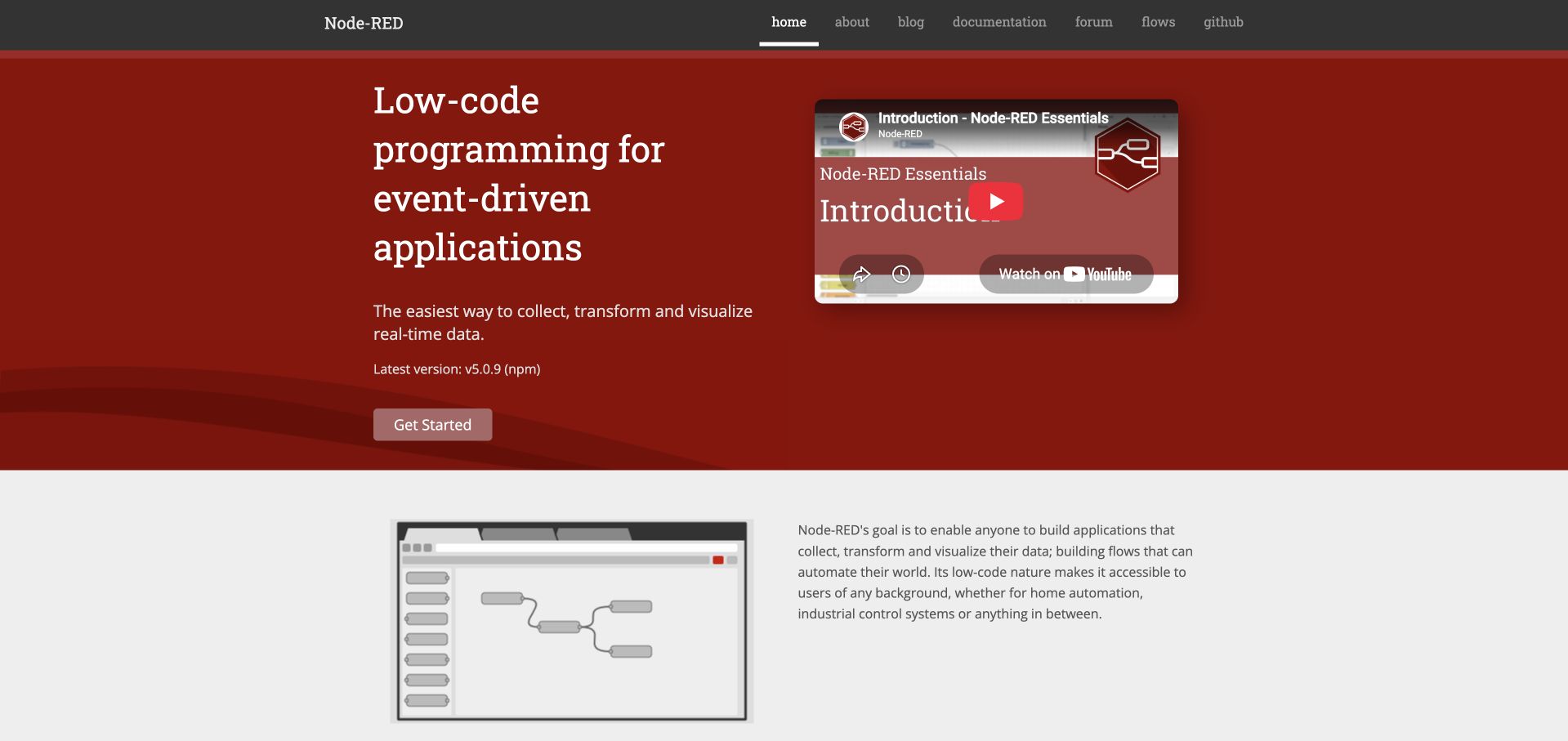
Node-RED’s red opening panel combines a direct product category with an introductory video and a simple getting-started action. Below it, a flow-editor image and explanatory paragraph begin to show how the system is used. The navigation gives documentation, examples, community and source code their own predictable places. Its official project declares a Node.js runtime dependency; the product’s implementation is not evidence that every site built around a Node-RED workflow uses the same frontend or deployment model.
What you can learn
Make a technical tool’s first explanation concrete, then offer both reading and watching routes. Put the official learning path near the first action so new users do not have to assemble an introduction from forum posts. Keep the diagram representative of a task a beginner can actually complete.
Pros
The opening names the tool category clearly instead of relying on an unexplained brand metaphor.
The introductory video is paired with text and a conventional starting route rather than standing alone.
Cons & considerations
The compact type and traditional navigation may feel dense when viewed on a narrow screen.
An embedded video introduces third-party loading and accessibility considerations that a screenshot cannot verify.
Platform source: Official Node.js engineering or project evidence. Node.js runtime dependency of the flow-based application. The cited engineering, project or customer source establishes only the named language association. It does not establish the marketing page runtime, every company system, current deployment continuity or independent performance results. Platform evidence is separate from the direct website screenshot and is not a complete current infrastructure audit.
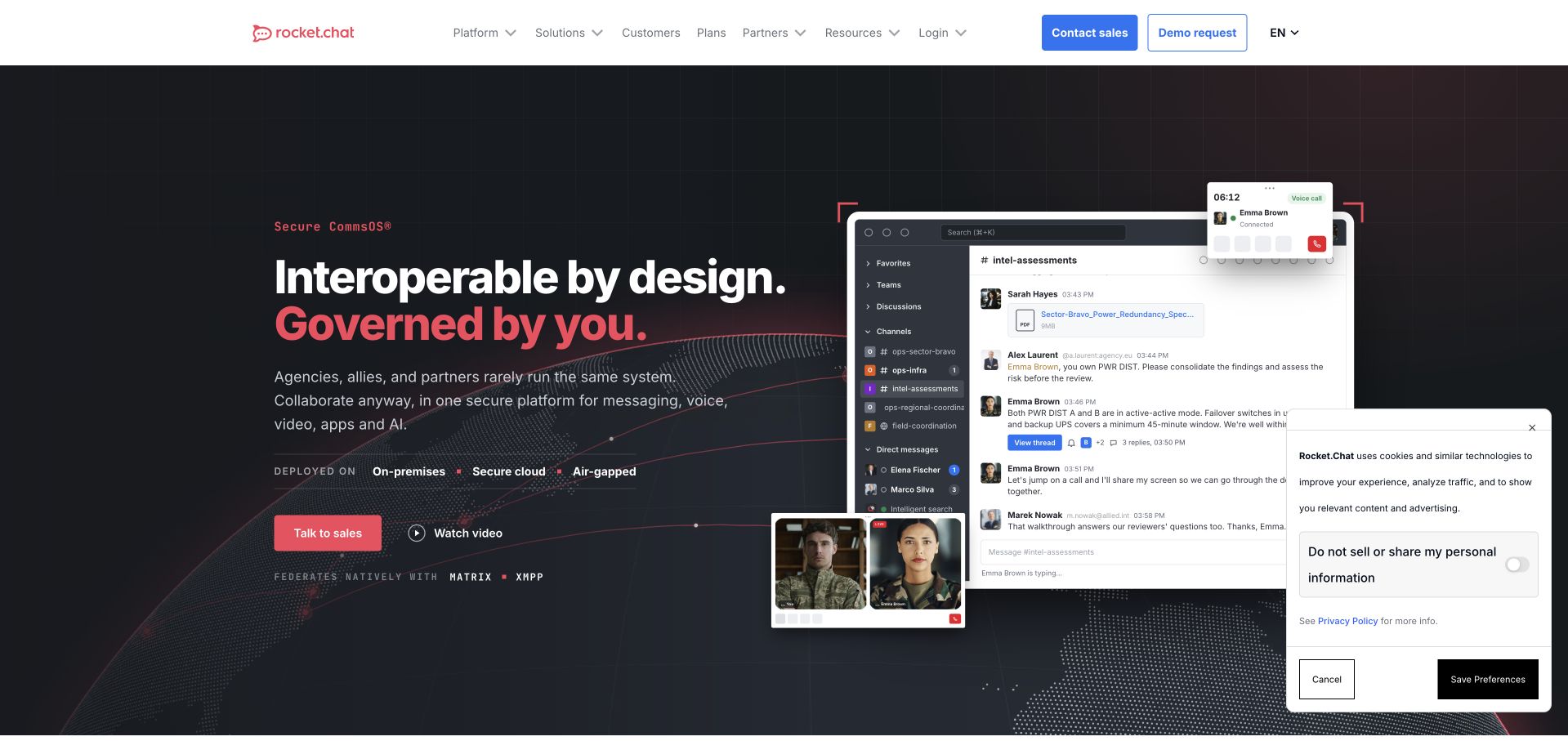
Rocket.Chat pairs a governance-focused headline with a large messaging-interface composition. The image shows channels and conversations, giving the infrastructure language an immediate product context. Sales and demonstration actions are visually separated, while the header exposes platform, solutions and resource routes. The official package manifest identifies a Node.js server engine; the pictured marketing page does not establish the controls, deployment model or regulatory suitability of any individual installation.
What you can learn
Connect a technical requirement such as control or interoperability to a familiar user task. The interface explains what people will use; supporting technical pages should explain how it is operated. Avoid letting a security-oriented aesthetic imply certifications, compliance outcomes or access guarantees that the public evidence has not established.
Pros
The messaging interface provides a concrete counterpart to an otherwise abstract governance proposition.
Separate product and solution navigation can serve technical evaluators and organization-specific research without one overloaded menu.
Cons & considerations
The broad control message still needs detailed deployment and ownership information before a buying decision.
A dense interface collage becomes difficult to read when scaled down and should not replace an accessible demonstration.
Platform source: Official Node.js engineering or project evidence. Node.js server engine declared in the official package manifest. The cited engineering, project or customer source establishes only the named language association. It does not establish the marketing page runtime, every company system, current deployment continuity or independent performance results. Platform evidence is separate from the direct website screenshot and is not a complete current infrastructure audit.
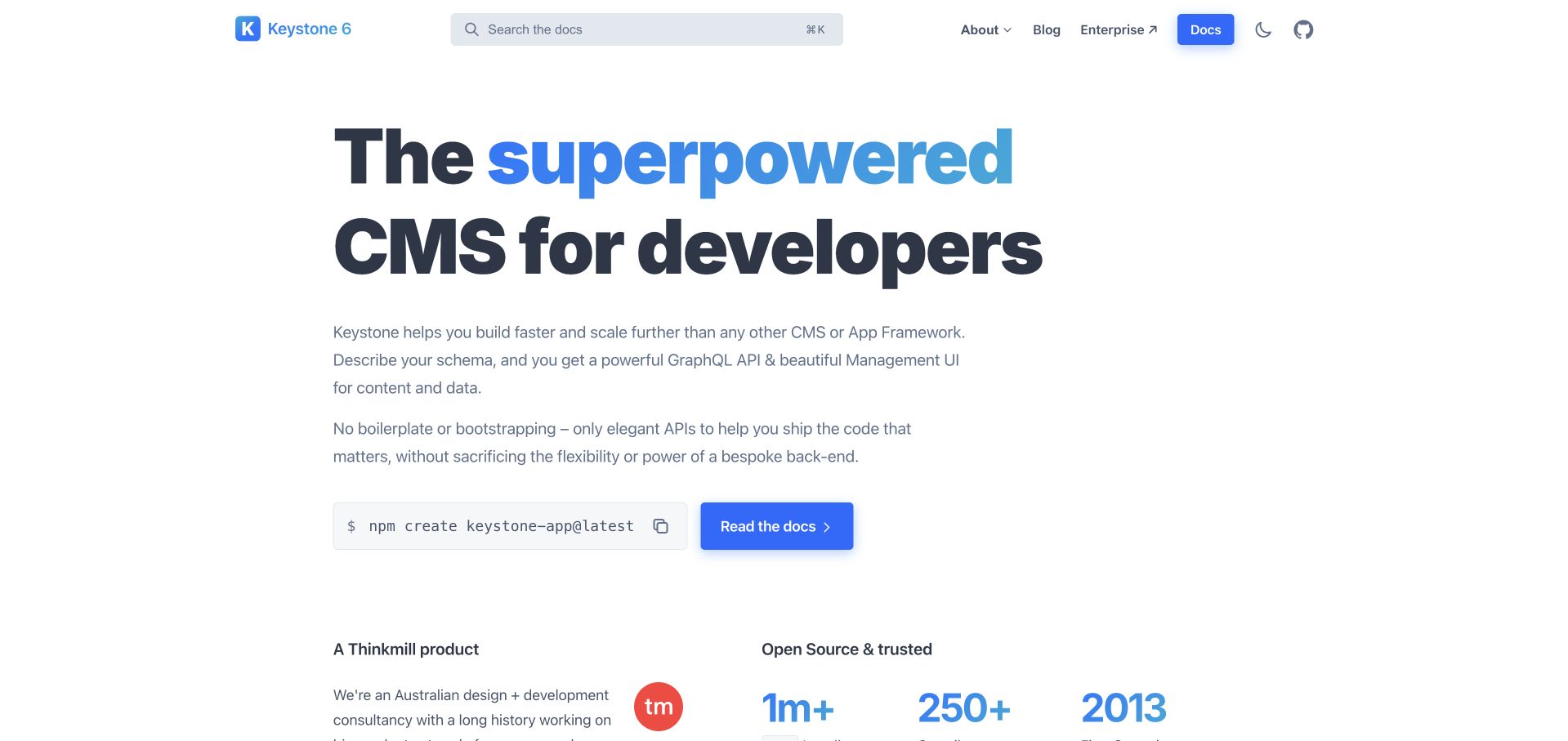
Keystone uses a bright, predominantly white opening and a large developer-focused headline. A short description names the schema, API and management interface, while a command and documentation action provide concrete next steps. Search is visible in the header, making the site feel connected to its documentation rather than separated from it. The official project establishes its Node.js framework association; the marketing page does not prove the architecture of every application a developer might build with Keystone.
What you can learn
Be explicit about the intended builder and the first unit of work. A developer-oriented homepage can be approachable without hiding technical vocabulary, provided it connects each important term to a useful starting route. Keep the learning and reference material searchable from the same recognizable header.
Pros
The starting command and documentation button make the implementation route visible beneath the introductory claim.
A restrained page and prominent search control support a reference-oriented product without unnecessary visual noise.
Cons & considerations
A broad superpowered claim needs concrete examples of editorial workflows and application boundaries further down.
Technical shorthand can still exclude non-developer stakeholders who need to understand maintenance and content ownership.
Platform source: Official Node.js engineering or project evidence. Node.js CMS application framework. The cited engineering, project or customer source establishes only the named language association. It does not establish the marketing page runtime, every company system, current deployment continuity or independent performance results. Platform evidence is separate from the direct website screenshot and is not a complete current infrastructure audit.
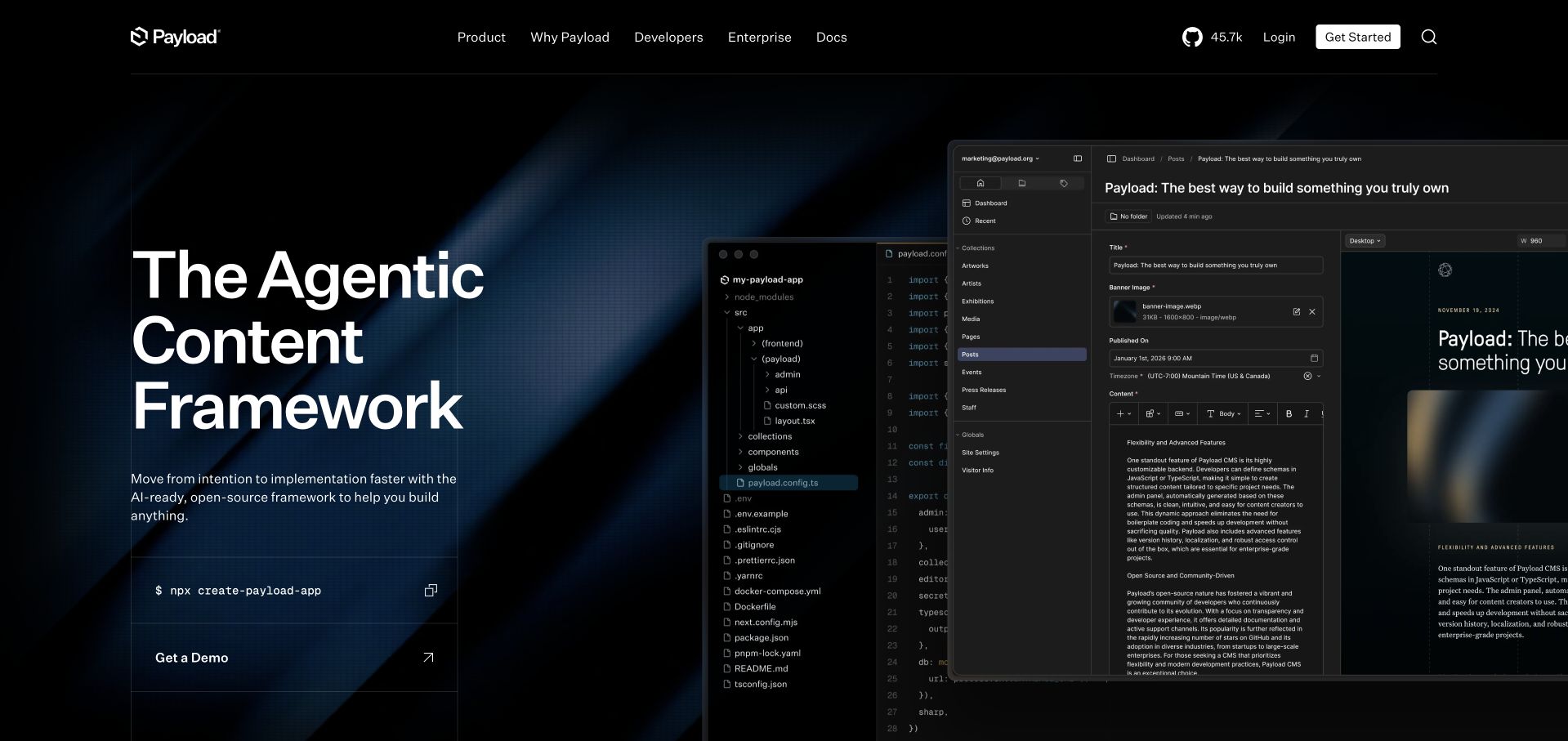
Payload’s dark homepage places a large content-framework statement beside overlapping code and administration interfaces. The composition communicates that developers and editors are expected to work with different surfaces of the same system. The command below the introduction reinforces the builder route, while product and enterprise navigation leave room for a longer evaluation. Payload’s public project establishes a Node.js application association; neither the screenshots nor the framework label establish the runtime of every deployment or customer-facing frontend.
What you can learn
Show how the developer model and editorial interface relate instead of selling them as disconnected features. The best interface pairing explains who works where and what changes become visible to the other person. Follow an expressive framework claim with concrete content-modeling, preview, authorization and deployment guidance.
Pros
The paired code and administration views make the product’s dual technical and editorial roles tangible.
A starting command gives the headline a practical implementation route without forcing a sales conversation.
Cons & considerations
The overlapping screenshots are visually rich but too small to explain detailed editing or configuration tasks.
An agent-oriented positioning statement may leave conventional content-management requirements insufficiently explicit at the opening.
Platform source: Official Node.js engineering or project evidence. Node.js-based application/CMS project; not a marketing-page inventory. The cited engineering, project or customer source establishes only the named language association. It does not establish the marketing page runtime, every company system, current deployment continuity or independent performance results. Platform evidence is separate from the direct website screenshot and is not a complete current infrastructure audit.
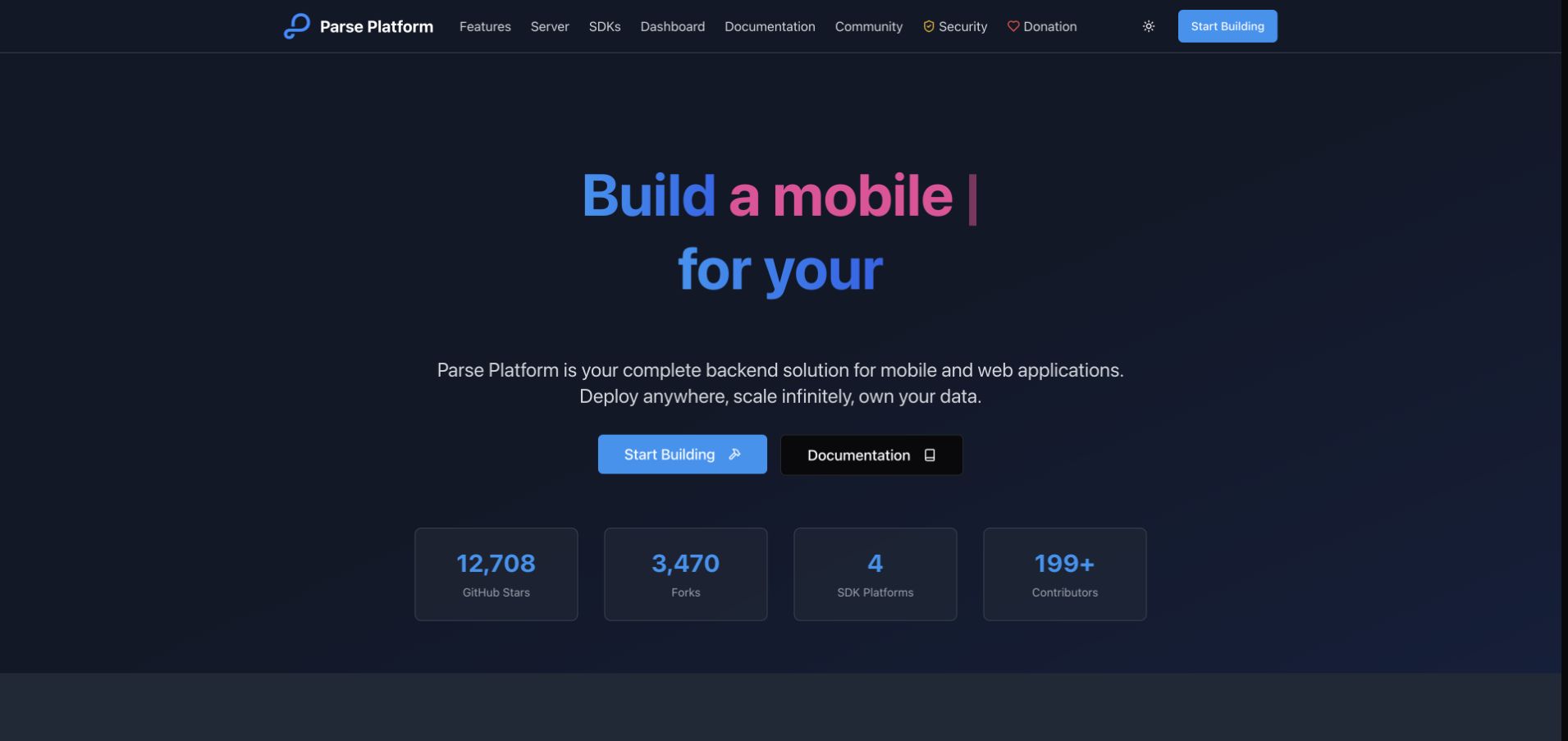
Parse Platform uses a dark blue opening, a short backend description and two clear starting actions. The navigation exposes server, SDKs, dashboard, community and security subjects, helping the visitor understand that this is an ecosystem rather than one downloadable theme. Project counters provide additional context below the introduction without replacing the explanation. The public Parse Server source establishes a Node.js and Express implementation; the page itself does not prove which components a particular application uses or how they are hosted.
What you can learn
Introduce the core service first, then separate the tools that surround it. Someone evaluating a backend needs to distinguish the server, client SDK and management interface. Keep a practical building route beside documentation, and make operations and security information discoverable before a team chooses a deployment.
Pros
The introduction names the backend role plainly and provides distinct implementation and documentation actions.
The navigation makes related components visible rather than implying the platform is a single undifferentiated product.
Cons & considerations
Animated headline text can leave a captured or partially rendered phrase incomplete without a stable fallback.
Project counters are not a substitute for compatibility, maintenance or deployment information relevant to a specific application.
Platform source: Official Node.js engineering or project evidence. Node.js and Express implementation of Parse Server. The cited engineering, project or customer source establishes only the named language association. It does not establish the marketing page runtime, every company system, current deployment continuity or independent performance results. Platform evidence is separate from the direct website screenshot and is not a complete current infrastructure audit.
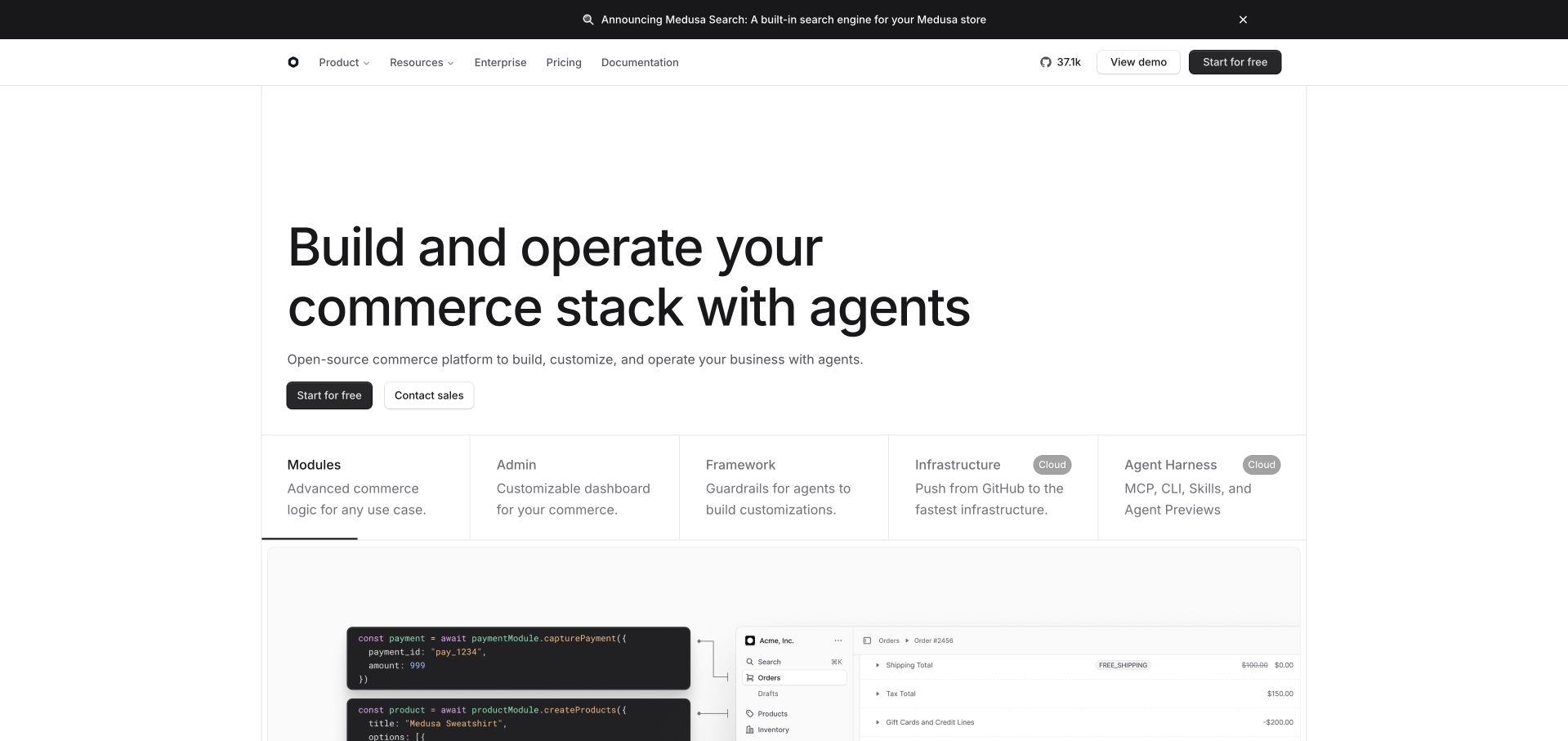
Medusa’s white opening uses a short commerce proposition followed by columns for modules, administration, framework and infrastructure. A code sample and product interface begin below, showing that the offer spans more than a storefront theme. Demo and getting-started actions provide distinct routes for investigation and implementation. The official project establishes the Node.js commerce-framework association; the visible page does not identify the runtime of a merchant’s frontend or prove that a particular payment or fulfillment workflow is configured.
What you can learn
Make the implementation layers of commerce visible early. Buyers need to understand what they receive, what they must configure and what remains a separate integration. A capability grid is most useful when each label leads to a concrete task, a working example and a clear boundary of responsibility.
Pros
The capability columns help distinguish commerce services, administration and development infrastructure at the first read.
Code and interface imagery give technical and operational audiences different ways to understand the same product.
Cons & considerations
Agent-focused language can obscure traditional requirements such as product modeling, order operations and exception handling.
The small code and interface previews need a fuller demonstration before a team can assess implementation effort.
Platform source: Official Node.js engineering or project evidence. Node.js commerce application framework. The cited engineering, project or customer source establishes only the named language association. It does not establish the marketing page runtime, every company system, current deployment continuity or independent performance results. Platform evidence is separate from the direct website screenshot and is not a complete current infrastructure audit.
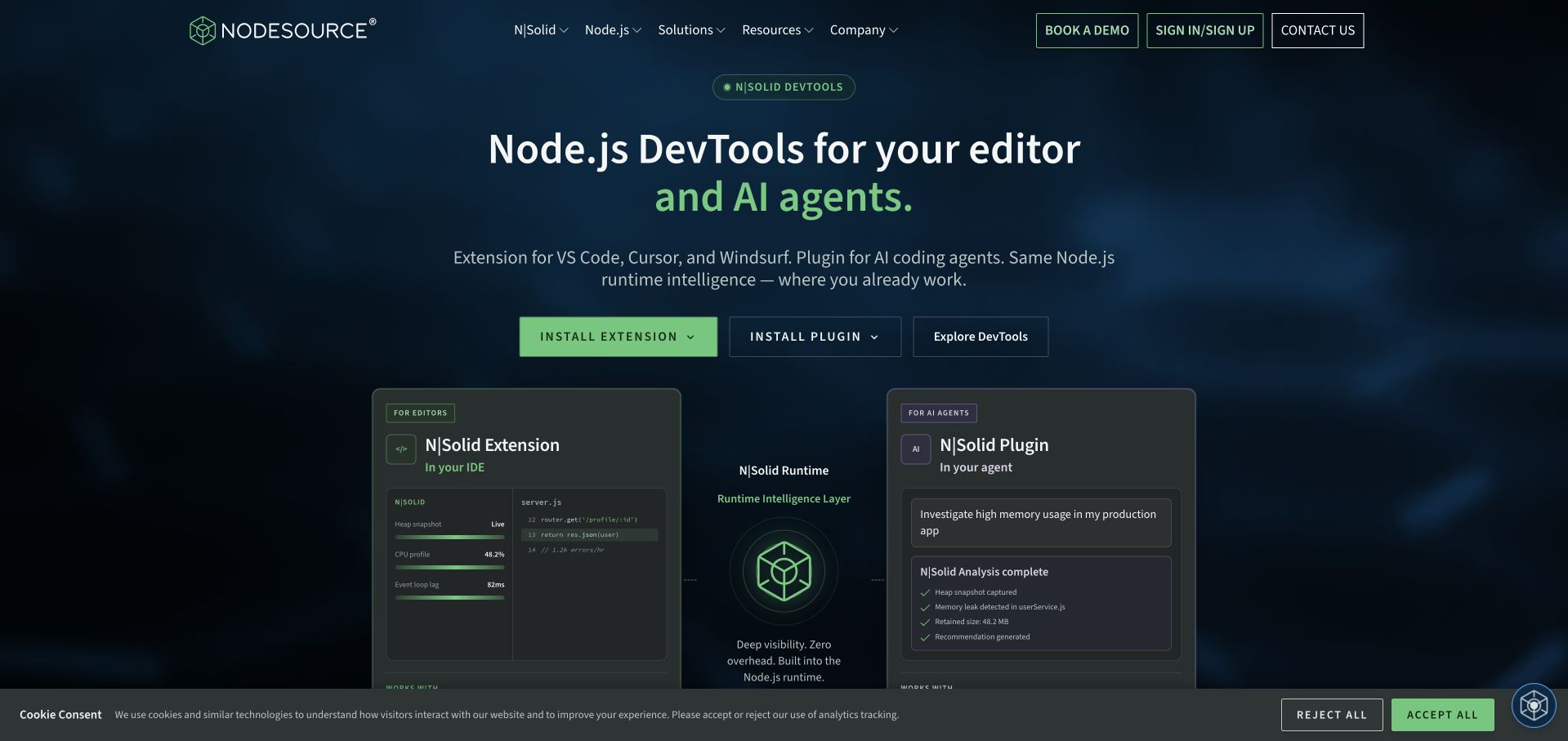
NodeSource’s homepage frames its offer around Node.js tools for an editor and AI agents, with installation actions above two recognizable product panels. The dark blue and green palette connects the headline, buttons and interface previews without making every element equally bright. Product, service and resource routes remain available for deeper investigation. Its official N|Solid material establishes the Node.js product association; the captured marketing images are not independent evidence of runtime overhead, diagnostic coverage or an organization’s production configuration.
What you can learn
Show where a developer will encounter the product in their daily work. Separate the installation path from the evidence needed to evaluate operational claims. A useful observability introduction should also explain what is collected, where it goes and which problems the tool can or cannot diagnose.
Pros
The editor and plugin actions connect the broad diagnostic proposition to concrete installation choices.
The product panels provide a more informative starting point than an abstract illustration of performance.
Cons & considerations
Several product names and installation options require careful labeling to avoid an unclear first choice.
The opening screenshots cannot establish privacy behavior, compatibility or the real cost of instrumentation in production.
Platform source: Official Node.js engineering or project evidence. Node.js runtime and observability product association. The cited engineering, project or customer source establishes only the named language association. It does not establish the marketing page runtime, every company system, current deployment continuity or independent performance results. Platform evidence is separate from the direct website screenshot and is not a complete current infrastructure audit.
Kegan has 15+ years of experience working with small businesses, Fortune 500 companies, and everything in between. No development job is too big or too small: he brings the same hands-on attention to a focused improvement, a complete website, or a custom application.
For Node.js projects, he can help with content architecture, custom functionality, system integrations, testing, and maintainable handover. He works directly with clients on scope, design, implementation, testing, and handover, with an emphasis on clear communication and a system that remains practical to maintain after launch.
Show 3 other Node.js developersHide other Node.js developers
Choose a Node.js responsibility that the team can operate
A website with a small server-side task
Keep the primary publishing workflow simple when custom behavior is limited to a bounded API or integration. Identify the endpoint’s receiving system, confirmation, failure state and data owner. A styled form and a successful local request are not proof that production messages or business records reach the correct destination.
A content or commerce application
Model the actual content and operational work before choosing an open-source framework from this collection. Rehearse an editor update, a catalog change and a failed integration. The application, frontend, database, payments and hosting can remain separate choices even when the framework provides convenient connections between them.
A real-time or integration-heavy service
Describe connection lifetime, reconnect behavior, duplicate events and the source of truth. Give slow external services and expensive processing bounded handling. A historical success story about many simultaneous connections is context, not a capacity estimate for a different application or its current dependency mix.
From references to requirements
Plan the complete application lifecycle
Draw the request and data boundary
Record which inputs are trusted, where authorization occurs and which system owns each persistent fact. Include malformed bodies, excessive inputs and interrupted requests. Keep secrets out of browser code and avoid turning a convenient client-side check into the only enforcement of a server-side rule.
Rehearse failure before launch
Test a timed-out provider, repeated webhook, rejected write and partially completed user action in an appropriate nonproduction environment. Decide which operations may be retried and how the operator reconciles an uncertain result. The user should receive an accurate state rather than an unconditional success message.
Make upgrades and support concrete
Choose supported runtime and dependency versions during implementation, document the package-lock workflow and assign an update owner. Rebuild and test from a clean environment before release. Include observability, backup, rollback and a realistic handover; a repository that only its original developer can deploy is not a complete delivery.
A useful handover demonstration
Ask the actual team to carry out its routine job: publish a realistic update, correct a mistake, preview a narrow screen, and identify who owns an integration failure. For a library or frontend framework, also ask who maintains the content source and deployment. A polished screenshot does not answer those operational questions.
Beyond the screenshot
Node.js application checklist
Name the runtime’s actual job.
Distinguish build-time tooling from production execution.
Write representative successful and failed interactions.
Enforce authorization and validation server-side.
Bound input size, concurrency and external waits.
Identify expensive work outside the main request path.
Plan repeated events and uncertain provider outcomes.
Keep credentials out of browser assets and public logs.
Test framework, database and integration compatibility.
Choose supported runtime and dependency versions.
Rehearse clean builds, deployment and rollback.
Document operating and upgrade responsibilities.
Test with real content, a keyboard, a small screen, slow or failed requests, and the people who will maintain the system. These are planning checks, not an accessibility, security, performance, or search-ranking certification.
Sources & editorial method
How this Node.js collection was reviewed
Twenty distinct public website source pages were independently reviewed for this collection. Screenshots are direct browser captures, with actual source URLs, dates, timestamps where known, dimensions and attribution retained. Existing source-page captures were inspected and reused without changing their original capture dates. New screenshots were captured November 9 UTC during the November 8, 2026 Pacific research session. Private account screens, transient blank shells and challenge pages were excluded. Official engineering, runtime, repository and project sources establish only the named language or workload association; historical and archived projects remain qualified. They do not establish current marketing-homepage runtime, a full corporate technology inventory, independent performance results or service-quality endorsement. Original reviews describe visible public design, not private account workflows. A separate bounded public source audit records additional supported technologies before publication. Images and trademarks belong to their owners.
Every image is an unmodified capture from the actual website, with its source and capture date. Some captures are reused from our shared catalog; their dates remain the original capture dates. None comes from a vendor gallery or a generated reconstruction. Moving imagery and live content can change.
Technology attribution uses public page assets or metadata, official platform documentation, or a cited first-party project case study. Documentary and framework-relationship evidence is identified where used; it is not a complete current backend inventory. A CMS image CDN alone does not establish a full CMS deployment. A library’s presence does not prove which individual controls use it, and a platform label does not establish AI authorship.
The composition notes, lessons, pros and tradeoffs are original editorial observations. We have not measured conversion, traffic, security, performance or accessibility conformance. Website owners retain their brands and imagery; these examples are not our client portfolio. Written, Edited and Curated are independent records, not dates advanced by a build. See our editorial standards or suggest a correction.
Questions worth asking
Node.js website development FAQs
Does a React site automatically run on Node.js?
No. React is a browser-interface technology and can be delivered in different ways. Node.js might be used for building assets, serving requests or not be part of the observed production path. The evidence needs to identify the actual role.
Are all these public homepages confirmed Node.js applications?
No. Some primary sources document a separate application or historical workload at the organization. Others establish an open-source project’s runtime. The guide preserves those distinctions instead of attributing every pictured page to Node.js.
Is Node.js suitable for every kind of background work?
Choose an execution model around the actual workload. Inspect expensive computation, memory needs, dependency waits and operational ownership. Do not assume asynchronous syntax makes every task non-blocking or removes the need for limits.
Can I copy the stack of an open-source product here?
Use its source and documentation to evaluate a specific requirement, not as a complete project plan. Review licensing, dependencies, deployment, security configuration, upgrades and the work needed to adapt its workflows.
What should be included in a small Node.js handover?
At minimum, explain local setup, configuration, secrets handling, tests, deployment, error investigation, backup or reconciliation where relevant, and rollback. Assign a named owner for runtime and dependency updates rather than leaving that work implicit.
Borrow a clear interface or explanation pattern, then choose the smallest Node.js boundary that serves the real task. The quality of the workflow and its operating plan matter more than matching a recognizable brand’s language choice.