A HubSpot integration should help a visitor complete the conversation they chose. These examples pair public HubSpot resource evidence with genuine screenshots and original reviews of demos, inquiries, subscriptions, and the content that makes those requests understandable.
A good form begins before the first field. The surrounding page should explain the offer, show relevant evidence, and tell the visitor what happens next. A demo request, support issue, donation, and product signup should not become indistinguishable because they share a marketing platform.
The examples include professional services, software, hospitality, retail, publishing, and nonprofits. The recorded resource references establish public website integrations. They do not prove HubSpot CMS hosting, private CRM use, ownership of every form, or the handling of sensitive records. The collection is a design and implementation planning reference, not an audit of internal sales systems.
Before the examples
What makes good HubSpot website development in 2026?
Preserve the visitor’s intent
Name the action and response clearly. If someone requests a tour, explain the tour process; if they subscribe to editorial updates, describe the updates. Carry useful context forward without quietly converting one request into permission for unrelated communication.
Separate tracking from hosting
HubSpot documents installing its tracking code on externally hosted pages. A HubSpot resource can therefore coexist with another CMS or hosting platform. Inventory the actual form, tracking, content, and transactional systems before planning changes, and assign responsibilities to each one.
Review labels, help text, errors, required fields, confirmation, and the receiving team. A polished empty form is only one state. Keep the request proportional to the task, and provide a sensible contact alternative when an embedded dependency cannot load.
The collection · 20 examples
20 HubSpot website examples worth studying
IDEO, Oxfam America, Netlify, Tribeca, and Magnolia Bakery open the collection. Their public pages show different ways of establishing context before asking for action; the recorded HubSpot references are scoped to those named properties.
We start with five recognizable brands or organizations: IDEO, Oxfam America, Netlify public website, Tribeca Festival, Magnolia Bakery. Each attribution applies to the named website property, not every product or website belonging to its organization. This is a curated reading sequence, not a measured ranking.
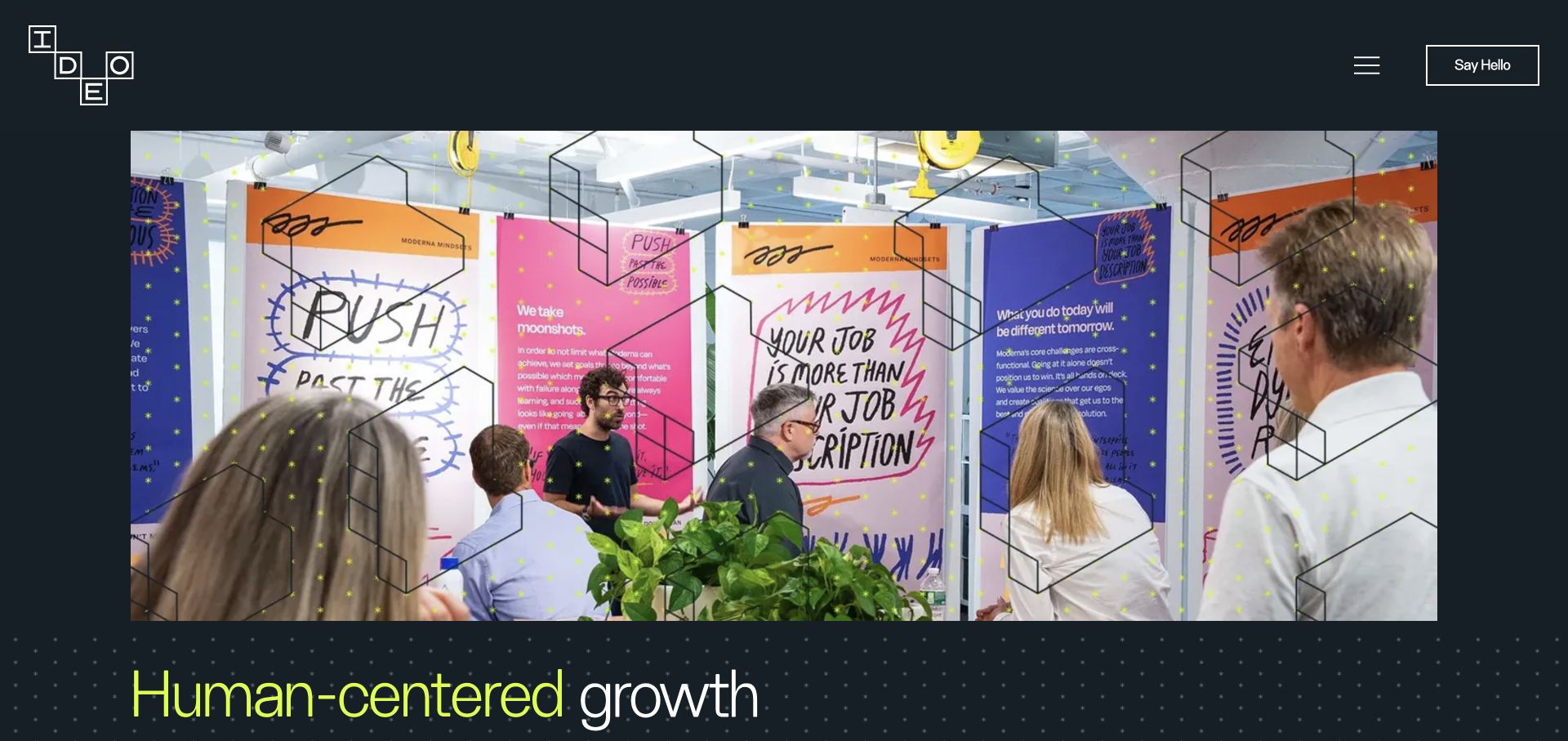
IDEO’s colorful project image sits inside a dark, restrained frame, with a small contact action near the menu. The design asks visitors to understand the work before beginning a conversation. That is a useful pattern for a website connected to HubSpot: the public journey can establish relevance before a form asks for personal details. The sampled HubSpot resource shows an integration on this page, but it does not identify the CMS or prove how inquiries are routed internally. The practical lesson is to align the contact experience with the depth of the portfolio.
What you can learn
For your own consultancy, carry a clearly named project or service context into an inquiry only when appropriate and disclosed. Keep the initial form short, explain the next step, and verify that a successful submission receives the intended acknowledgment.
Pros
Project imagery supplies meaningful evidence before visitors encounter a sales conversation.
The contact route remains available without dominating the creative work.
Cons & considerations
A minimal contact label may leave the response process unclear until another page.
A HubSpot script does not establish ownership of the visible contact experience.
Platform source: Exact public source-page evidence. The exact sampled page references a HubSpot public resource. This shows a website integration, not HubSpot CMS hosting, CRM records, form ownership, or an observed sales workflow. Platform evidence is separate from the direct website screenshot and is not a complete current infrastructure audit.
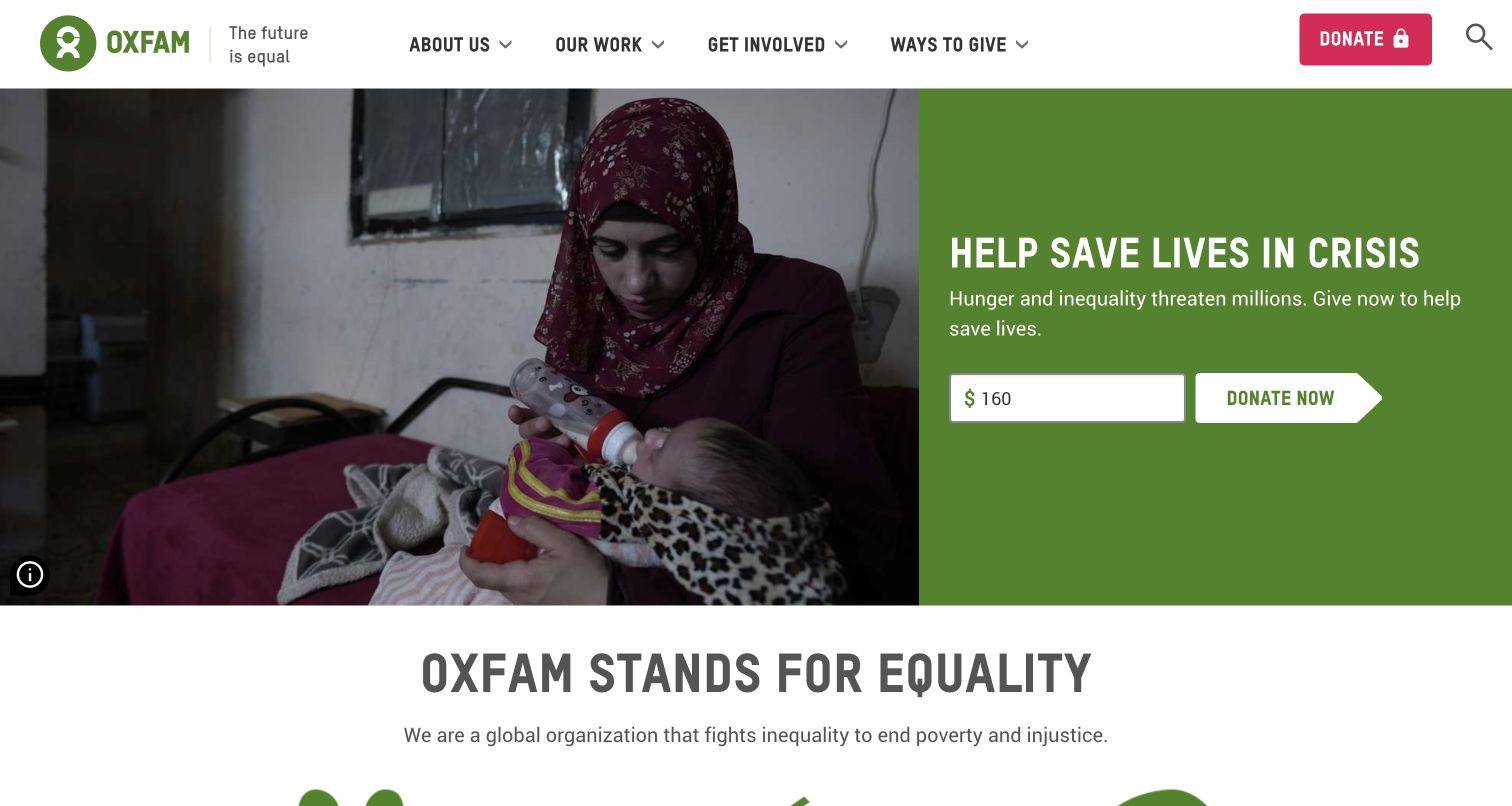
Oxfam America places a crisis appeal beside a substantial documentary photograph, with an amount field and donation action in a green panel. The header also gives room to organizational information, work, involvement, and other ways to give. This is a useful public website integration example because fundraising and ongoing supporter communication have different purposes. HubSpot resource evidence should not be treated as proof of the donation processor or a particular supporter database. The page’s hierarchy instead suggests how a nonprofit can connect campaign context with a clear, bounded next step.
What you can learn
Separate donation processing, newsletter consent, and advocacy interest in your own implementation. Explain what each form accomplishes, avoid bundling unrelated permissions, and test confirmation and followup paths using a designated test environment rather than making real gifts during QA.
Pros
The appeal and amount control provide a concrete action beside the campaign story.
Alternative involvement routes remain visible for visitors who are not ready to donate.
Cons & considerations
A prominent donation ask can overshadow educational information for first time visitors.
Public HubSpot resources do not prove payment completion or donor record synchronization.
Platform source: Exact public source-page evidence. The exact sampled page references a HubSpot public resource. This shows a website integration, not HubSpot CMS hosting, CRM records, form ownership, or an observed sales workflow. Platform evidence is separate from the direct website screenshot and is not a complete current infrastructure audit.
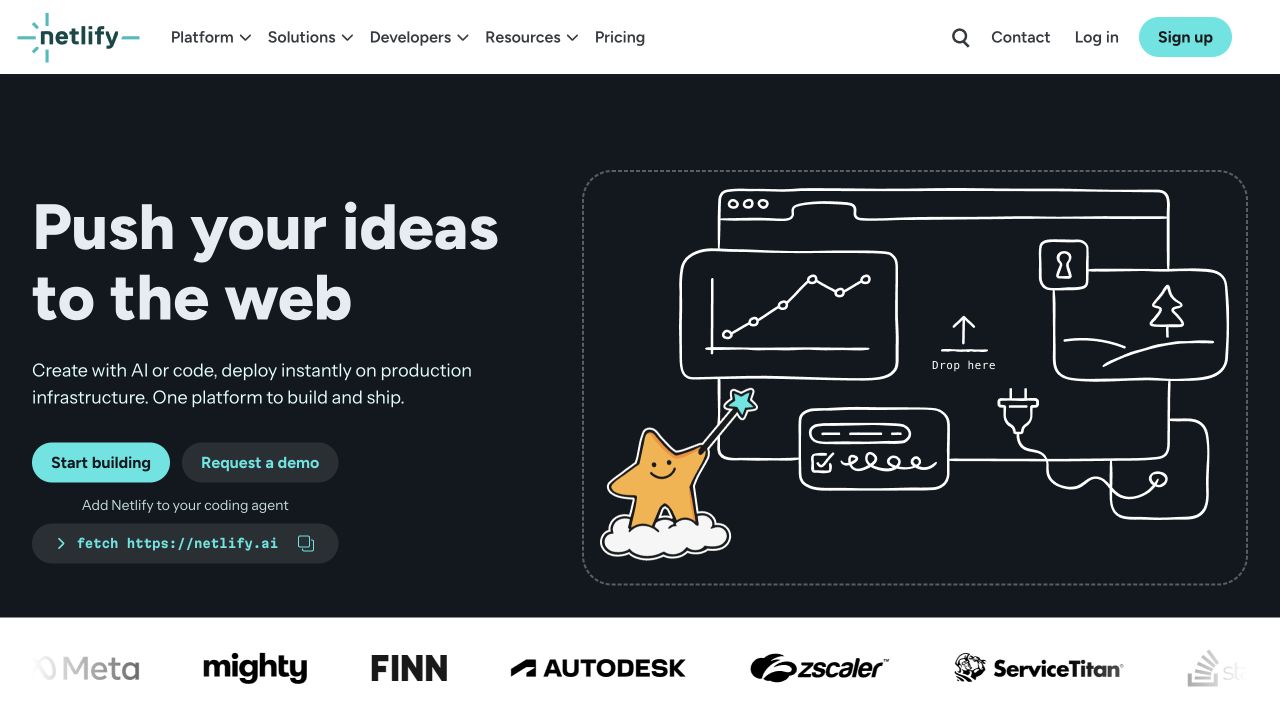
Netlify’s homepage pairs an illustrated website workspace with a concise promise about publishing ideas. A bright starting button sits beside a quieter demo request, while developer resources, pricing, login, and signup remain in the header. The two main actions recognize different levels of buying readiness. On a HubSpot connected marketing site, that distinction should survive beyond the click. A developer trying the platform should not automatically receive the same form or followup as an enterprise prospect. The evidence here is a public integration, not an account or CRM workflow audit.
What you can learn
Map demo inquiries and self service adoption to separate intents before connecting forms or reports. Preserve useful campaign context without copying unnecessary personal data, and make each confirmation tell the visitor whether to expect an account screen or a human response.
Pros
Two differently weighted actions accommodate both independent evaluation and assisted buying.
Visible developer and pricing routes provide context before a visitor shares details.
Cons & considerations
A unified marketing database can blur fundamentally different visitor intentions.
The public homepage does not reveal the behavior of the product application.
Platform source: Exact public source-page evidence. The exact sampled page references a HubSpot public resource. This shows a website integration, not HubSpot CMS hosting, CRM records, form ownership, or an observed sales workflow. Platform evidence is separate from the direct website screenshot and is not a complete current infrastructure audit.
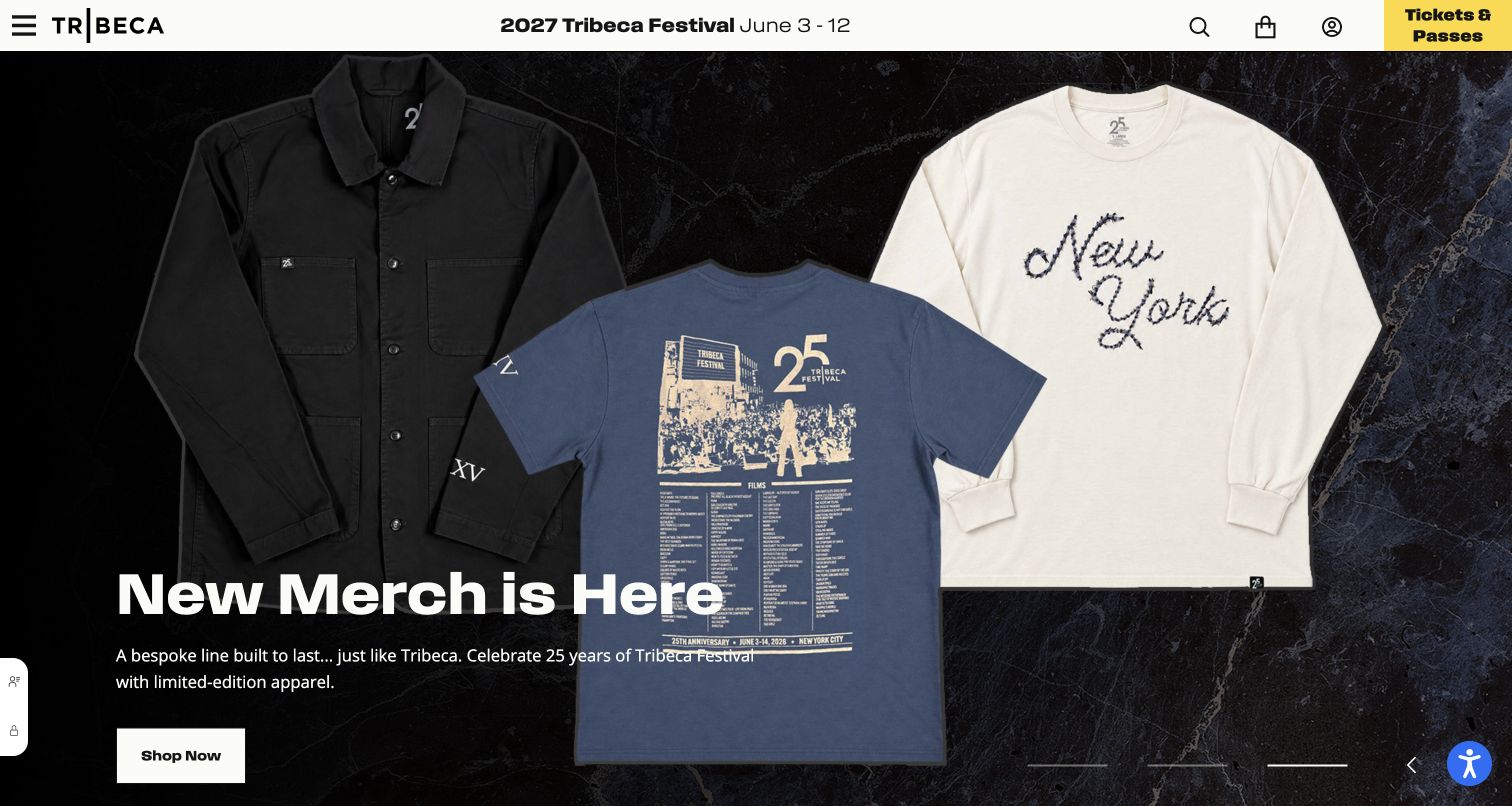
Tribeca’s capture leads with festival merchandise against a dark product photograph, while a date strip and bright ticket action keep the event identity in view. Shopping, festival attendance, and editorial interest are related but different reasons to return. A HubSpot website integration can sit alongside any of those experiences without proving that it powers the storefront or ticketing system. The transferable design lesson is to preserve audience intent. Someone interested in a festival announcement may not want retail promotions, and a merchandise customer may need practical order information rather than event sales followup.
What you can learn
Define communication choices around the visitor’s expressed interest and the relevant event season. Keep ticketing and merchandise confirmations authoritative in their own systems, and test that marketing forms explain the type of updates being requested before any subscription is completed.
Pros
Festival dates and tickets remain easy to locate during a retail promotion.
A clear merchandise action makes the temporary campaign’s purpose understandable.
Cons & considerations
Seasonal campaigns can leave stale audience assumptions if preferences are never reviewed.
The integration evidence does not identify the platform handling tickets or orders.
Platform source: Exact public source-page evidence. The exact sampled page references a HubSpot public resource. This shows a website integration, not HubSpot CMS hosting, CRM records, form ownership, or an observed sales workflow. Platform evidence is separate from the direct website screenshot and is not a complete current infrastructure audit.
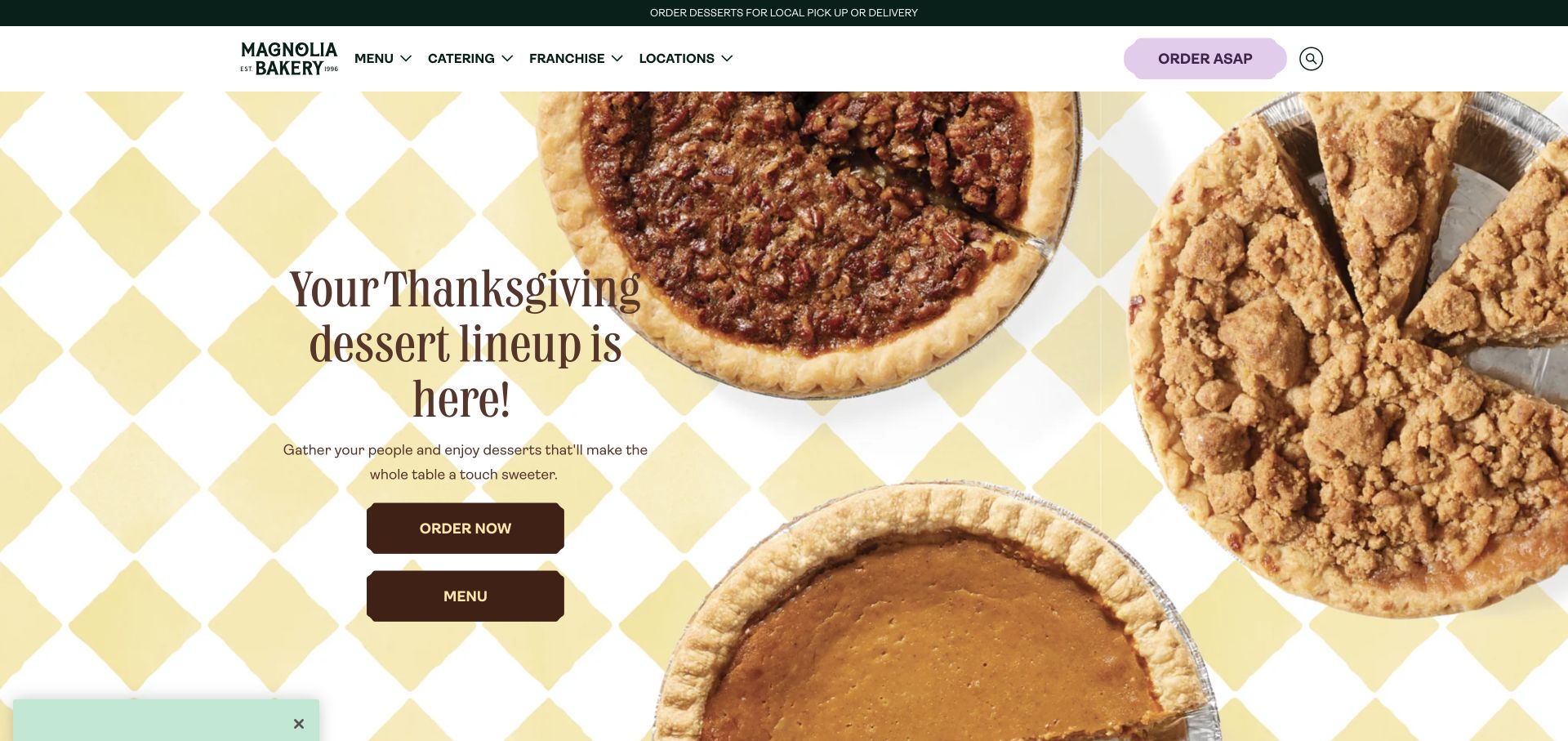
Magnolia Bakery’s seasonal homepage puts pies and a pale patterned background around a short holiday message. Order and menu buttons occupy the same compact area, while catering, franchise, and location information remain in navigation. The design makes an immediate food decision easy without removing less urgent business routes. For a HubSpot integration plan, these audiences deserve different treatment. A customer checking a dessert menu, an event organizer seeking catering, and a franchise prospect should not be forced through the same request. The source association alone does not identify the ordering platform.
What you can learn
Give catering, franchise, and consumer updates explicit forms or destinations with appropriate expectations. Keep order status in the commerce system, connect marketing permissions deliberately, and verify that a seasonal campaign link lands on an available product or service after the holiday changes.
Pros
Product photography and concise copy make the seasonal offer understandable quickly.
Separate navigation acknowledges business inquiries beyond individual dessert purchases.
Cons & considerations
Seasonal artwork requires timely updates across email links and landing pages.
A HubSpot resource does not establish fulfillment, inventory, or customer order handling.
Platform source: Exact public source-page evidence. The exact sampled page references a HubSpot public resource. This shows a website integration, not HubSpot CMS hosting, CRM records, form ownership, or an observed sales workflow. Platform evidence is separate from the direct website screenshot and is not a complete current infrastructure audit.
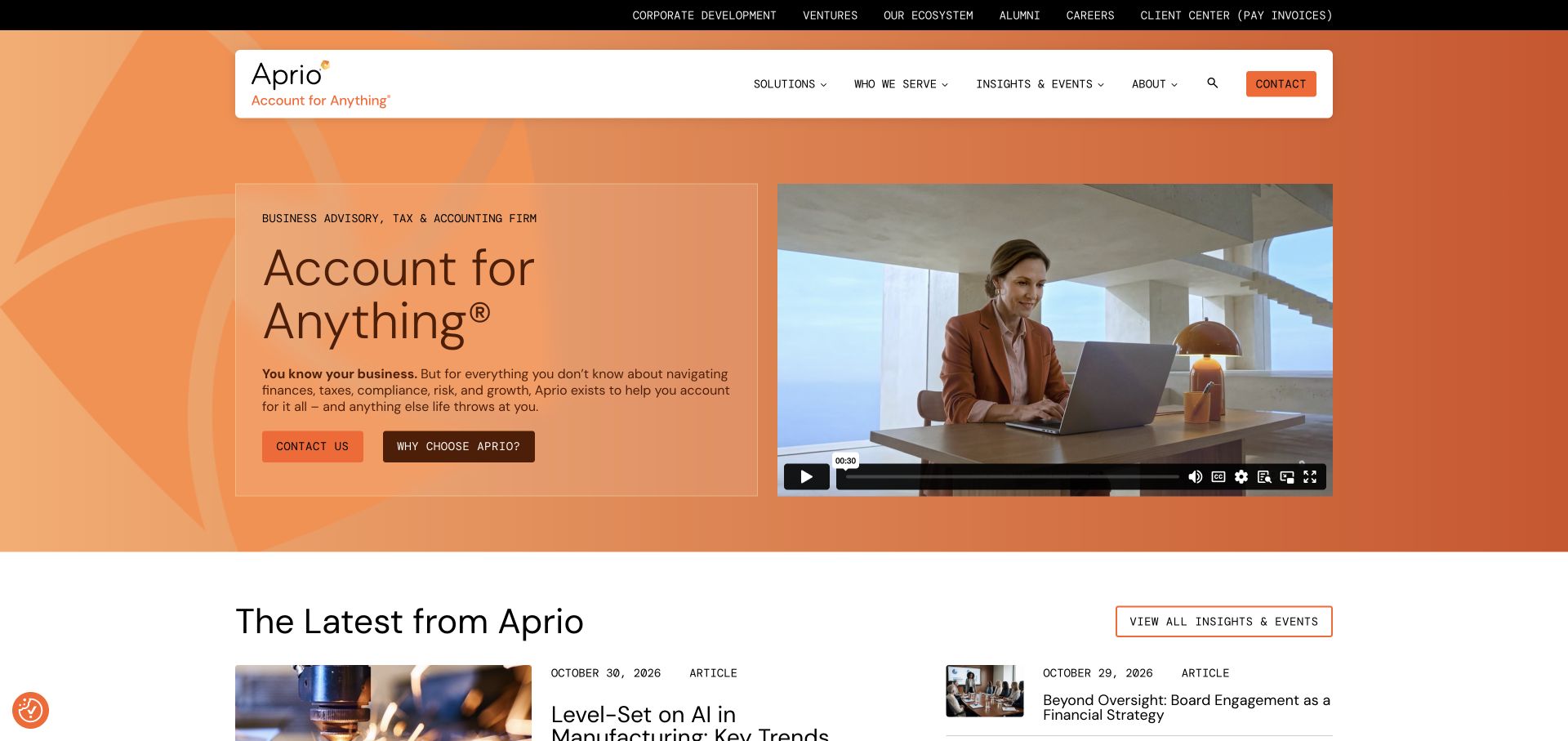
Aprio’s orange introduction combines a broad advisory message with a video and two distinct actions: contact and an explanation of why to choose the firm. Recent insights begin immediately below. This arrangement gives a prospect several ways to evaluate expertise before sharing details. It is a useful HubSpot integration example because the website can support an extended decision without turning every article visit into a sales request. The public resource signal does not disclose CRM records or establish which system stores financial information supplied later in a professional relationship.
What you can learn
Connect inquiry forms to a clearly named service and explain who will respond. Keep sensitive financial documents out of general marketing forms, provide a suitable secure channel when needed, and test acknowledgments separately from newsletter subscription preferences.
Pros
A choice between contact and further explanation supports different levels of readiness.
Recent insights add substance below the firm’s broad positioning statement.
Cons & considerations
A general advisory promise still needs specific service context on deeper pages.
Marketing integration evidence cannot establish the handling of confidential client material.
Platform source: Exact public source-page evidence. The exact sampled page references a HubSpot public resource. This shows a website integration, not HubSpot CMS hosting, CRM records, form ownership, or an observed sales workflow. Platform evidence is separate from the direct website screenshot and is not a complete current infrastructure audit.
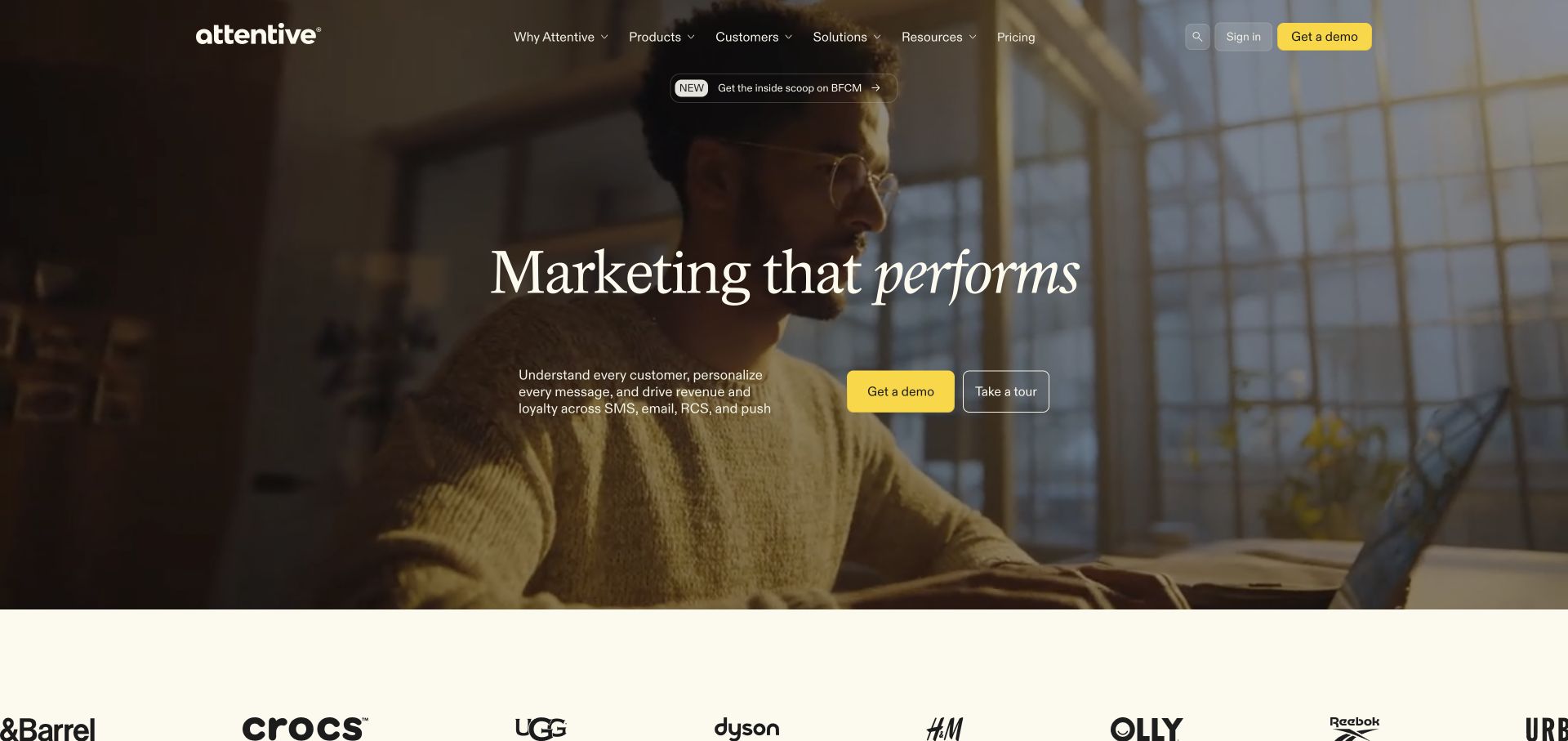
Attentive uses a warm photographic backdrop, a short performance oriented message, and two adjacent actions for a demo and a tour. Customer logos below add another layer of reassurance. The pattern is useful for HubSpot connected websites because it separates a lower commitment exploration path from a request for human assistance. A tour should not silently become a sales appointment. The sampled integration also should not be confused with evidence about Attentive’s own messaging product: a vendor can use another platform on its public marketing pages without that platform powering the application itself.
What you can learn
Describe what happens after each call to action and keep the two journeys measurable separately. If a demo requires contact details, explain the response and required fields; if a tour is ungated, preserve that expectation throughout the experience.
Pros
Adjacent tour and demo choices give visitors control over their level of commitment.
Customer recognition supports the promise without forcing an immediate form submission.
Cons & considerations
Broad performance language needs supporting detail beyond a polished hero image.
A marketing resource does not reveal the application’s technology or customer messaging stack.
Platform source: Exact public source-page evidence. The exact sampled page references a HubSpot public resource. This shows a website integration, not HubSpot CMS hosting, CRM records, form ownership, or an observed sales workflow. Platform evidence is separate from the direct website screenshot and is not a complete current infrastructure audit.
Azamara’s homepage gives a coastal ship photograph the full width of the hero, while cruise discovery, destination browsing, and booked guest information occupy a clear white header. Quote and expert contact routes sit in a smaller utility band. These are distinct stages of a travel relationship. For a HubSpot website integration, the important design question is which stage a visitor explicitly chooses. A browsing visitor may need destination information, while an existing guest needs operational help. The integration evidence does not establish how booking records or guest preferences are managed internally.
What you can learn
Give quote requests, general updates, and existing guest support different destinations and expectations. Carry destination interest only when useful, avoid requesting unnecessary travel details at first contact, and check that confirmation copy explains whether a specialist will follow up.
Pros
Inspiring imagery is balanced by concrete cruise and destination navigation.
Booked guest and expert contact routes recognize different visitor needs.
Cons & considerations
Long lead time travel promotions require careful date and availability maintenance.
Marketing integration should not be mistaken for access to passenger or booking records.
Platform source: Exact public source-page evidence. The exact sampled page references a HubSpot public resource. This shows a website integration, not HubSpot CMS hosting, CRM records, form ownership, or an observed sales workflow. Platform evidence is separate from the direct website screenshot and is not a complete current infrastructure audit.
Cervélo’s first view is dominated by a cyclist and bicycle, with oversized typography and a compact utility layer. The product’s setting and intended use do much of the explanatory work. This offers a useful HubSpot planning lesson for manufacturers: audience interest can begin with a product story before it becomes a dealer inquiry or email subscription. The public HubSpot resource does not prove which forms are connected or whether commerce happens directly. A strong implementation would keep those next steps recognizable instead of treating all product curiosity as a sales qualified request.
What you can learn
Connect product pages to explicit dealer, support, and update choices. If forms use product context, make that context visible and editable, and verify that aftercare requests reach a support process rather than a general marketing campaign.
Pros
The athletic image establishes a concrete product use case immediately.
Minimal navigation lets the product story retain visual priority in the opening view.
Cons & considerations
Large campaign typography leaves detailed suitability questions for later pages.
The resource signal cannot establish dealer routing or the ownership of every form.
Platform source: Exact public source-page evidence. The exact sampled page references a HubSpot public resource. This shows a website integration, not HubSpot CMS hosting, CRM records, form ownership, or an observed sales workflow. Platform evidence is separate from the direct website screenshot and is not a complete current infrastructure audit.
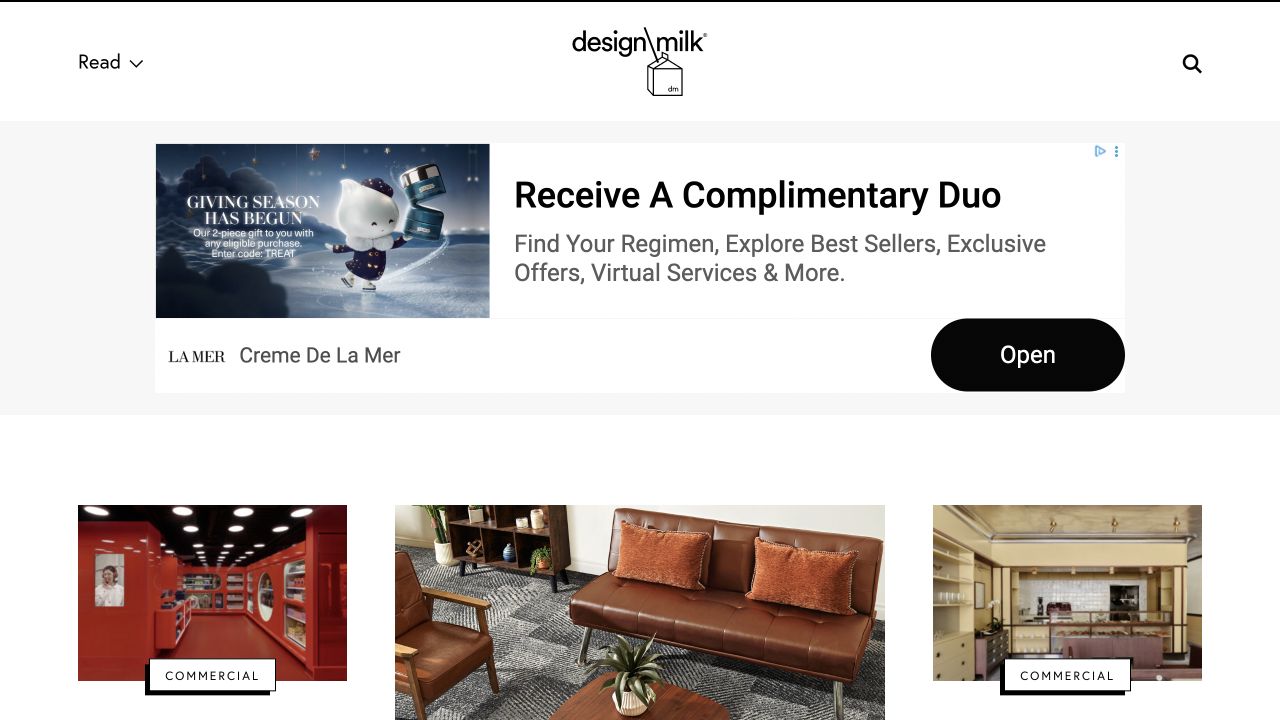
Design Milk presents a spare masthead above an advertising unit and a grid of illustrated editorial cards. The arrangement makes the distinction between the publication’s content and a sponsor’s promotion especially important. A HubSpot connected publisher should preserve that distinction in audience communication as well. A reader interested in design stories should understand whether a signup belongs to the publication, a partner, or a particular event. The observed HubSpot resource demonstrates a page integration, but it does not establish ownership of the advertisement or how subscriber preferences are represented internally.
What you can learn
Label editorial and partner forms clearly, explain the type of messages requested, and keep preference choices easy to revisit. In your own publication, verify campaign destinations and acknowledgments so that a subscription promise stays consistent beyond the attractive article grid.
Pros
A simple masthead leaves room for the publication’s visual editorial material.
Card imagery gives readers several topic entry points rather than one compulsory path.
Cons & considerations
A large advertisement can compete with the editorial content in the first view.
A shared page integration does not imply permission to combine partner audiences.
Platform source: Exact public source-page evidence. The exact sampled page references a HubSpot public resource. This shows a website integration, not HubSpot CMS hosting, CRM records, form ownership, or an observed sales workflow. Platform evidence is separate from the direct website screenshot and is not a complete current infrastructure audit.
DoveLewis gives emergency care and specialty services large, clearly separated actions over a photograph of the hospital. An emergency utility button and telephone number remain above the main navigation, alongside a donation route. This is a valuable HubSpot integration example because the primary website task may be urgent assistance, not lead generation. Marketing forms and educational subscriptions should support that purpose without interrupting it. The public resource evidence does not identify clinical systems or prove that HubSpot processes any patient or appointment information behind the visible page.
What you can learn
Keep emergency instructions and telephone access independent from marketing scripts and optional forms. Use distinct paths for donations, community updates, and care inquiries, then test that rejection of optional cookies does not obstruct essential information or emergency navigation.
Pros
Emergency and specialty care are distinguished at both utility and hero levels.
The actual hospital photograph helps visitors recognize the physical destination.
Platform source: Exact public source-page evidence. The exact sampled page references a HubSpot public resource. This shows a website integration, not HubSpot CMS hosting, CRM records, form ownership, or an observed sales workflow. Platform evidence is separate from the direct website screenshot and is not a complete current infrastructure audit.
Fennies pairs a photograph of children and an educator with a concise introduction and a small yellow tour button. Navigation provides nursery, admissions, career, and advice routes, while credibility marks sit close to the hero message. The page shows a plausible first step for a parent exploring care, but a HubSpot resource alone does not establish the enrollment system or the ownership of the tour form. The useful design principle is to make the request precise: which nursery, what kind of visit, and what response should the family expect.
What you can learn
Collect only the details needed to arrange an initial conversation or tour, and explain why they are requested. Keep marketing preferences separate from admissions communication, offer an alternative contact route, and test location selection and confirmation without entering real children’s information.
Pros
A visible tour action turns a warm introduction into a concrete next step.
Nursery and admissions navigation support visitors who need details before contacting anyone.
Cons & considerations
A general homepage cannot answer every location specific availability question.
Public integration evidence does not establish enrollment processing or child data safeguards.
Platform source: Exact public source-page evidence. The exact sampled page references a HubSpot public resource. This shows a website integration, not HubSpot CMS hosting, CRM records, form ownership, or an observed sales workflow. Platform evidence is separate from the direct website screenshot and is not a complete current infrastructure audit.
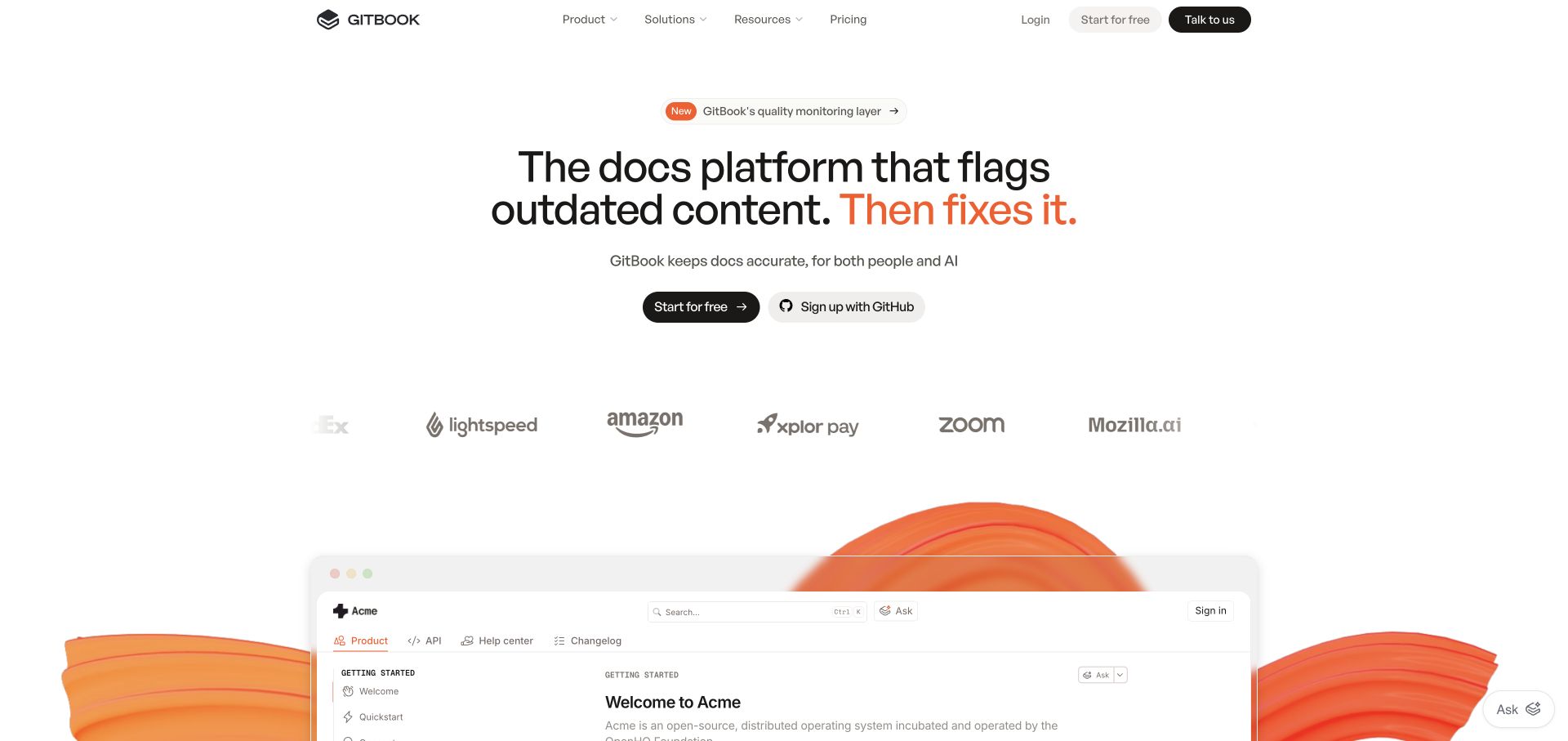
GitBook’s homepage uses a centered product promise, a free starting action, and a GitHub signup option above a preview of documentation. A quieter contact route remains in the header. This is a useful HubSpot website integration pattern because it recognizes that a developer may want to evaluate the product directly while an organization needs a conversation. The two routes should produce different expectations. The sampled resource does not establish the technology behind hosted documentation or the handling of GitHub authentication; it concerns the public marketing page used to introduce those possibilities.
What you can learn
Describe the difference between creating an account and requesting contact before connecting their reports. Keep authentication in its intended system, minimize marketing form fields, and verify that signup confirmation does not imply consent to unrelated sales followup.
Pros
The product preview connects the headline with a recognizable documentation experience.
Free adoption and commercial contact remain available as separate visitor choices.
Cons & considerations
Authentication and marketing integrations can become confusing if their responsibilities overlap.
The public page does not prove how customer documentation is stored or served.
Platform source: Exact public source-page evidence. The exact sampled page references a HubSpot public resource. This shows a website integration, not HubSpot CMS hosting, CRM records, form ownership, or an observed sales workflow. Platform evidence is separate from the direct website screenshot and is not a complete current infrastructure audit.
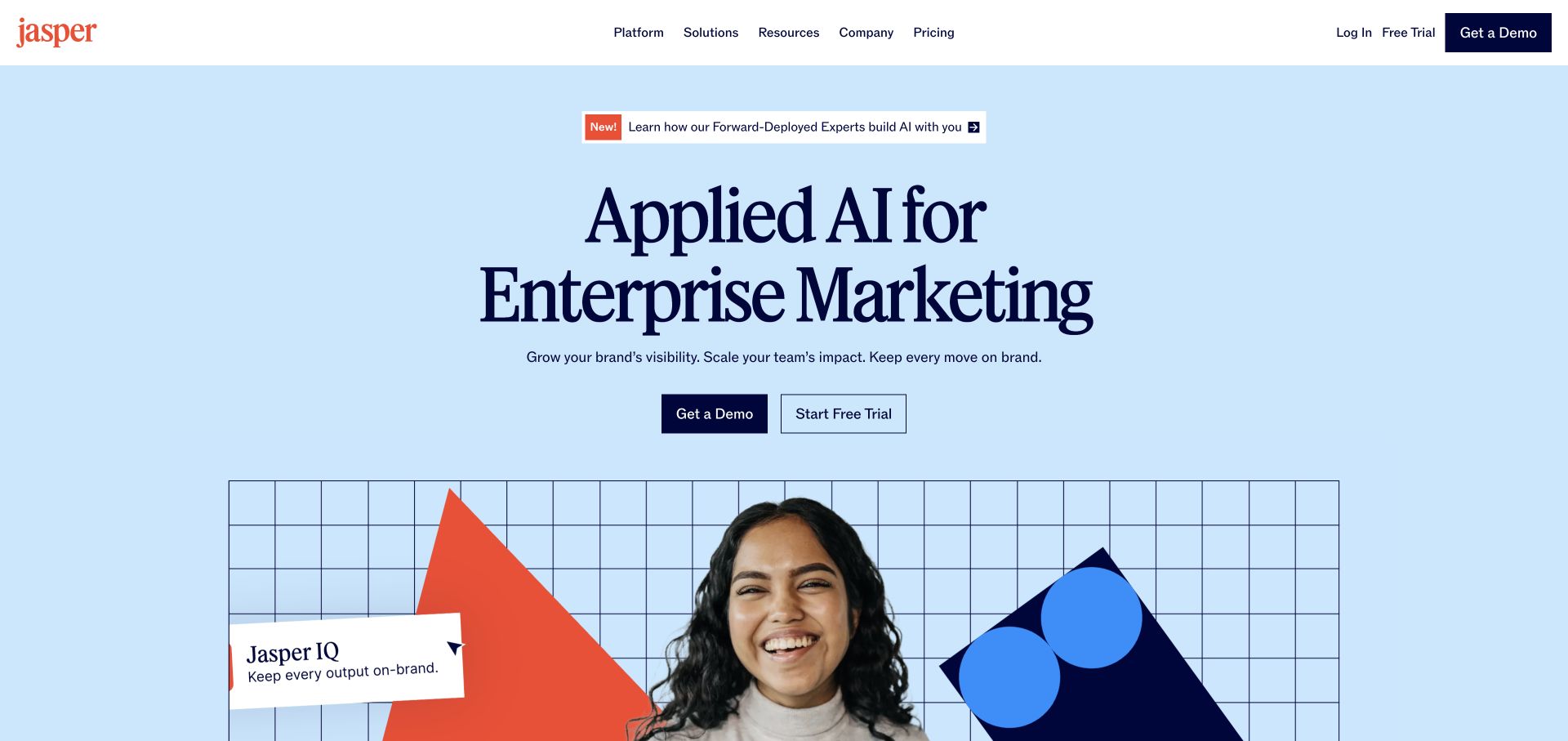
Jasper’s blue hero places a large enterprise marketing headline above demo and trial actions, with a product themed visual beneath. The restrained navigation keeps platform, solutions, resources, and pricing accessible. For a HubSpot connected marketing website, this is a practical example of two reasonable paths into evaluation. A trial is a product access decision; a demo is a request for a guided conversation. The observed integration does not prove that HubSpot powers Jasper’s application, stores generated content, or manages either path. Those claims would require separate product evidence.
What you can learn
Write confirmation copy around the action the visitor actually chose. Keep trial access and demo scheduling distinct, explain required business details, and verify any handoff to another domain while preserving consent choices and avoiding unnecessary duplication of contact records.
Pros
Two explicit evaluation routes accommodate different buying and learning preferences.
Pricing and resource links provide supporting context before a visitor shares details.
Cons & considerations
A broad enterprise promise still needs concrete examples on subsequent pages.
A marketing script cannot establish application architecture or private content processing.
Platform source: Exact public source-page evidence. The exact sampled page references a HubSpot public resource. This shows a website integration, not HubSpot CMS hosting, CRM records, form ownership, or an observed sales workflow. Platform evidence is separate from the direct website screenshot and is not a complete current infrastructure audit.
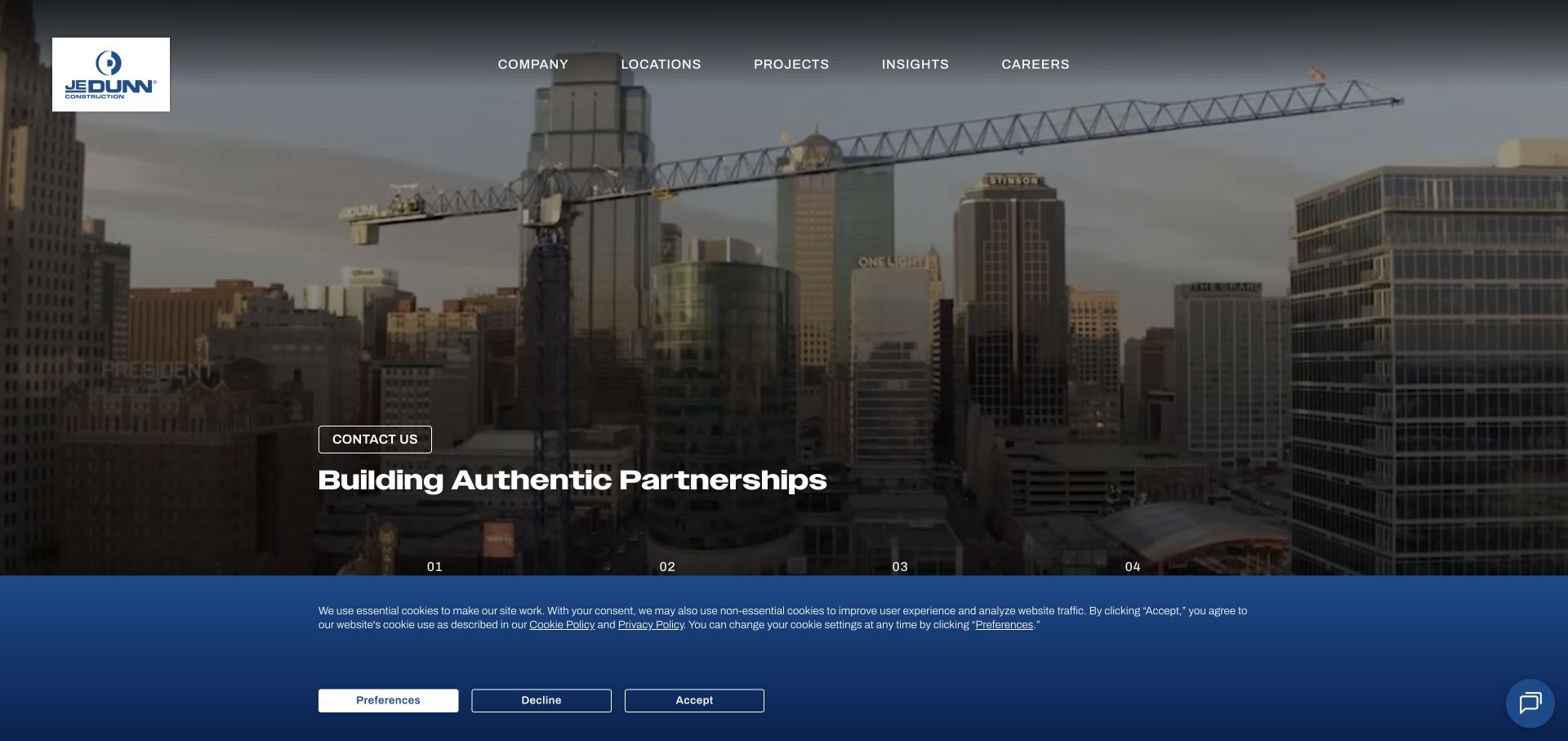
JE Dunn’s opening view uses a large urban construction scene, a compact contact action, and navigation for locations, projects, insights, and careers. The image establishes scale while the menu recognizes several audiences. A HubSpot website integration can support public inquiries, but a successful design still needs to distinguish a prospective project partner from a job applicant or a subcontractor. The sampled resource does not reveal the firm’s CRM structure or project management systems. The useful pattern is to let visible project and regional context guide the conversation before requesting extensive details.
What you can learn
Build clearly labeled inquiry routes with a responsible receiving team and an understandable response expectation. Keep recruitment and project submissions separate, request only initial context, and test routing for several regions without sending real proposals or employment applications.
Pros
Project imagery gives prospective clients tangible context for the firm’s work.
Locations and careers are named routes rather than hidden inside a generic contact page.
Cons & considerations
Broad partnership messaging needs a more specific destination for each audience.
The integration signal does not establish how confidential project information is managed.
Platform source: Exact public source-page evidence. The exact sampled page references a HubSpot public resource. This shows a website integration, not HubSpot CMS hosting, CRM records, form ownership, or an observed sales workflow. Platform evidence is separate from the direct website screenshot and is not a complete current infrastructure audit.
Kobre & Kim places a quoted recognition statement over a city skyline and gives search a prominent position within the hero. People, capabilities, results, and locations remain available in the restrained navigation. The page is designed for visitors who may already have a specific professional need. In a HubSpot integration plan, the central concern is appropriate context and boundaries. Browsing a practice or office should not lead to assumptions about a legal matter. The observed marketing resource does not establish confidential intake, client records, or the formation of a professional relationship.
What you can learn
Explain the limits of general contact forms and route sensitive matters through the firm’s approved intake process. Keep marketing subscriptions optional, avoid collecting unnecessary case details, and verify that office and lawyer destinations provide accurate contact expectations.
Pros
Search and named professional categories help visitors reach specific expertise.
The location context connects a global claim with an identifiable office setting.
Cons & considerations
Recognition language requires supporting details beyond the introductory quotation.
A public HubSpot integration cannot establish confidential intake or client relationship management.
Platform source: Exact public source-page evidence. The exact sampled page references a HubSpot public resource. This shows a website integration, not HubSpot CMS hosting, CRM records, form ownership, or an observed sales workflow. Platform evidence is separate from the direct website screenshot and is not a complete current infrastructure audit.
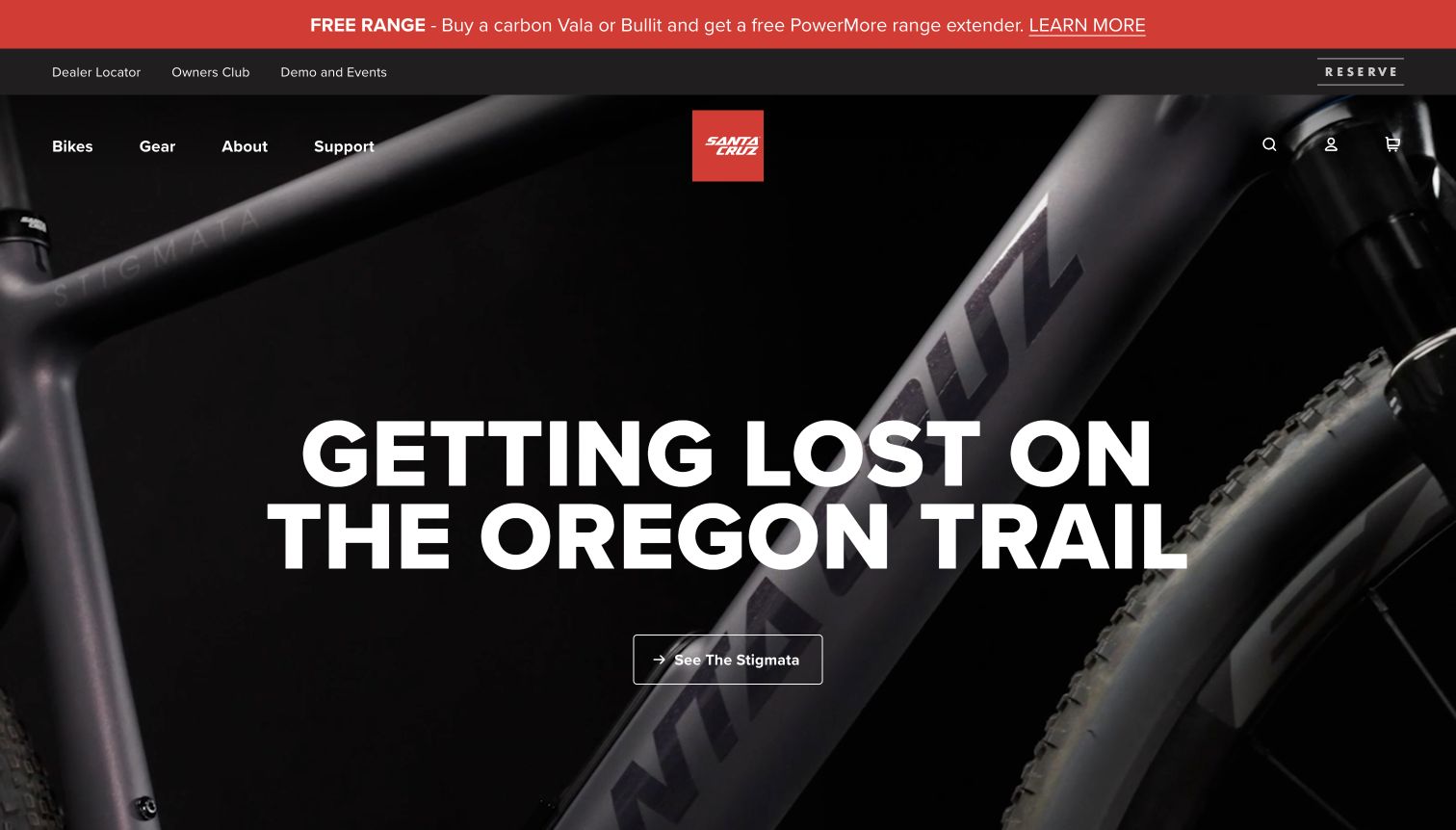
Santa Cruz presents a dark closeup of a bicycle beneath a bold trail themed headline. A product action sits below it, while dealer, owner, demo, and support routes appear in the surrounding navigation. The homepage accommodates both purchase research and an ongoing ownership relationship. That distinction matters when planning a HubSpot integration. Product interest, dealer assistance, and service requests need different next steps, even when they share the same visual brand. The public resource evidence does not prove dealer database synchronization or how warranty and support records are handled.
What you can learn
Give each product campaign a clear destination and preserve separate owner support routes. If a form includes a model or region, explain its purpose and let visitors correct it; test marketing preferences independently from necessary responses to support requests.
Pros
Detailed product imagery gives the campaign an immediate equipment focus.
Dealer and owner links acknowledge important journeys beyond a new purchase.
Cons & considerations
Large promotional imagery leaves fit and specification questions for deeper content.
Marketing resource evidence does not reveal warranty processing or dealer coordination.
Platform source: Exact public source-page evidence. The exact sampled page references a HubSpot public resource. This shows a website integration, not HubSpot CMS hosting, CRM records, form ownership, or an observed sales workflow. Platform evidence is separate from the direct website screenshot and is not a complete current infrastructure audit.
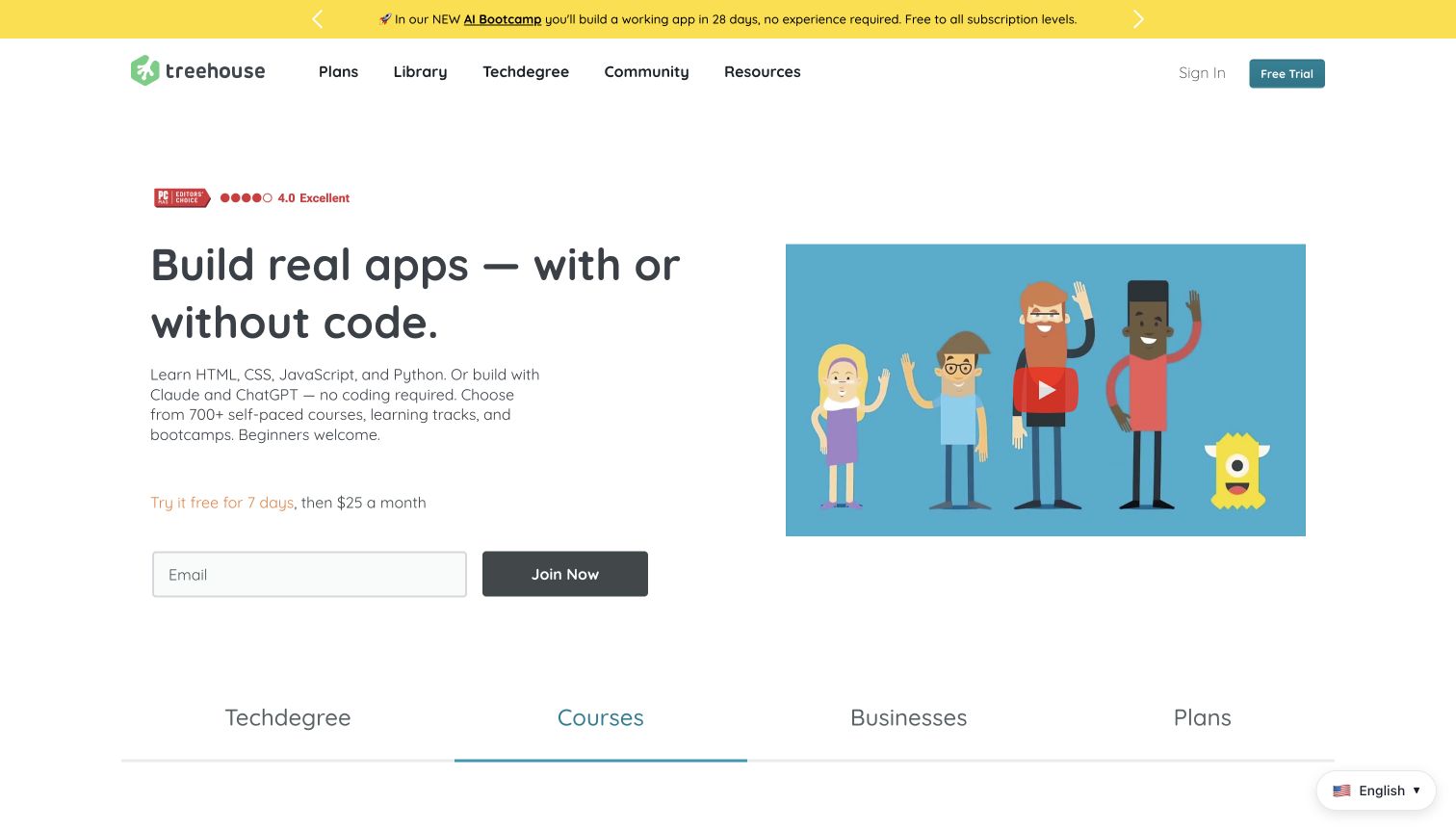
Treehouse places a plain language learning promise beside an illustrated video, with a small email field and joining action below. Trial duration and subsequent pricing are presented near that form, while course, community, and plan routes remain visible. This is a useful HubSpot integration pattern because the visitor can evaluate the commitment before supplying contact information. The resource association does not establish the learning platform or prove what happens after joining. The strongest transferable idea is the proximity of practical terms to the decision, rather than hiding them behind an appealing illustration.
What you can learn
Keep trial conditions, billing expectations, and access steps close to the form in your own learning site. Separate course enrollment from optional marketing preferences, verify the confirmation sequence, and make it easy to reach course details without first becoming a contact.
Pros
Trial and pricing context appear close to the visible joining decision.
Course and community routes allow further evaluation before any details are entered.
Cons & considerations
A short hero cannot communicate the depth or suitability of every learning path.
The integration signal does not verify enrollment, billing, or course completion behavior.
Platform source: Exact public source-page evidence. The exact sampled page references a HubSpot public resource. This shows a website integration, not HubSpot CMS hosting, CRM records, form ownership, or an observed sales workflow. Platform evidence is separate from the direct website screenshot and is not a complete current infrastructure audit.
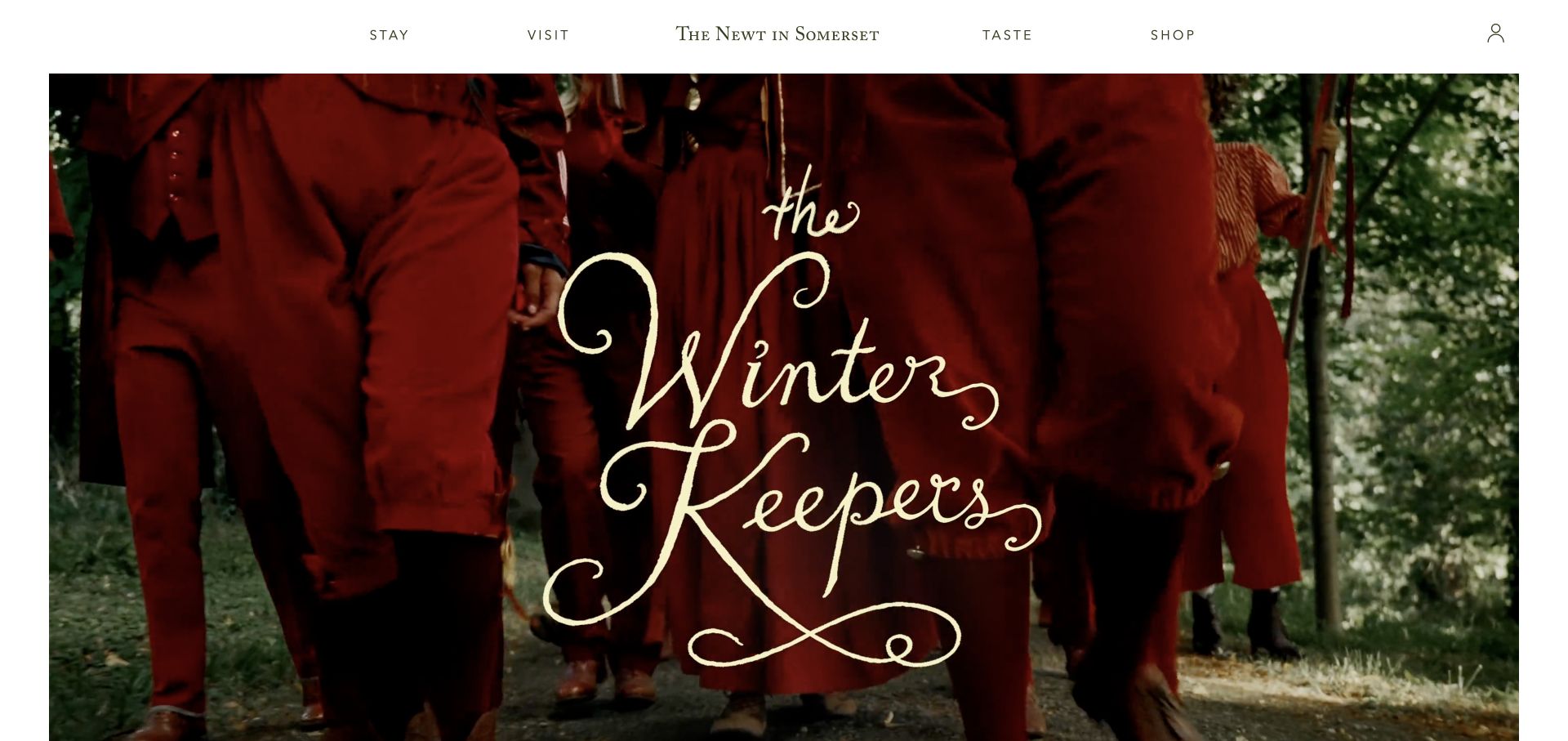
The Newt in Somerset uses a seasonal photographic story beneath exceptionally spare navigation. Stay, visit, taste, and shop are the main ways into the estate, framing several experiences without a dense menu. That clarity is useful when planning HubSpot connections: interest in a hotel stay is different from a garden visit or a retail order. The public resource association should not be expanded into a claim about reservation systems, membership records, or commerce operations. The practical design lesson is to keep the visitor’s selected experience recognizable through any subsequent inquiry or subscription.
What you can learn
Use distinct destinations and communication preferences for the estate’s major experiences. Explain whether an inquiry concerns availability, an event, or general updates, and check seasonal campaigns for stale dates or mismatched links before reusing them in followup messages.
Pros
A small set of experience labels makes a multifaceted destination easy to approach.
Seasonal imagery communicates atmosphere without crowding the primary navigation.
Cons & considerations
Sparse navigation can require additional exploration for practical booking details.
A marketing resource cannot establish reservation availability or membership synchronization.
Platform source: Exact public source-page evidence. The exact sampled page references a HubSpot public resource. This shows a website integration, not HubSpot CMS hosting, CRM records, form ownership, or an observed sales workflow. Platform evidence is separate from the direct website screenshot and is not a complete current infrastructure audit.
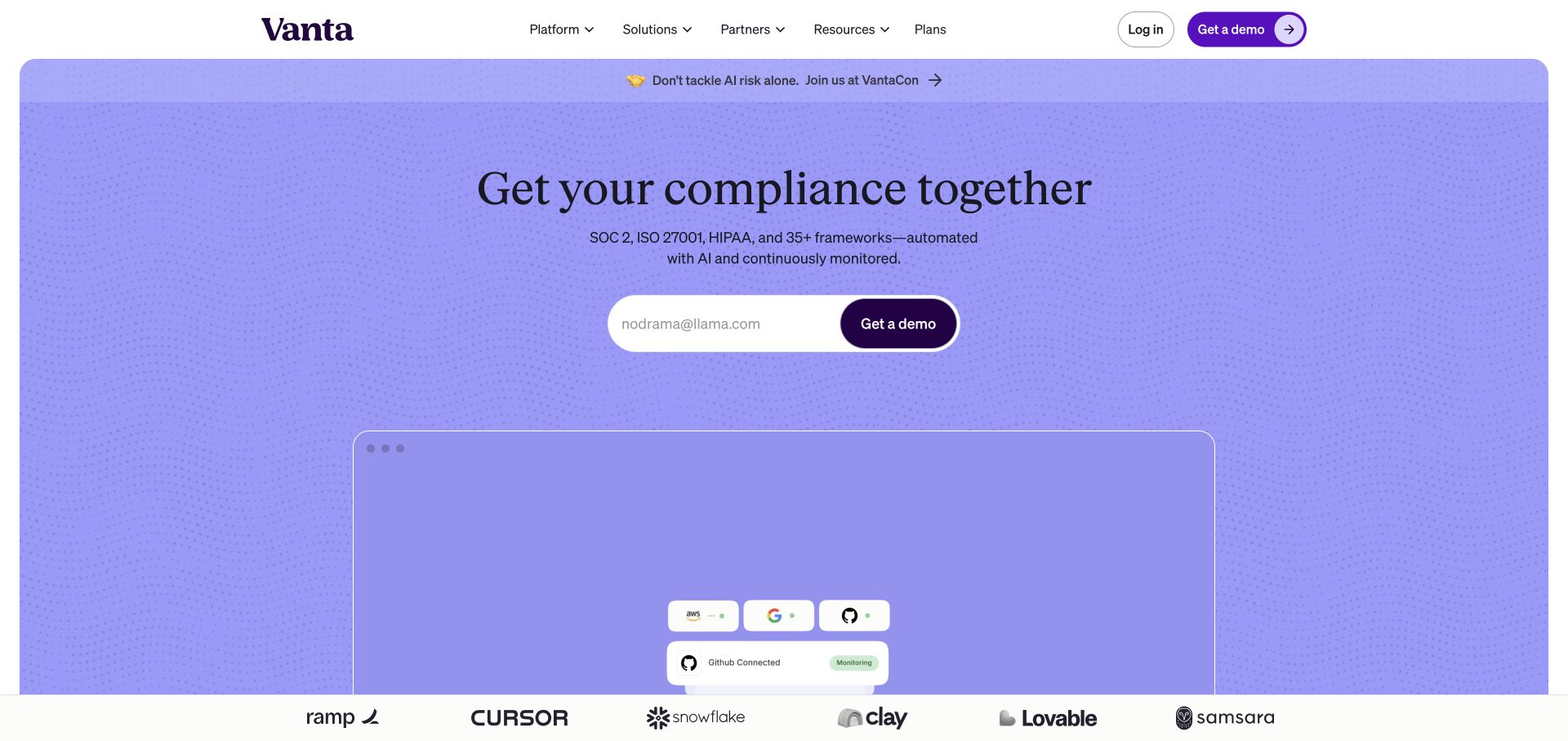
Vanta’s lavender hero centers a compliance related promise above a compact demo form. Product imagery and customer logos reinforce the message, while login remains separate in the header. The composition makes the initial sales action prominent without exposing a long questionnaire in the first view. For a HubSpot integration, the useful lesson is to make that exchange understandable: what information is required and what happens next. The public resource signal does not establish the backend used for customer evidence, audit work, or the platform’s own security and compliance processes.
What you can learn
Keep demo collection limited to the information needed to arrange the requested conversation. Explain the next step, preserve an independent login route for existing customers, and verify that marketing confirmations avoid promising assessments or certifications the website has not actually performed.
Pros
A compact form makes the sales entry point easy to identify.
Product imagery and customer recognition provide supporting context around the request.
Cons & considerations
A concise hero cannot explain every qualification behind broad compliance language.
A marketing integration is not evidence about private customer audits or security controls.
Platform source: Exact public source-page evidence. The exact sampled page references a HubSpot public resource. This shows a website integration, not HubSpot CMS hosting, CRM records, form ownership, or an observed sales workflow. Platform evidence is separate from the direct website screenshot and is not a complete current infrastructure audit.
HubSpot supports forms embedded on external websites. Follow the current form editor’s documentation, including its domain and integration requirements. Match styling to the page while preserving labels and feedback, and verify the result with an owned test process.
A separate form or scheduling destination can be appropriate when the next step needs more context. Make the destination and expected response clear before the visitor leaves the page. Keep a direct inquiry separate from optional newsletter or promotional choices.
Keep transactional systems authoritative
Orders, payments, reservations, and clinical or professional intake may belong to other systems. Document their boundaries and only synchronize information deliberately. A marketing resource on the public page is not evidence that all those systems share one database.
From references to requirements
Plan the response as carefully as the page
Map the receiving process
Identify who receives each type of request, what information they need, and the promised response. Remove fields that have no clear use. Give location, service, or product context an explicit purpose and let visitors correct it.
Test with representative states
Check mobile layouts, keyboard access, invalid input, missing required fields, successful confirmation, and optional cookie choices. Use designated test records and recipients. Do not verify a live form by sending real customer information or unexpected messages.
Maintain the integration inventory
Record embed versions, domain settings, owners, and related campaigns. Recheck forms after template changes and remove obsolete destinations. Make routine review part of content maintenance so the contact experience remains accurate as services evolve.
A useful handover demonstration
Ask the actual team to carry out its routine job: publish a realistic update, correct a mistake, preview a narrow screen, and identify who owns an integration failure. For a library or frontend framework, also ask who maintains the content source and deployment. A polished screenshot does not answer those operational questions.
Beyond the screenshot
HubSpot website integration checklist
Name the visitor’s action and expected response.
Identify the actual CMS, form, tracking, and transaction systems.
Keep required fields proportionate to the initial request.
Separate marketing preferences from necessary service communication.
Verify domain and embed requirements in current official documentation.
Test labels, errors, confirmations, and keyboard navigation.
Use designated test records and validate the receiving workflow.
Assign an owner and review integrations when campaigns change.
Test with real content, a keyboard, a small screen, slow or failed requests, and the people who will maintain the system. These are planning checks, not an accessibility, security, performance, or search-ranking certification.
Sources & editorial method
How this HubSpot collection was reviewed
Examples use exact public source-page HubSpot references with original observation dates and genuine direct browser captures. Reviews analyze the visible interface and propose transferable planning lessons. No private CRM, customer records, or internal workflow was accessed, and no form submission was used to claim a working integration.
Every image is an unmodified capture from the actual website, with its source and capture date. Some captures are reused from our shared catalog; their dates remain the original capture dates. None comes from a vendor gallery or a generated reconstruction. Moving imagery and live content can change.
Technology attribution uses public page assets or metadata, official platform documentation, or a cited first-party project case study. Documentary and framework-relationship evidence is identified where used; it is not a complete current backend inventory. A CMS image CDN alone does not establish a full CMS deployment. A library’s presence does not prove which individual controls use it, and a platform label does not establish AI authorship.
The composition notes, lessons, pros and tradeoffs are original editorial observations. We have not measured conversion, traffic, security, performance or accessibility conformance. Website owners retain their brands and imagery; these examples are not our client portfolio. Written, Edited and Curated are independent records, not dates advanced by a build. See our editorial standards or suggest a correction.
Questions worth asking
HubSpot website development FAQs
Does a HubSpot script mean a website uses HubSpot CMS?
No. HubSpot tracking and forms can be integrated with externally hosted websites. CMS, hosting, and backend CRM claims require separate evidence.
Should every form ask for the same fields?
No. Match the fields to the action and the receiving team’s needs. A newsletter signup, tour request, and professional inquiry have different purposes and should set different expectations.
Can a public resource prove a CRM workflow works?
No. It does not reveal contact records, routing, automation, or successful delivery. Validate those behaviors with appropriate access and designated test data in the system you control.
What matters most before adding an embed?
Define the visitor’s intent, the response process, the domain requirements, and the complete form states. Styling is useful, but clear labels and reliable confirmation are equally important.