Best phpBB Websites of 2026 (20 Real-World Examples)
phpBB forums that make durable discussion archives usable
These 20 phpBB examples compare category tables, specialist terminology, recent activity, search routes, and the presentation of long-running communities.
phpBB’s forum model is familiar, but a recognizable table layout does not automatically make a large archive easy to navigate. Useful category names, active-area labels, and readable topic metadata still require editorial decisions.
Ableton, Image-Line, Apache OpenOffice, Linux Mint, and VideoLAN lead the examples. Platform credits and identifiable core, extension, or theme resources support the associations.
Before the examples
What makes good phpBB website development in 2026?
Make the category table explain itself
Pair names with brief descriptions and distinguish support, announcements, and general discussion. Specialists may understand abbreviations that newcomers do not.
Show dates and closed or retired states clearly. An old solution can remain useful without looking like current product guidance.
Prioritize readable topic information
Keep titles, last activity, and useful counts legible. Dense columns and decorative badges should not overwhelm the subject of a discussion.
The collection · 20 examples
20 phpBB website examples worth studying
The collection includes explicitly qualified variants such as Celestia’s phpBBex presentation. It does not infer software maintenance quality or security from appearance.
We start with five recognizable brands or organizations: Ableton Forum, FL Studio Forum, Apache OpenOffice Community Forum, Linux Mint Forums, The VideoLAN Forums. Each attribution applies to the named website property, not every product or website belonging to its organization. This is a curated reading sequence, not a measured ranking.
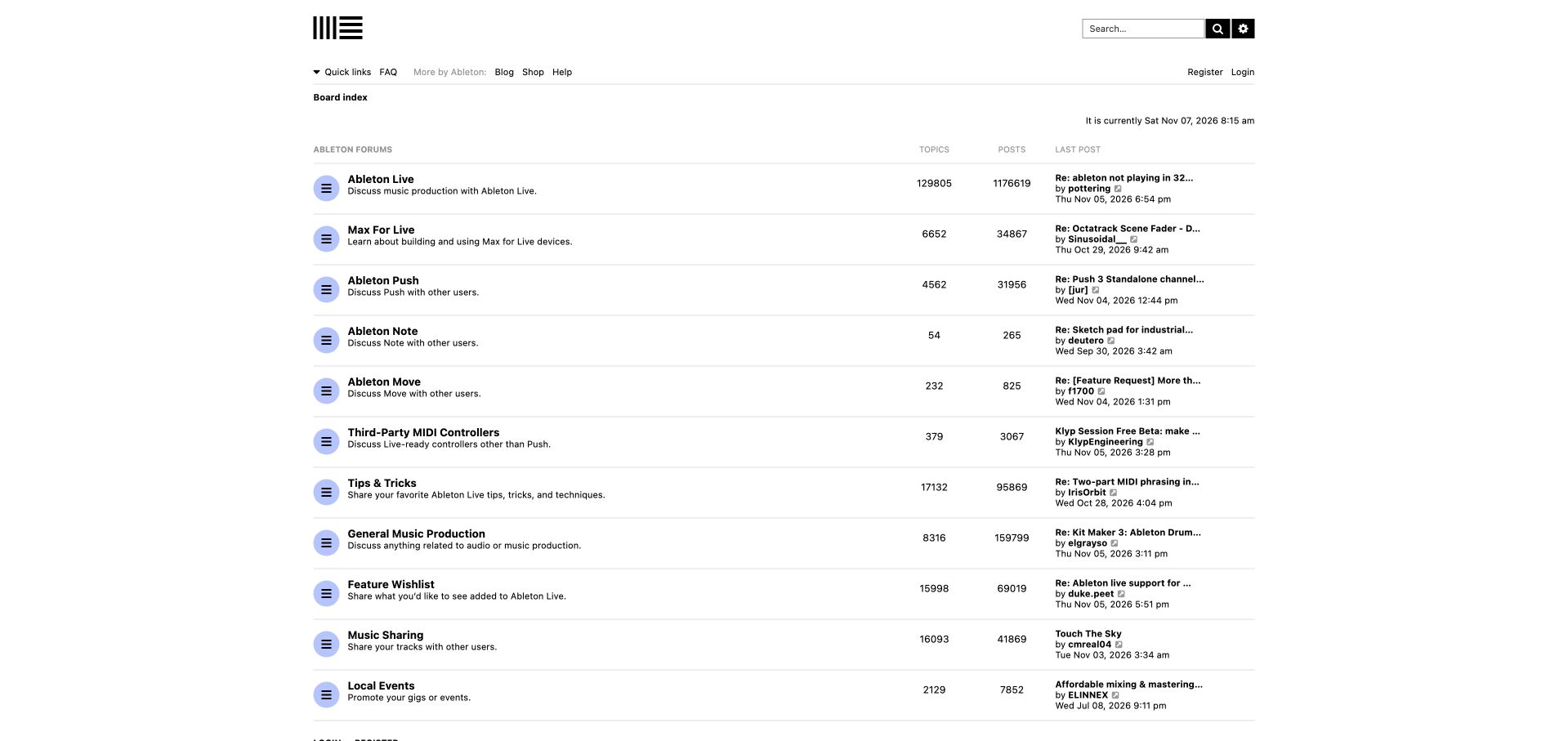
Ableton strips its forum index down to a white background, black typography, thin dividing lines and small lavender status icons. Live, Max for Live, Push, Note and Move each have a dedicated row with a short purpose statement. Broader areas for production tips, feature wishes, shared music and local events follow the product groups. The result gives familiar names priority without needing a large promotional hero. Blog, shop and help links still connect the forum to the wider business, but they remain secondary. This is a strong example of a custom phpBB theme changing the feel of a conventional category table. Its restraint also exposes a few weaknesses: the metadata is small, and the latest-post column truncates titles that might otherwise help a visitor choose a discussion.
What you can learn
If visitors already recognize the products, use that recognition to simplify the first decision. Preserve concise category descriptions and a clear help route, while giving recent-thread previews enough space to remain useful.
Pros
Product names dominate the hierarchy without promotional clutter.
Creative sharing and local events extend participation beyond troubleshooting.
Platform source: Public page platform evidence. The public page links its phpBB platform credit or official phpBB community resources. Platform evidence is separate from the direct website screenshot and is not a complete current infrastructure audit.
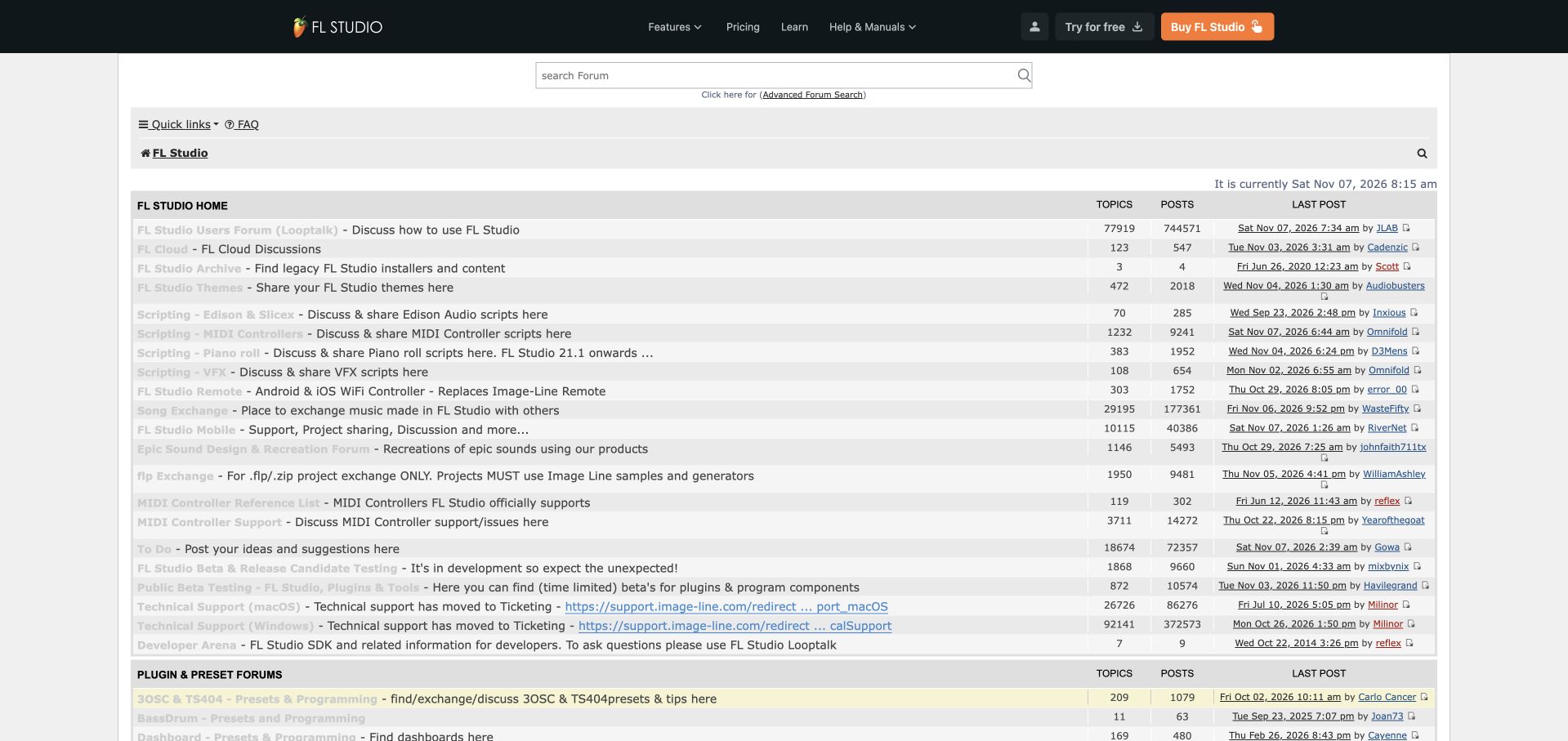
FL Studio's forum places a dense category directory beneath dark product navigation for features, learning and help. A search field appears above rows covering general discussion, cloud services, legacy material, themes and several kinds of scripting. Music sharing, mobile use, controller support and beta testing extend the directory further. The descriptions often explain a specific contribution or limitation, making the index useful for experienced users who know what they need. Technical-support rows explicitly point to the separate ticketing destination, a boundary between peer discussion and formal service. The sheer number of rows creates a demanding first visit, however, and pale category titles have much less contrast than their adjacent descriptions in the observed guest view.
What you can learn
A mature product community needs a clear distinction between reference material, peer exchange and formal support. Keep specialist destinations explicit, but use stronger grouping and readable link styles so an extensive index does not become an undifferentiated list.
Pros
Specialist scripting and sharing areas have precise descriptions.
Formal support is redirected to the appropriate ticketing route.
Cons & considerations
The long, tightly packed index is difficult to survey quickly.
Pale category links have weak contrast against light row backgrounds.
Visible tech stack
Earlier / documented evidence
phpBB
Platform source: Public page platform evidence. The page exposes phpBB-style core, extension, or prosilver theme resource paths. Platform evidence is separate from the direct website screenshot and is not a complete current infrastructure audit.
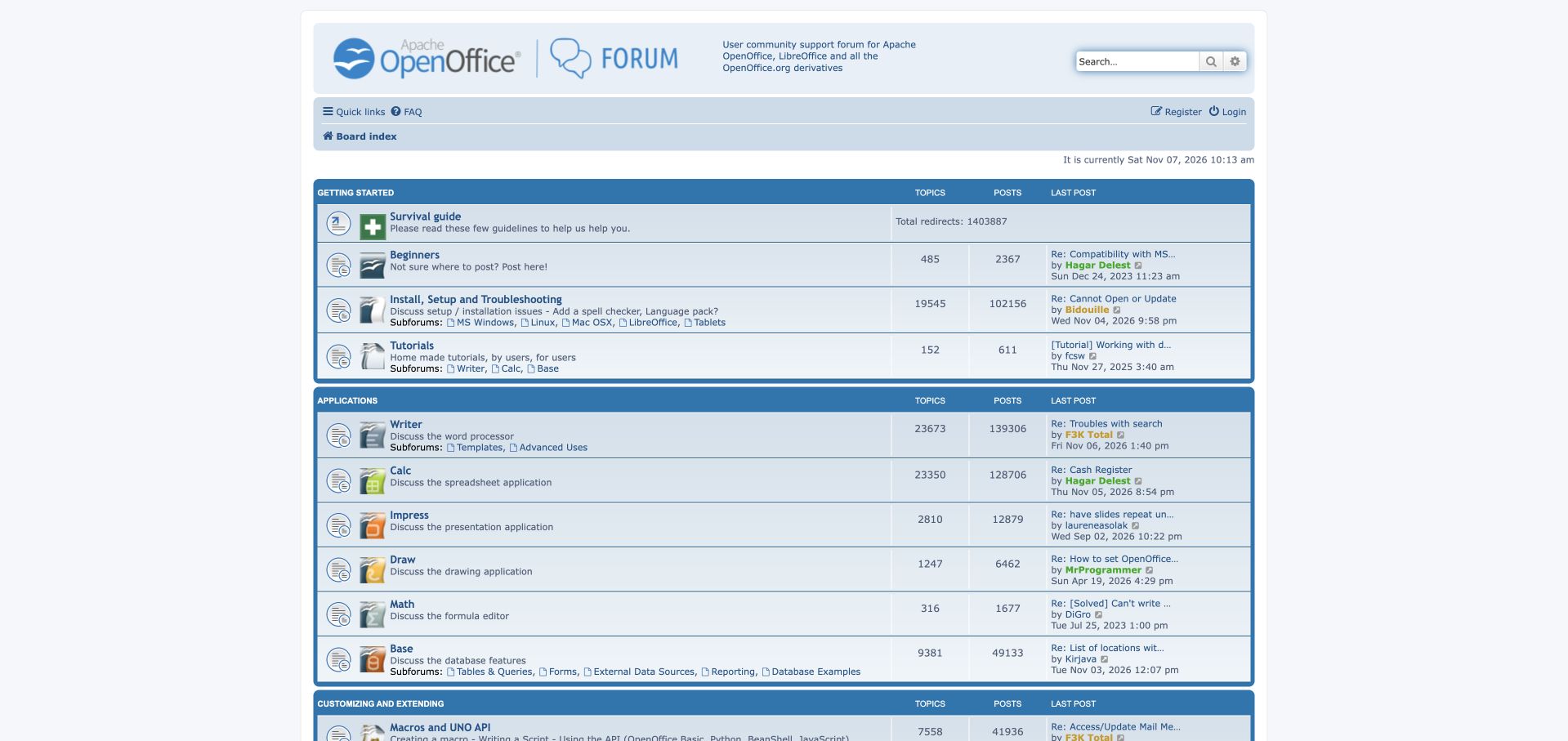
Apache OpenOffice's English-language community forum uses blue section bars and recognizable application icons to organize a compact index. A getting-started group leads with the survival guide, a beginner destination, installation help and tutorials. The next group maps directly to Writer, Calc, Impress, Draw, Math and Base, with short explanations of what each application does. Installation subforums also expose operating-system choices before a visitor opens the parent category. This arrangement is practical for a suite where the product name alone may not identify the problem. The header states that the community also covers LibreOffice and related derivatives, setting a wider scope than the logo might suggest. Small text and narrow recent-post previews make the desktop table dense despite its clear grouping.
What you can learn
Combine a welcoming general destination with product-specific boards. Application icons can accelerate recognition, but explanatory labels and an explicit support scope are essential when several related products share one community.
Pros
The beginner route gives uncertain visitors an obvious starting point.
Application groups and installation subforums expose useful choices early.
Platform source: Public page platform evidence. The public page links its phpBB platform credit or official phpBB community resources. Platform evidence is separate from the direct website screenshot and is not a complete current infrastructure audit.
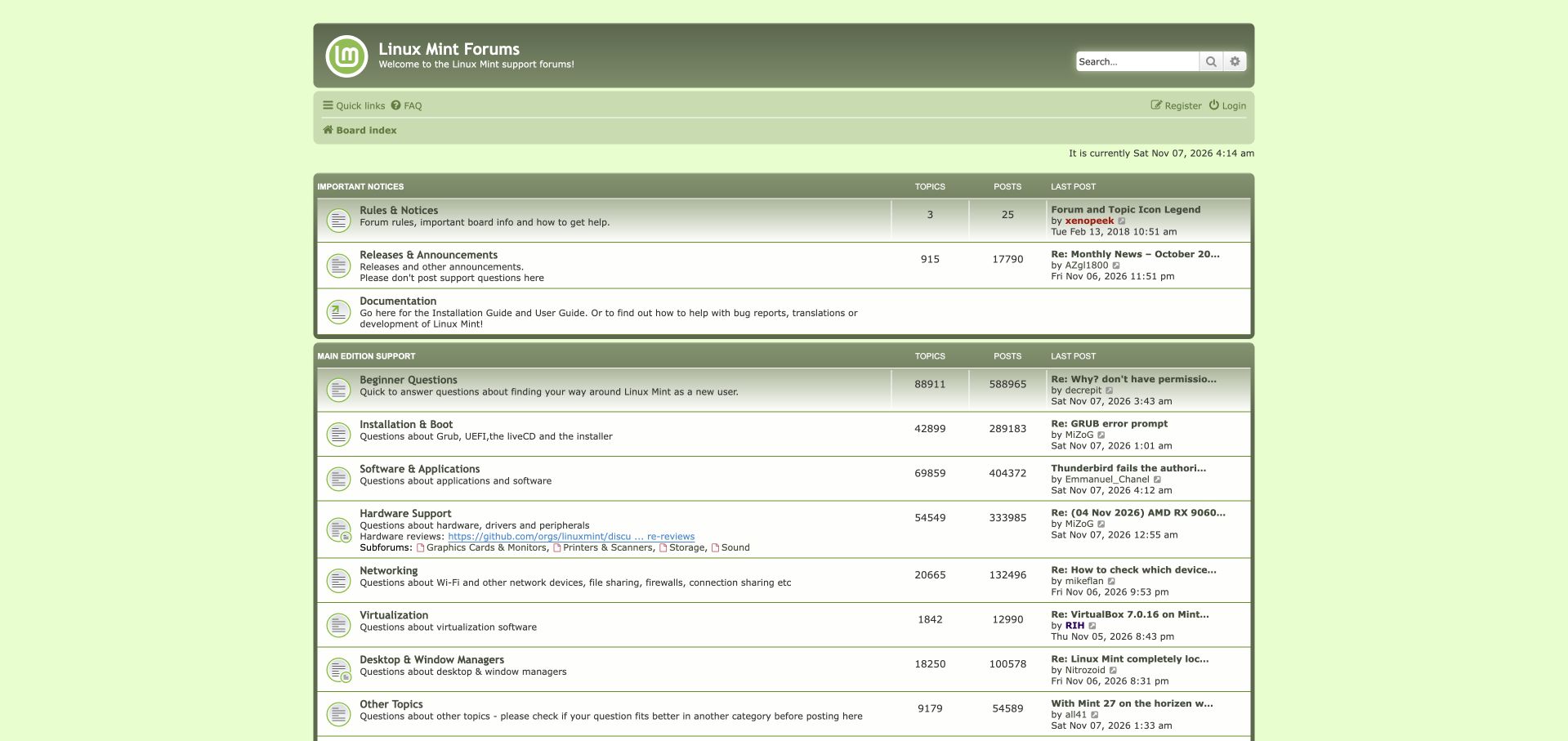
Linux Mint's green forum theme keeps a familiar category table within a centered page width. Rules, releases and documentation form an introductory group, followed by main-edition support organized around beginner questions, installation and boot, applications, hardware, networking and desktop environments. Short descriptions explain the boundaries, and the announcements row explicitly discourages support questions there. The documentation entry provides a route to installation guidance and contribution information without pretending those resources are discussion threads. This is a useful example of shaping phpBB around the problems users experience rather than an internal organizational chart. Some hardware links and subforum names are tightly packed, while the latest-post column has little room for long issue titles. The gentle green treatment is distinctive but gives secondary headings limited emphasis.
What you can learn
Use concrete problem categories and an explicit beginner destination to reduce uncertainty before posting. Explain where support does not belong, and keep reference links distinct enough that visitors understand when they are leaving discussion.
Pros
Problem-based groups make the support map understandable.
Documentation and beginner help are visible near the top.
Cons & considerations
Subforum links become crowded within some rows.
Narrow latest-post previews hide parts of longer issue descriptions.
Visible tech stack
Earlier / documented evidence
phpBB
Platform source: Public page platform evidence. The public page links its phpBB platform credit or official phpBB community resources. Platform evidence is separate from the direct website screenshot and is not a complete current infrastructure audit.
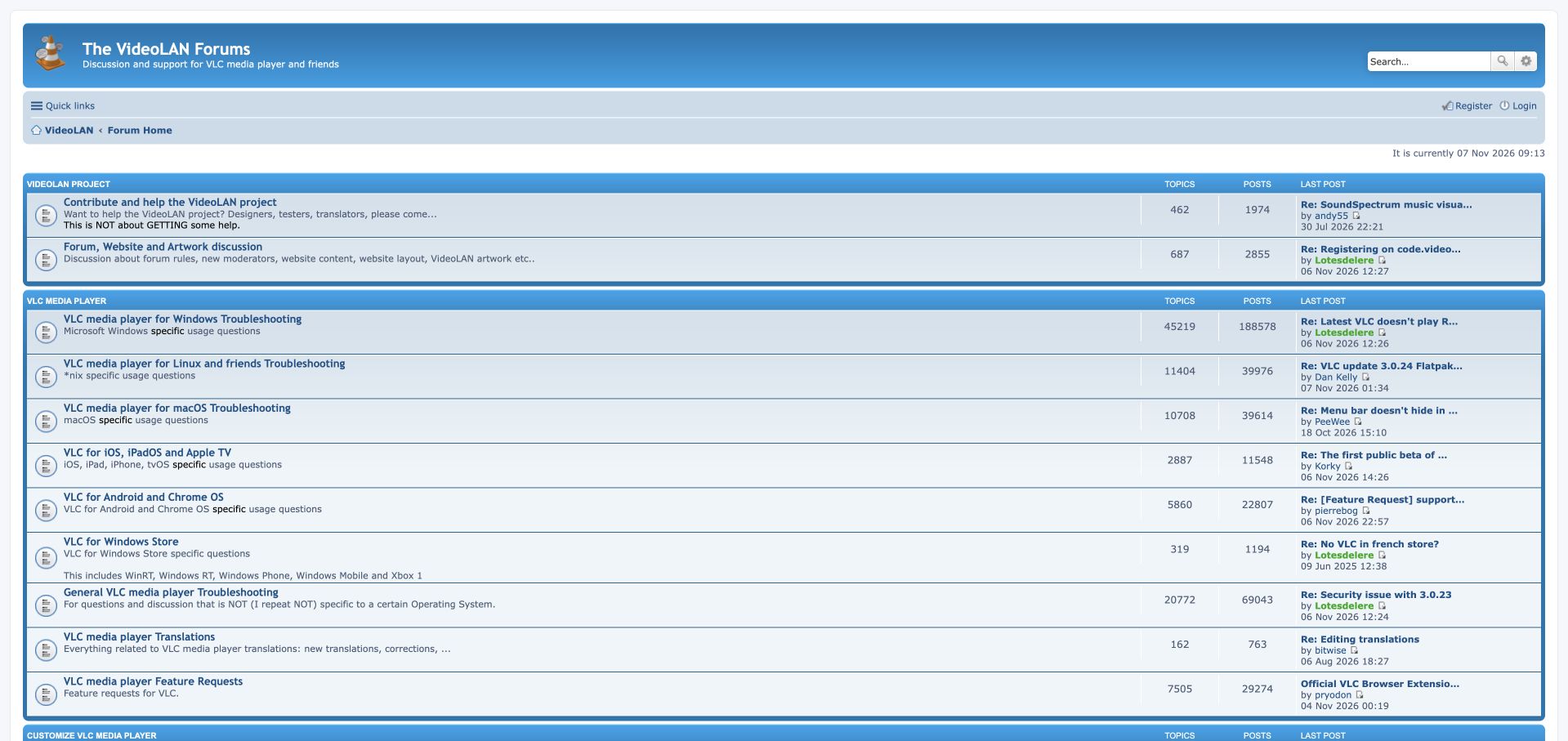
VideoLAN's forum uses a blue header with the familiar VLC cone above a full-width category table. The opening project group distinguishes contributing from asking for help, and its description makes that boundary unusually explicit. The main VLC section then separates Windows, Linux, macOS and mobile platforms, followed by general troubleshooting, translations and feature requests. Further groups cover customization, development and streaming. This gives an established project room for both users and contributors without collapsing every conversation into one support board. The platform descriptions help visitors choose the right place, but the desktop layout stretches names and recent activity far apart. Older testing areas also remain in the wider index, making careful archive labeling important for anyone copying this structure.
What you can learn
Make giving help and seeking help distinct community journeys. Organize technical support around the environment in which the problem occurs, and clearly identify legacy development areas so their historical value does not confuse current users.
Pros
Contribution and troubleshooting purposes are stated explicitly.
Operating-system categories provide clear support destinations.
Cons & considerations
Full-width rows separate related information across a large distance.
Long-lived testing areas need deliberate archive context.
Visible tech stack
Earlier / documented evidence
phpBB
Platform source: Public page platform evidence. The public page links its phpBB platform credit or official phpBB community resources. Platform evidence is separate from the direct website screenshot and is not a complete current infrastructure audit.
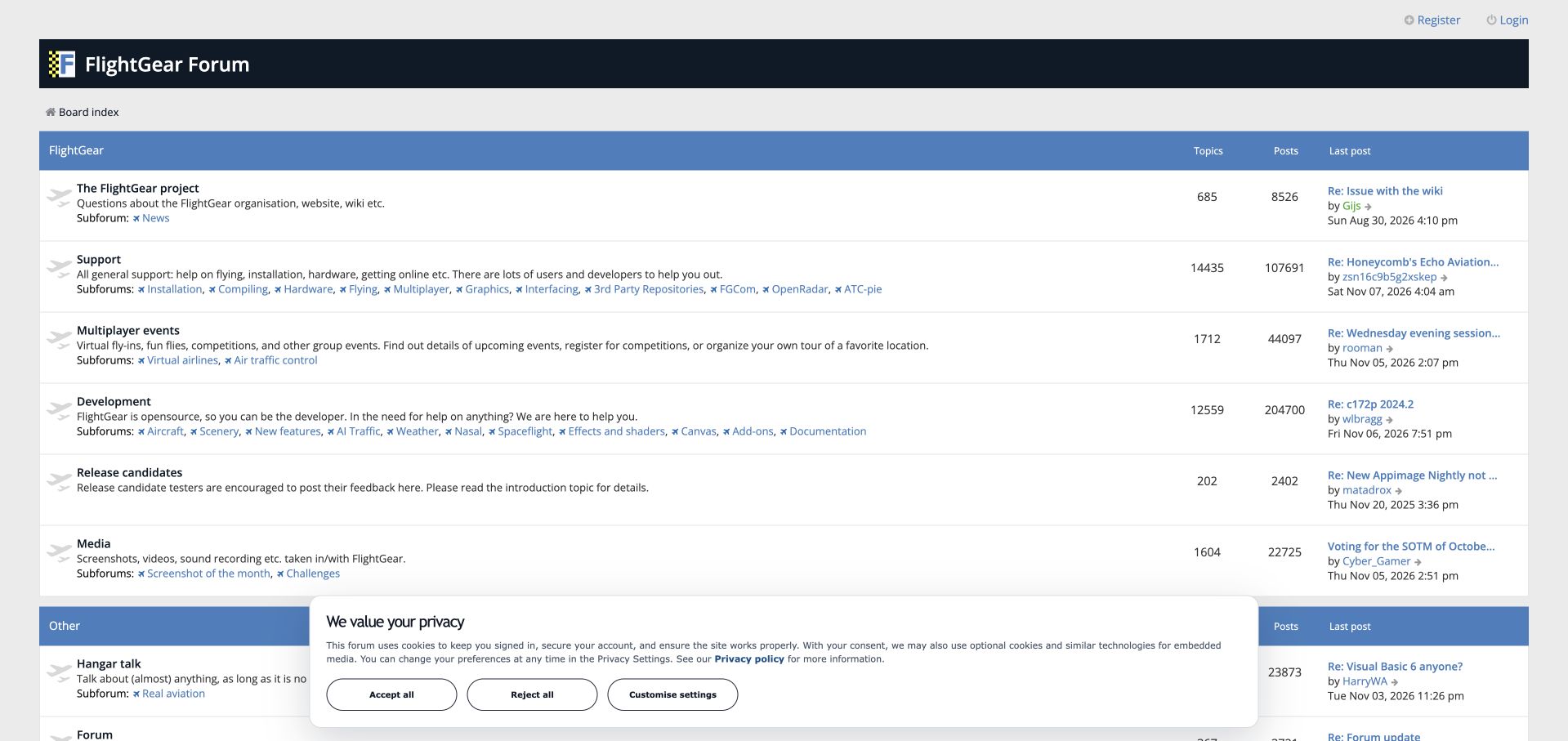
FlightGear's forum places a dark identity bar above spacious white rows and blue section headings. The main group separates the project itself, support, multiplayer events, development, release candidates and media. Descriptions explain the purpose of each destination, while subforums expose detailed routes such as installation, flying, scenery and air traffic control. The event section treats doing something together as a main community activity rather than burying it in general chat. Aircraft-shaped row icons add a small subject-specific detail without taking over the layout. The large desktop width creates long lines of subforum links, however, and the latest-post area sits far from the category description. A prominent global search route is not visible in the captured opening view.
What you can learn
Structure a specialist community around its forms of participation, including events and creative output. Keep detailed subforums available, but prevent a long inline list from becoming the only way to understand the hierarchy.
Pros
Shared events sit alongside support and development as a main activity.
Descriptions explain the role of each broad community area.
Cons & considerations
Long subforum lists are hard to scan across wide rows.
Search is not prominent in the observed first screen.
Visible tech stack
Earlier / documented evidence
phpBB
Platform source: Public page platform evidence. The public page links its phpBB platform credit or official phpBB community resources. Platform evidence is separate from the direct website screenshot and is not a complete current infrastructure audit.
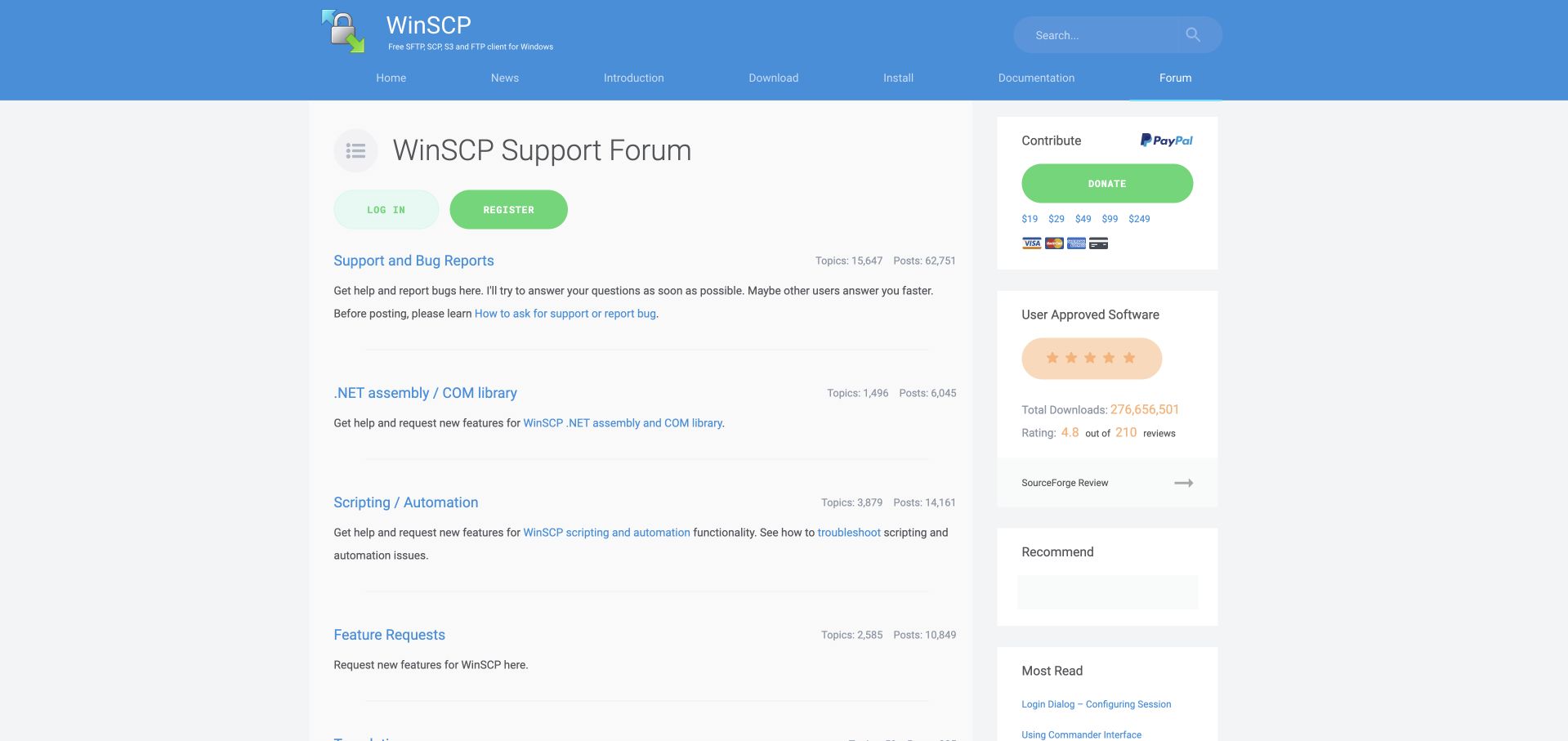
WinSCP's forum feels integrated with the surrounding product website rather than a separate bulletin board. The blue header retains download, installation and documentation navigation, while the main content presents support categories as spacious sections with explanatory paragraphs. General help, the .NET assembly and COM library, scripting, feature requests and translation each have a clear role. The general support description links to instructions for asking a useful question, and the automation area points to troubleshooting guidance. Counts remain secondary, aligned to the right of each heading. The design trades table density for readability, though the vertical spacing means fewer choices fit in the first screen. Donation and review panels in the sidebar also compete with the immediate support task.
What you can learn
Use the surrounding product site's visual system to make a forum feel continuous with documentation. Explain specialized support routes in plain language and place preparation guidance beside them, while keeping fundraising and social proof subordinate to help.
Pros
Category explanations distinguish ordinary use from scripting and integration.
Documentation remains part of the main product navigation.
Cons & considerations
Large vertical gaps slow comparison of all support destinations.
Sidebar donation and rating panels compete with troubleshooting choices.
Platform source: Public page platform evidence. The public page links its phpBB platform credit or official phpBB community resources. Platform evidence is separate from the direct website screenshot and is not a complete current infrastructure audit.
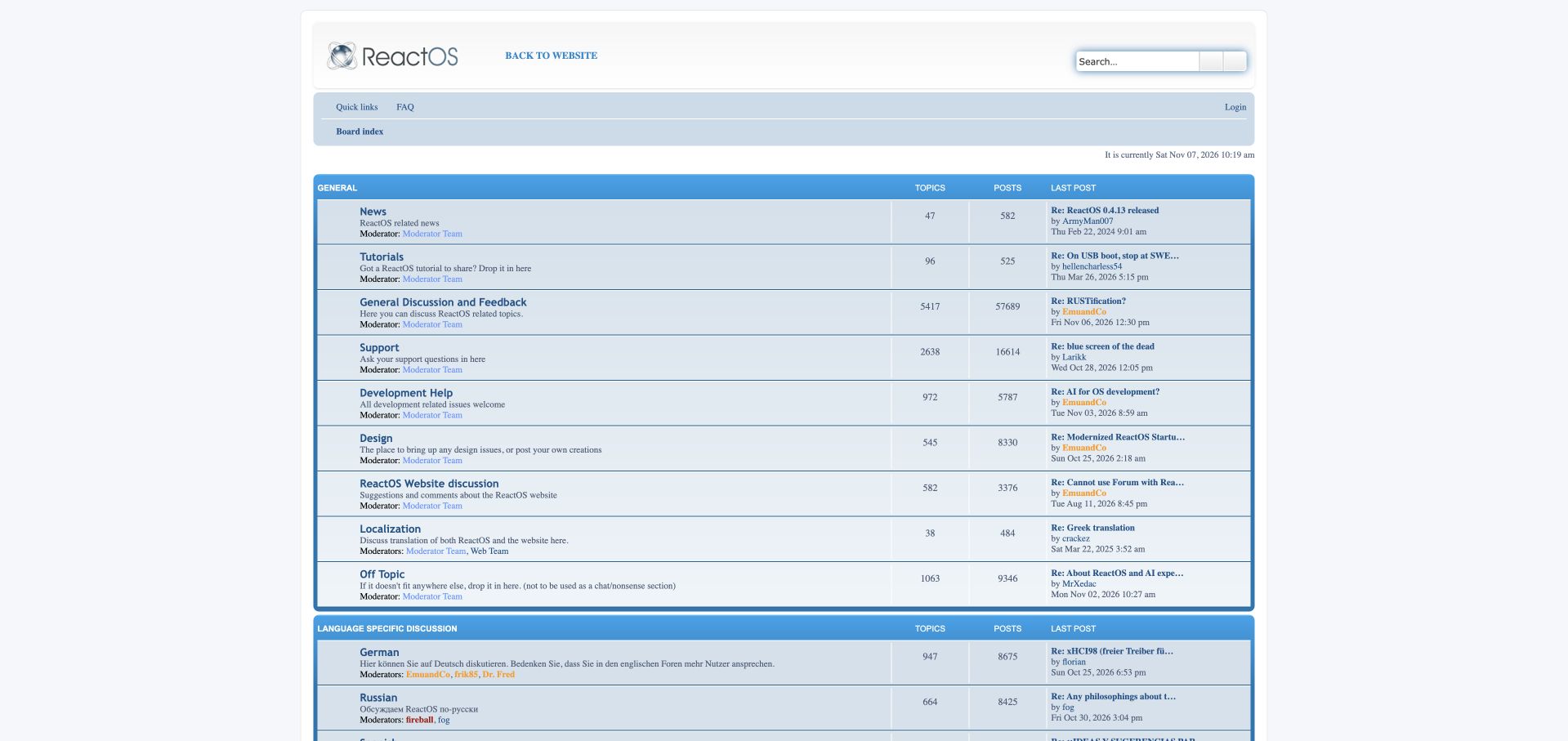
ReactOS uses a restrained blue and gray forum index with a compact project header and a direct route back to its main website. News, tutorials, discussion and support lead into more specialized contribution areas. Development Help sits alongside Design, Website and Localization, giving those activities their own visible destinations rather than burying them beneath programming. Language-specific groups extend participation further down the page. The familiar table structure makes recent posts and topic totals easy to compare, although repeated moderator lines add a great deal of fine print. Some news entries are older than active discussion threads, so the index works better as a map of the community than as a current product-release digest.
What you can learn
A contribution directory communicates who belongs in a project. Give design, documentation and translation clear entrances alongside code, then distinguish stable reference areas from places where current conversations are happening.
Pros
Design and localization receive explicit contribution destinations.
Short category labels make the overall project structure understandable.
Cons & considerations
Repeated moderation details make already compact rows busier.
Older announcement dates can obscure where current activity is concentrated.
Platform source: Public page platform evidence. The public page links its phpBB platform credit or official phpBB community resources. Platform evidence is separate from the direct website screenshot and is not a complete current infrastructure audit.
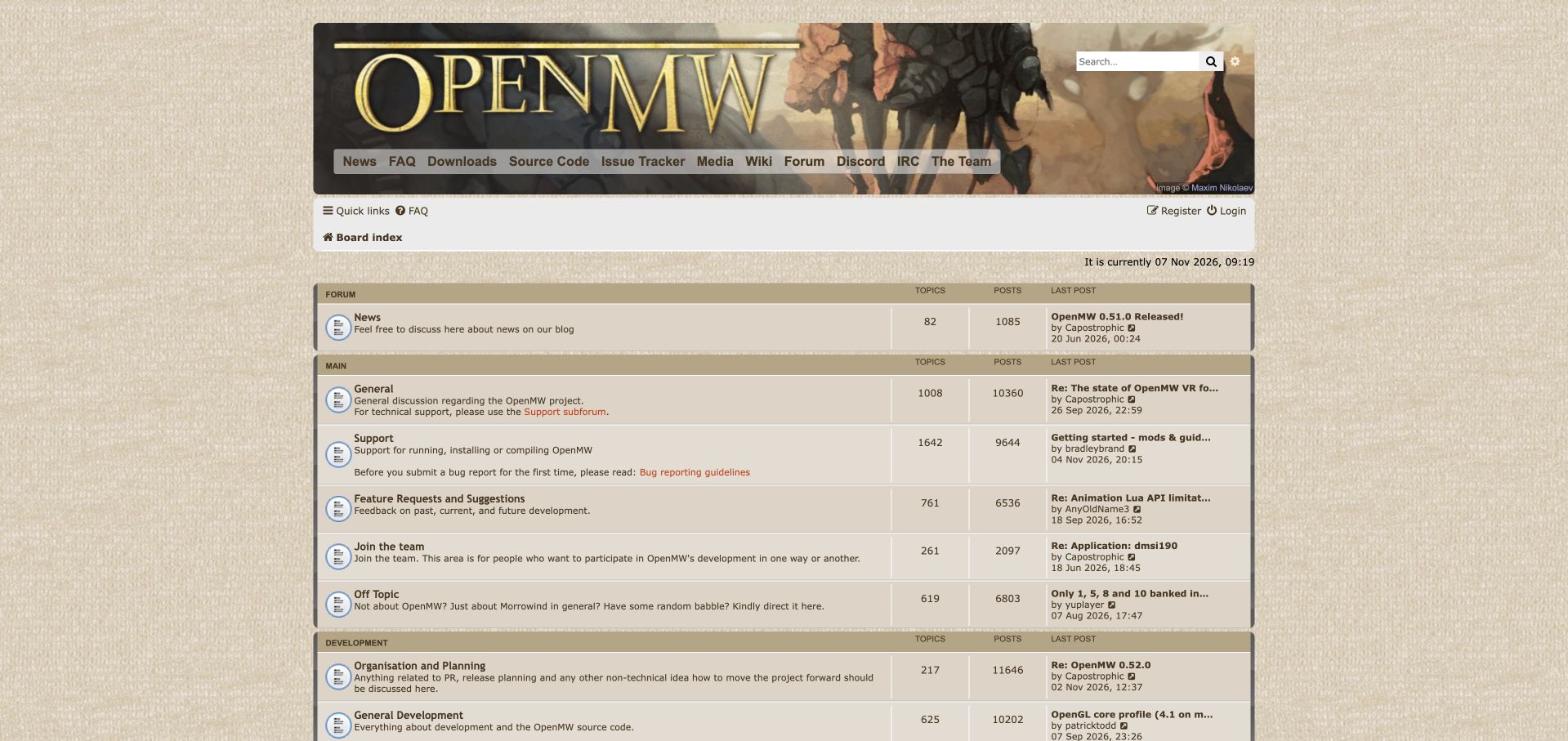
OpenMW surrounds its forum with textured tan surfaces and a large illustrated fantasy header. Links to downloads, source code, the issue tracker and the wiki connect discussion with the project's working resources. The main directory is unusually explicit about intent: general discussion says it is not the support area, while support points readers toward bug-reporting guidelines. Feature requests and an invitation to join the team sit nearby, with development organization further down. This creates several purposeful next steps without pretending every question belongs in one queue. The illustrated identity is memorable, but the large masthead and many utility destinations delay the practical forum rows. Compact tan tables also demand careful reading when descriptions, metadata and links accumulate.
What you can learn
Describe what belongs in each discussion area before users post. Link the preparation needed for an effective bug report at the category entrance, and keep contribution opportunities visible beside support.
Pros
Category descriptions establish clear support and discussion boundaries.
Project resources and contribution routes are closely connected.
Cons & considerations
The large illustrated header pushes practical categories downward.
Numerous destinations and dense rows compete for attention.
Visible tech stack
Earlier / documented evidence
phpBB
Platform source: Public page platform evidence. The public page links its phpBB platform credit or official phpBB community resources. Platform evidence is separate from the direct website screenshot and is not a complete current infrastructure audit.
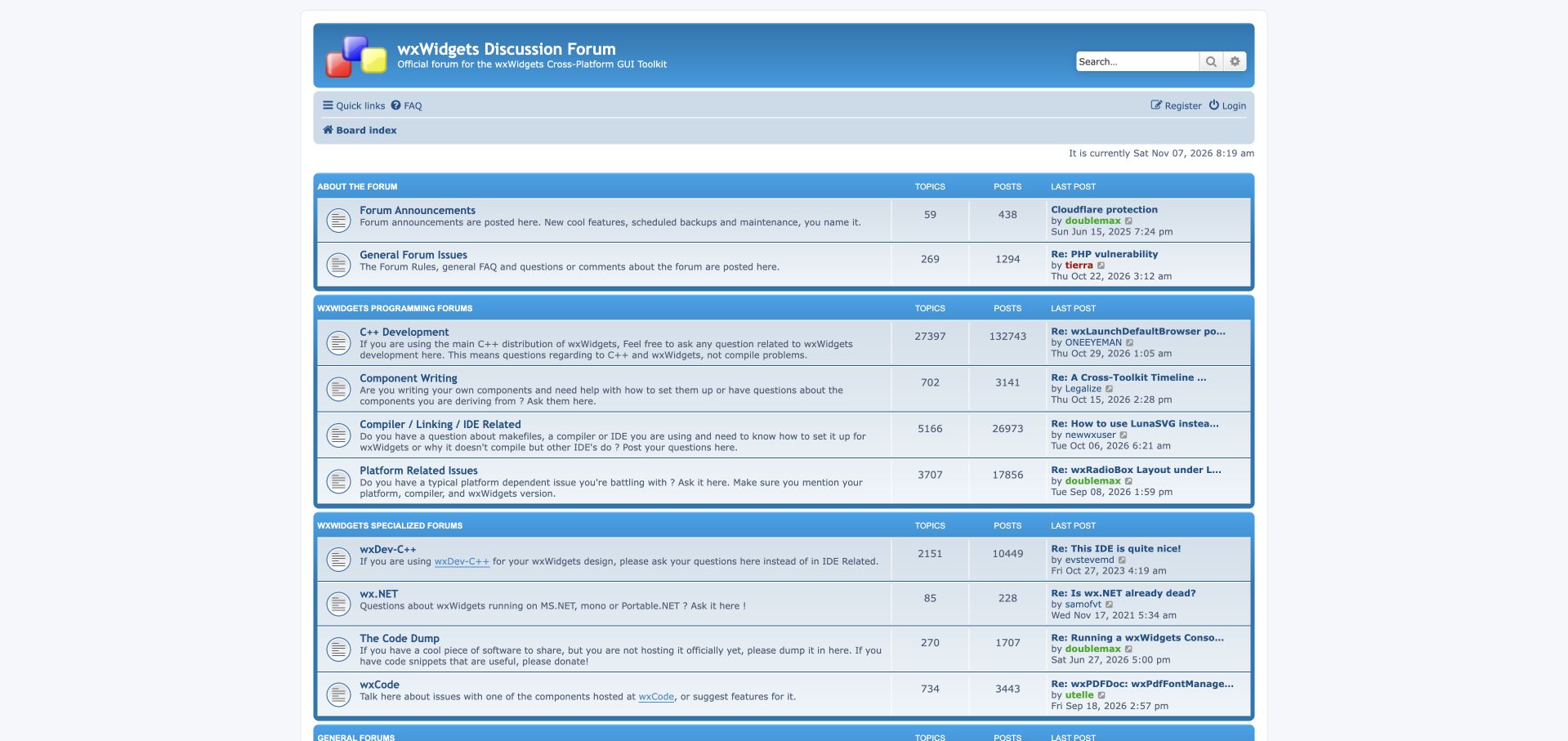
The wxWidgets forum uses a blue branded header above a conventional centered category table. Its strongest design decision is the distinction between programming questions, writing components, compiler and linker problems, and platform-specific issues. The platform description asks for the operating system, compiler and wxWidgets version, bringing useful diagnostic context into the directory itself. More specialized bindings and code-sharing destinations continue below the general support areas. This organization helps developers recognize whether they are asking about an API or the environment needed to run it. The presentation is less successful at prioritizing newcomers: forum administration occupies the first section, and long descriptions produce a dense wall of technical reading before all the available areas are visible.
What you can learn
A developer forum can improve question quality before the editor opens. Separate environment failures from implementation questions and state the minimum diagnostic details where people choose their category.
Pros
Build tools, programming and platform issues have distinct destinations.
Diagnostic requirements are visible at the category level.
Cons & considerations
Administrative discussions precede the main developer support sections.
Long descriptions and specialist areas make the index visually dense.
Visible tech stack
Earlier / documented evidence
phpBB
Platform source: Public page platform evidence. The public page links its phpBB platform credit or official phpBB community resources. Platform evidence is separate from the direct website screenshot and is not a complete current infrastructure audit.
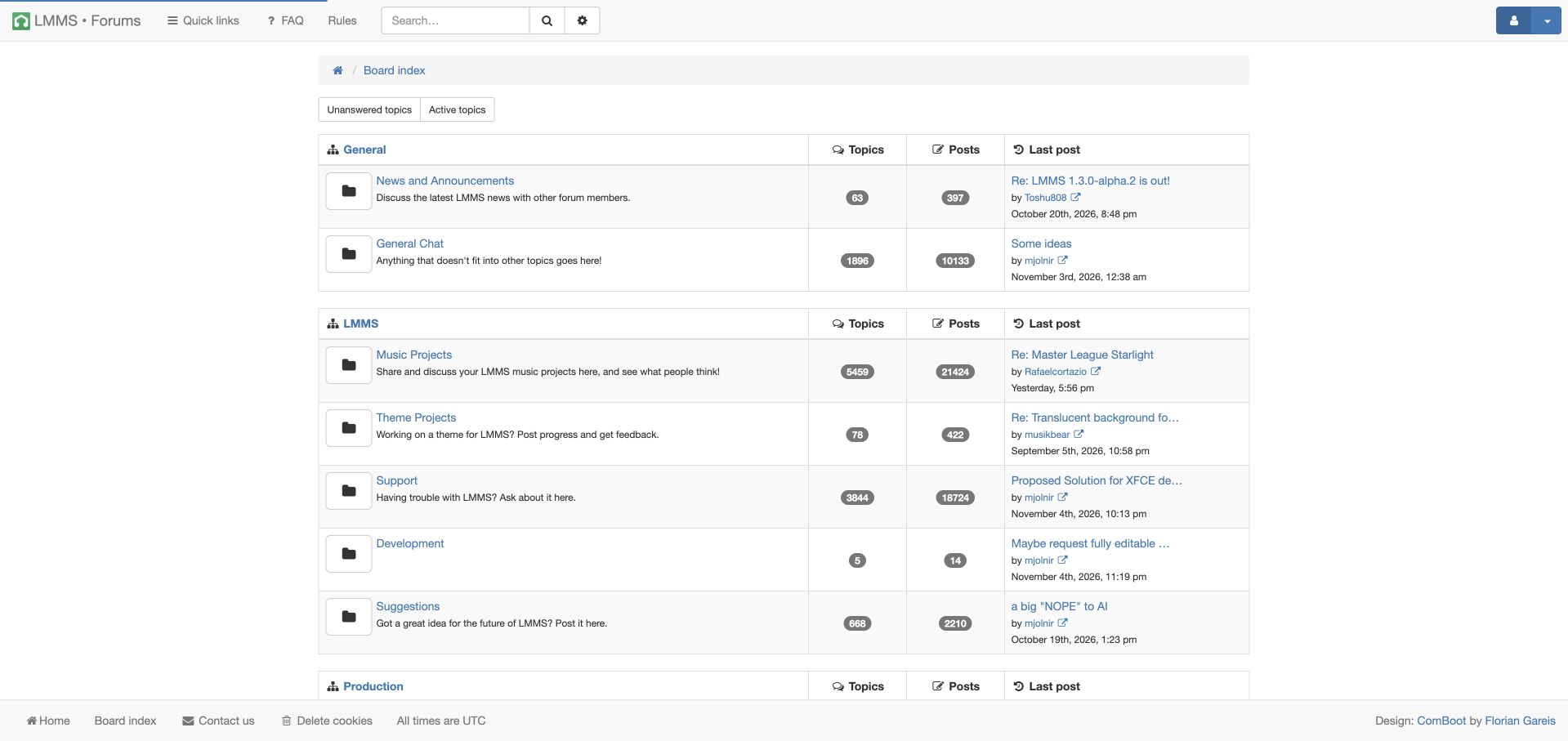
LMMS presents a clean white forum index below a slim gray utility bar. Unanswered and active-topic shortcuts appear before the category groups, giving returning helpers a direct route into work that needs attention. Music Projects and Theme Projects sit prominently beside support, development and suggestions, treating creative output as a central part of the community. Dark count badges and large folder icons provide a consistent rhythm across the tables. The structure is easy to recognize, although those oversized symbols consume space that could support more useful descriptions. Development is particularly terse beside more explanatory neighbors. The page establishes a practical community entrance, but some categories communicate their purpose much more clearly than others.
What you can learn
A creative product's community should show what people make as well as where they encounter problems. Pair project-sharing categories with direct unanswered-topic access so both contributors and volunteer helpers have an obvious entrance.
Pros
Music and theme projects are prominent within the main directory.
Unanswered-topic access supports repeat visits by community helpers.
Cons & considerations
Large folder icons and count badges occupy substantial row space.
Uneven category descriptions leave some contribution routes less clear.
Platform source: Public page platform evidence. The public page links its phpBB platform credit or official phpBB community resources. Platform evidence is separate from the direct website screenshot and is not a complete current infrastructure audit.
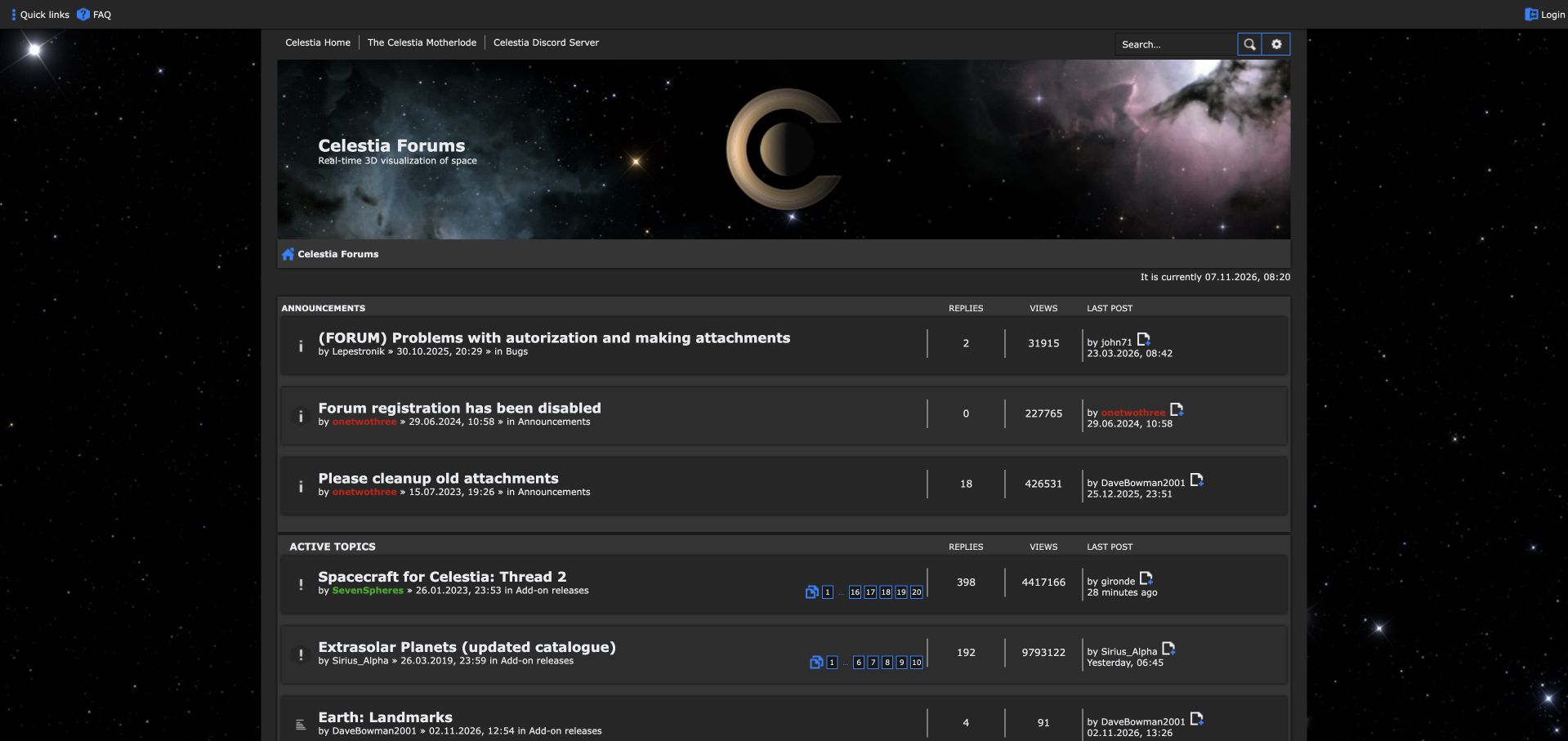
Celestia places a space-themed header and central discussion area against a dark starfield background. Below the project navigation, announcements cover practical forum conditions before an active-topic list brings add-ons and other continuing projects into view. Inline page numbers reveal the depth of these conversations and allow experienced readers to move into established threads. The visual identity fits the astronomy subject immediately, and recent activity is easier to locate than it would be in an index containing only broad categories. Operational notices take substantial priority, however, including an explicit registration-disabled announcement. That restriction matters: this is an example of browsing an existing community, not a model of frictionless new-member onboarding. The installation identifies phpBB and phpBBex in its public credits.
What you can learn
An activity-first entrance can make a specialist archive feel current, but operational restrictions need equally clear disclosure. Preserve the difference between a useful public reading resource and a community accepting new participants.
Pros
Active threads reveal ongoing work beyond the category structure.
Space imagery gives the specialist community a recognizable identity.
Cons & considerations
Housekeeping announcements dominate the entrance before project discussion.
Registration is explicitly disabled in the observed public notice.
Platform source: Public page platform evidence. The public page links its phpBB platform credit or official phpBB community resources. The page also identifies the phpBBex variant. Platform evidence is separate from the direct website screenshot and is not a complete current infrastructure audit.
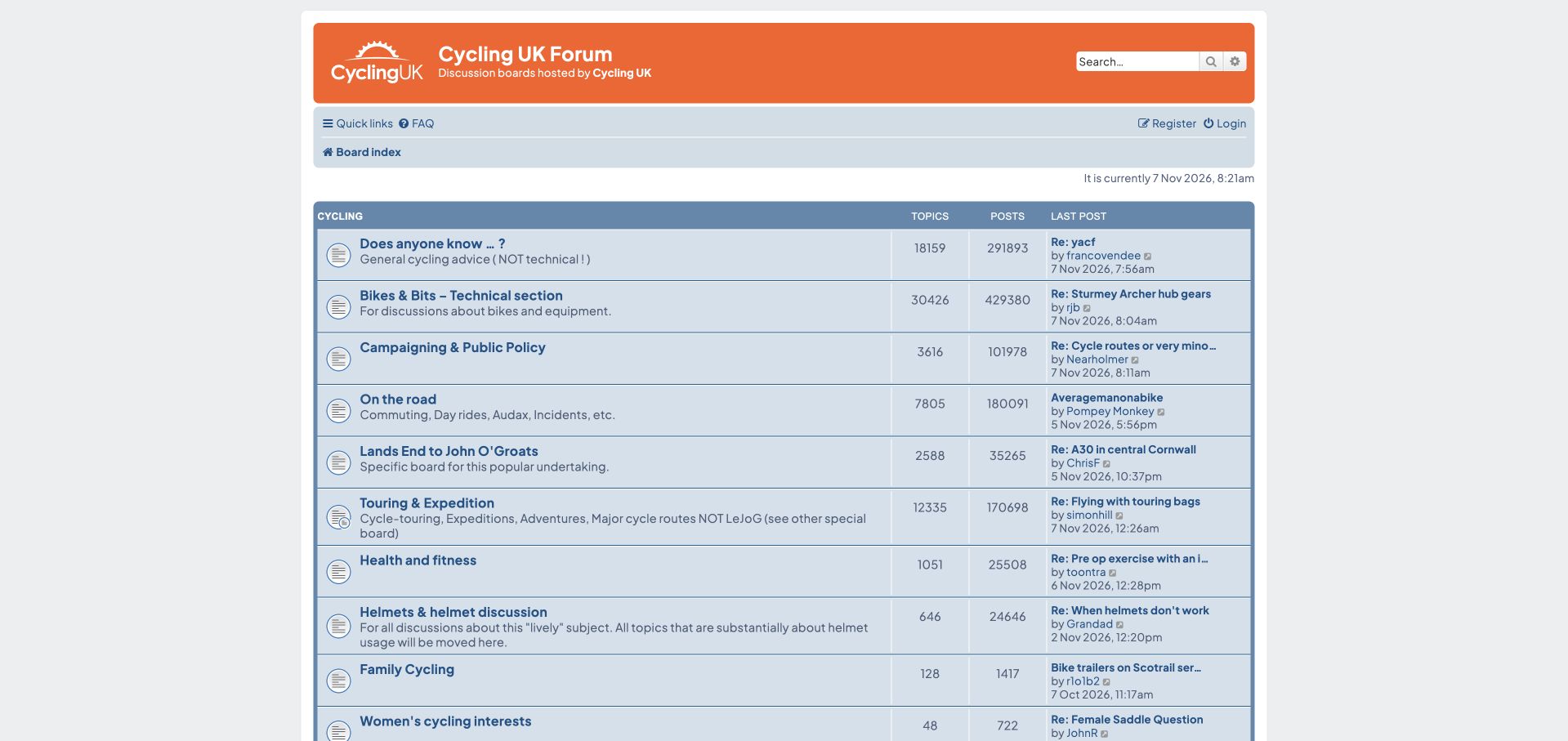
Cycling UK's orange branding gives way to a centered blue forum directory organized around how people ride and what they need to discuss. General questions explicitly exclude technical matters, while Bikes and Bits provides that separate destination. Campaigning, road riding, touring, family cycling and a dedicated Land's End to John o' Groats area make the scope more specific than a generic discussion board. Descriptions also clarify when a popular route belongs outside the broader touring category. These boundaries are useful for an established community with recurring subjects. The resulting index is long, though, and abbreviations such as LEJOG require familiarity. Topic counts and recent-post previews add useful context while making each row more demanding to scan.
What you can learn
Use the activities and recurring questions that shape a community to define its categories. Where one subject earns a dedicated area, explain that exception in the neighboring category rather than expecting newcomers to know the history.
Pros
Activity-based categories reflect several different visitor intentions.
Descriptions clarify boundaries between general, technical and route discussions.
Cons & considerations
Community-specific abbreviations require prior knowledge or explanation.
The long directory and detailed metadata slow an initial overview.
Platform source: Public page platform evidence. The public page links its phpBB platform credit or official phpBB community resources. Platform evidence is separate from the direct website screenshot and is not a complete current infrastructure audit.
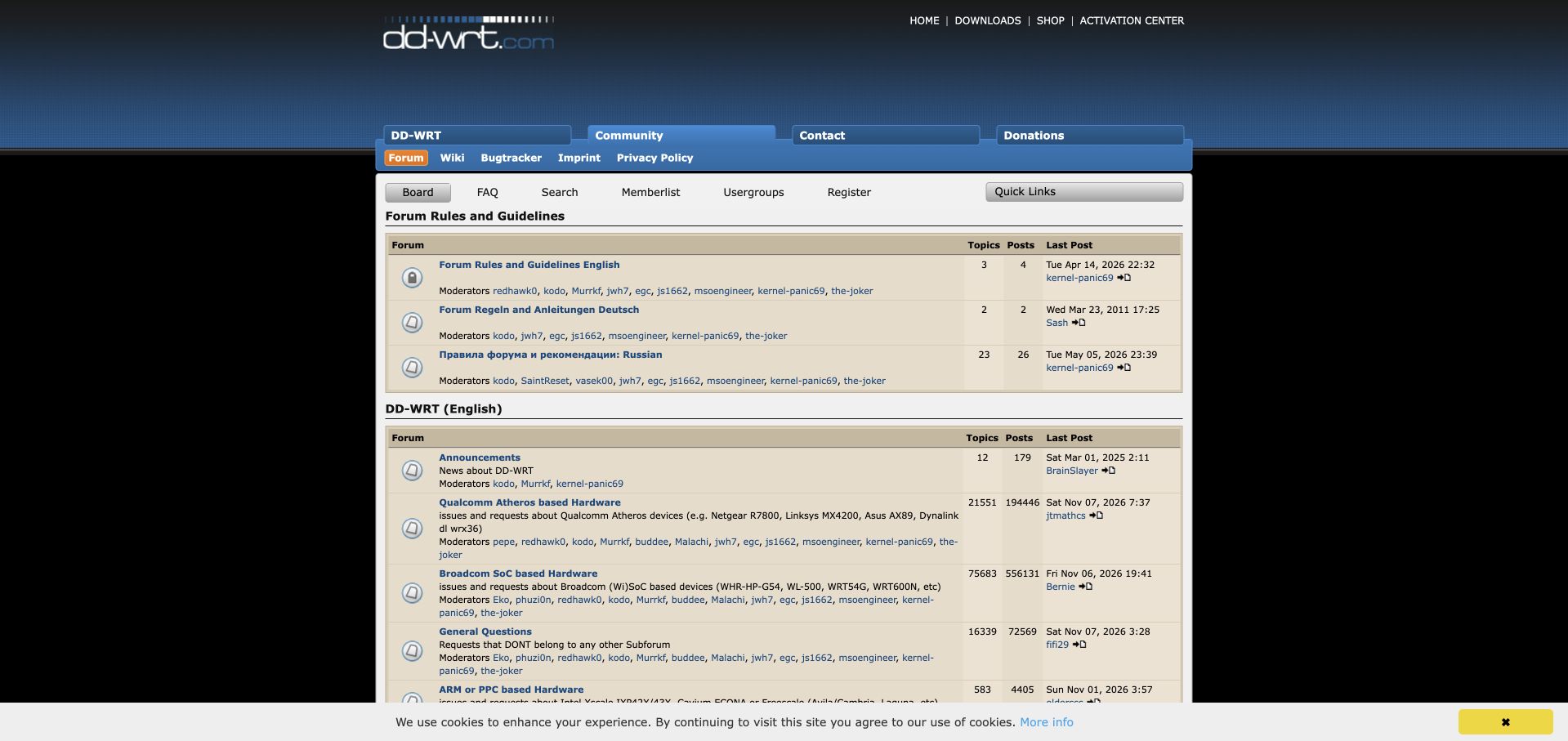
DD-WRT's narrow forum sits within a black background beneath a blue gradient masthead and compact project navigation. The directory begins with rules and language-specific sections, then separates English support by hardware families including Qualcomm Atheros, Broadcom and ARM. Device examples in the descriptions help translate those architectural labels into something a router owner might recognize. A general destination provides a fallback when the specialist classification is unclear. The structure preserves valuable technical distinctions, but it assumes more hardware knowledge than a beginner may possess. Repeated moderator lists and densely packed recent-post columns further crowd the small layout. This is a visibly older phpBB installation, useful for studying durable support taxonomy without assuming it demonstrates the features of current phpBB releases.
What you can learn
When hardware changes the answer, reflect that in support navigation. Explain specialist family names with recognizable device examples and retain a clear route for people who cannot confidently classify their equipment.
Pros
Hardware families separate questions with materially different technical contexts.
Device examples help interpret otherwise specialist category names.
Cons & considerations
Chipset terminology creates an initial hurdle for inexperienced owners.
Repeated moderation details crowd the narrow table layout.
Platform source: Public page platform evidence. The public page links its phpBB platform credit or official phpBB community resources. Platform evidence is separate from the direct website screenshot and is not a complete current infrastructure audit.
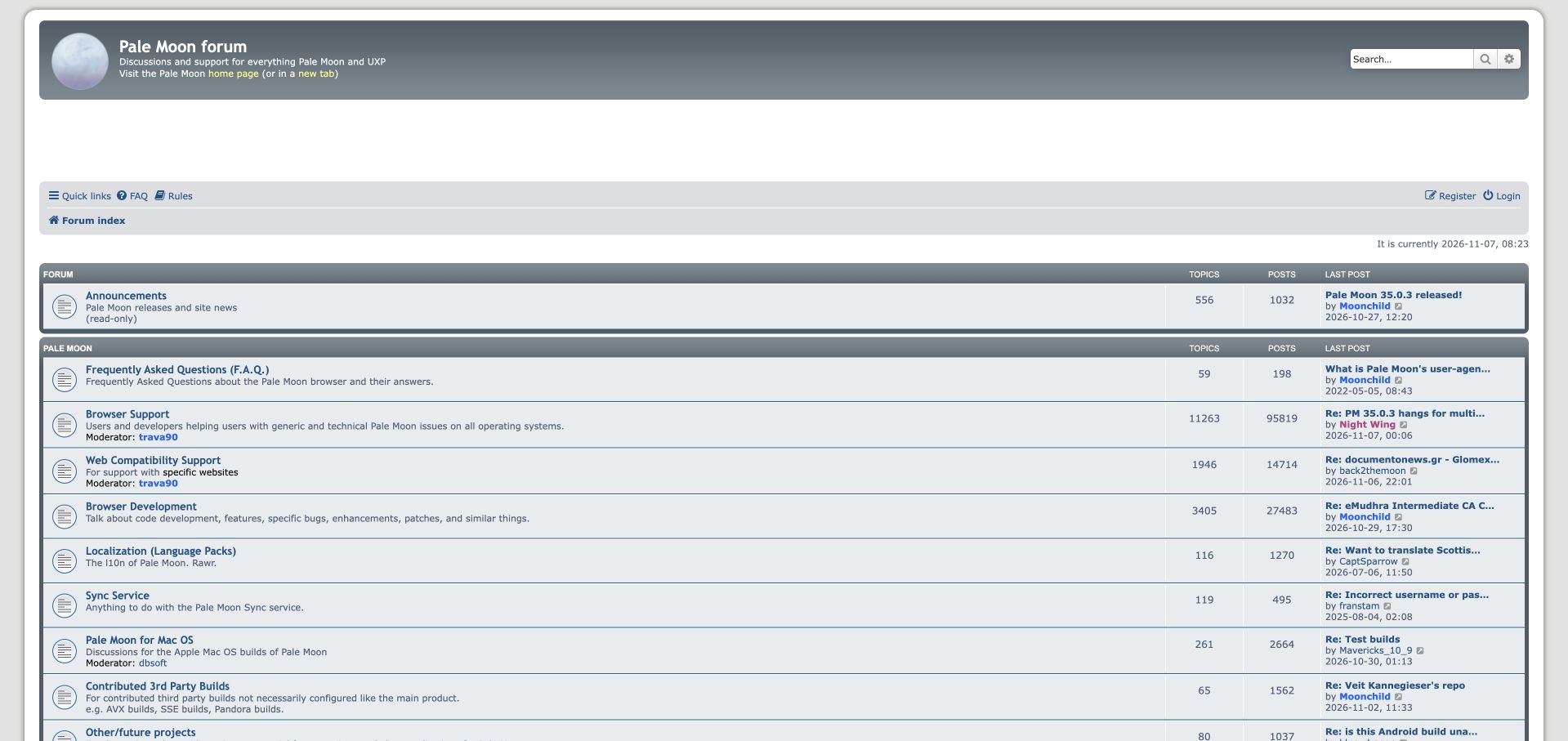
Pale Moon combines a moon illustration and restrained gray-blue branding with a wide conventional forum directory. Announcements are explicitly marked read-only, while general browser support and web compatibility support receive separate destinations. That distinction is particularly useful for a browser: a problem with one website is not automatically the same kind of question as a problem with the application itself. Development, localization, synchronization and alternative builds extend the support map. Third-party build guidance also signals that configurations may differ from the main project. Large gaps near the top and compact recent-post previews weaken the visual rhythm, however. Older reference dates coexist with active discussion, requiring readers to distinguish durable guidance from current announcements rather than treating every row as news.
What you can learn
Support navigation should separate failures inside a product from problems at its boundaries. Give compatibility questions their own clear destination and explain when unofficial configurations change the scope of available help.
Pros
Website compatibility is separated from general browser troubleshooting.
Read-only notices and alternative-build boundaries are explicitly labeled.
Cons & considerations
Large empty areas interrupt the transition into practical categories.
Compact metadata makes current discussion and older reference material harder to compare.
Platform source: Public page platform evidence. The public page links its phpBB platform credit or official phpBB community resources. Platform evidence is separate from the direct website screenshot and is not a complete current infrastructure audit.
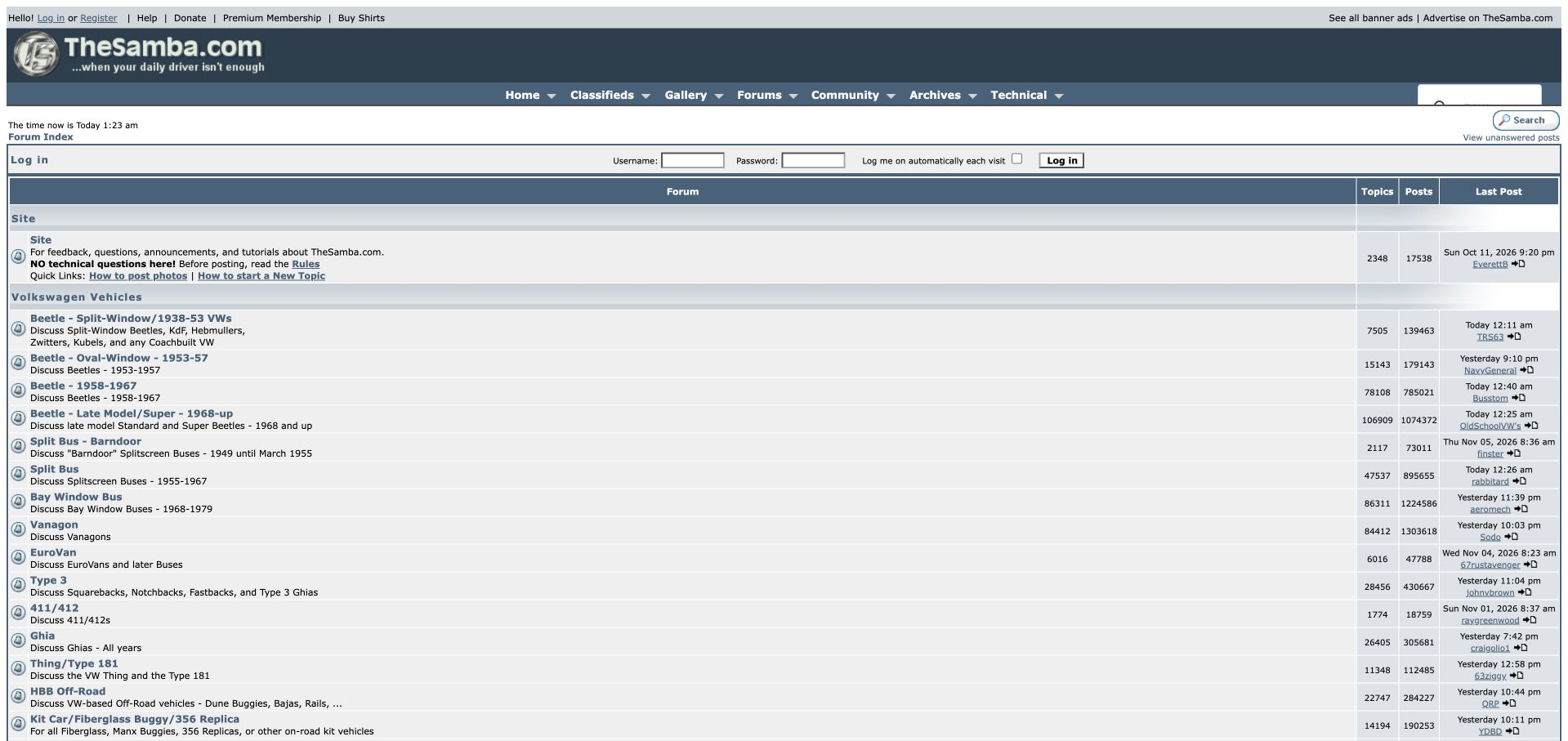
TheSamba's independent Volkswagen community uses a table beneath navigation for classifieds, galleries, archives and technical material. Its category names are highly specific: Beetle and bus discussions split by generation and year ranges, giving enthusiasts a direct route to the vehicles they own or research. Guidelines include help with posting photographs, connecting participation rules with the evidence useful in technical conversations. The surrounding archive and gallery links make the forum part of a larger reference environment. The cost is density. Small type, wide rows, login fields and several commercial or support links compete before readers reach the main discussions. The page is most useful as a study in specialist taxonomy, not as evidence of a Volkswagen-operated property.
What you can learn
An enthusiast archive should use the distinctions its readers actually rely on. Model generations and production years can provide a more precise entrance than broad product labels, provided the surrounding interface does not bury them.
Pros
Model and year distinctions give owners precise discussion destinations.
Archives, galleries and technical resources complement the forum.
Cons & considerations
Small type and wide tables create a demanding reading surface.
Login and commercial links compete with the core category entrance.
Visible tech stack
Earlier / documented evidence
phpBB
Platform source: Public page platform evidence. The public page links its phpBB platform credit or official phpBB community resources. Platform evidence is separate from the direct website screenshot and is not a complete current infrastructure audit.
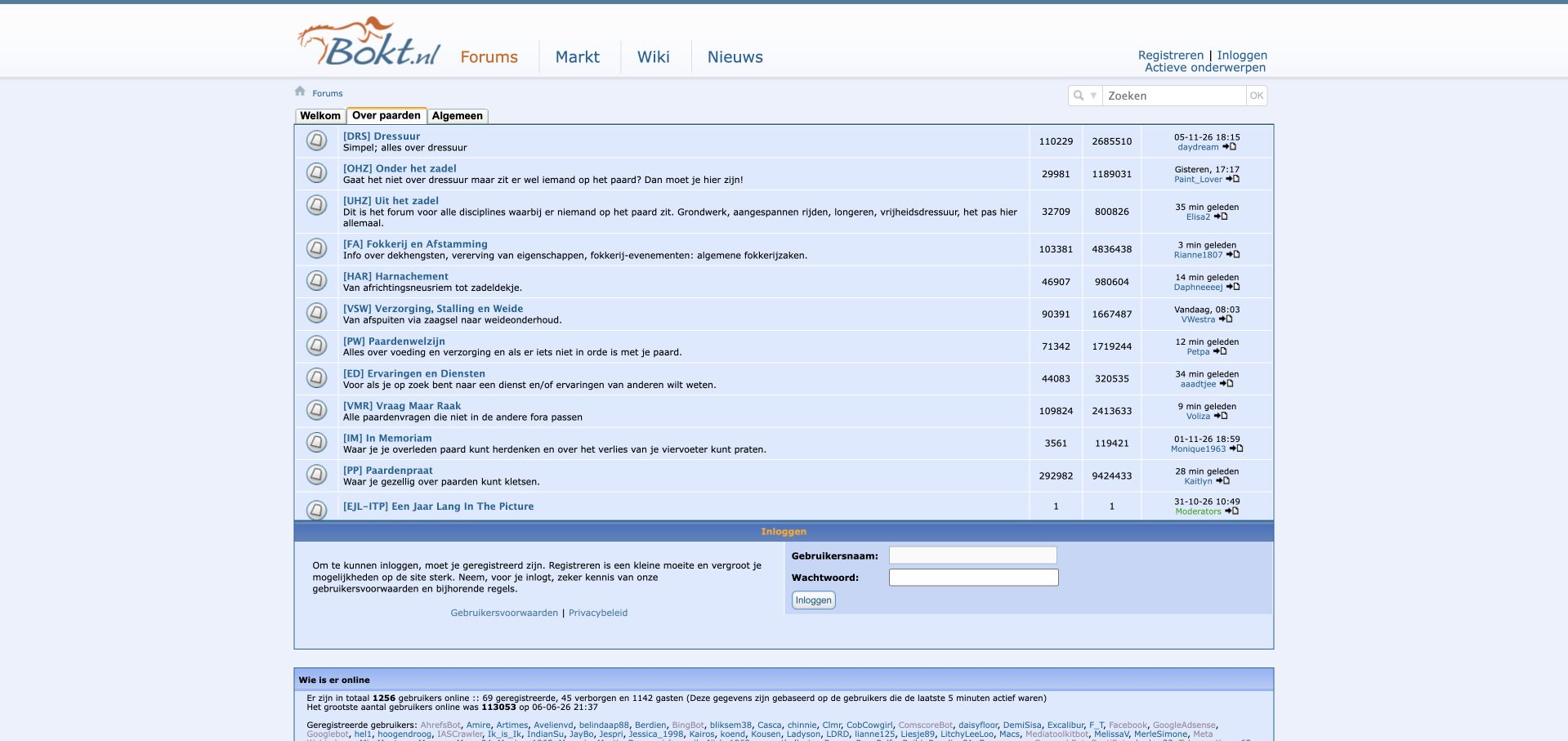
Bokt's forum places a compact blue directory below its horse wordmark and navigation to forums, a marketplace, wiki and news. Discussion areas distinguish riding disciplines, activities around the stable, breeding, equipment and broader community subjects. Short prefixes accompany fuller category names and descriptions, giving regular members a shorthand without removing all explanatory context. The result connects an taxonomy with related reference and marketplace destinations. On the observed desktop page, however, the directory packs a large amount of small text and numerical metadata into the first view. Insider abbreviations still ask newcomers to learn the site's vocabulary, and the lower login and online-user areas add weight after the categories. The example concerns interface organization, not the reliability of individual animal-care discussions.
What you can learn
Community shorthand can make a mature directory efficient for regulars, but pair it with plain descriptions. Keep specialized disciplines discoverable without assuming that every first-time visitor already knows the internal abbreviations.
Pros
Full descriptions provide context for specialist category prefixes.
Forum, reference and marketplace destinations share a coherent entrance.
Cons & considerations
Small type and dense metrics make the directory demanding to scan.
Insider abbreviations create a learning cost for new visitors.
Visible tech stack
Earlier / documented evidence
phpBB
Platform source: Public page platform evidence. The public page links its phpBB platform credit or official phpBB community resources. Platform evidence is separate from the direct website screenshot and is not a complete current infrastructure audit.
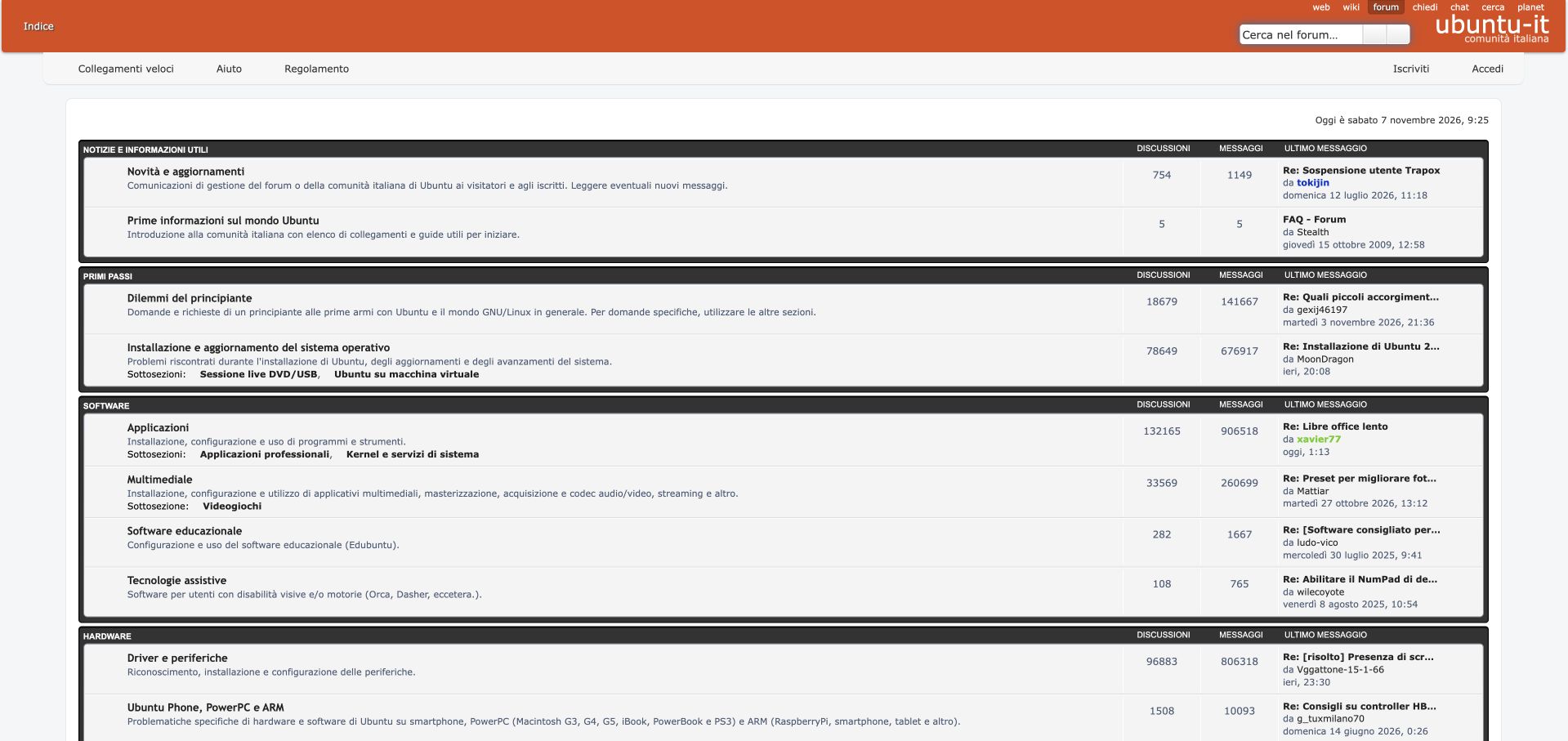
Ubuntu-it places an Italian-language forum beneath orange project branding and links to its wiki and other community resources. The structure gives beginners a distinct entrance before installation, software, hardware and networking sections. Descriptions explain what belongs in each area, with visible subcategories for virtual machines, live media, professional applications and other specialist needs. Assistive technology also has an explicit destination within the software group. This is more useful than simply translating a generic index: the category language explains how to ask for help within this particular community. The full-width rows and long metadata strings are less disciplined visually, and smaller headings can disappear among detailed descriptions. The technology observation applies to this Italian community forum rather than every website associated with Ubuntu.
What you can learn
Localization includes guidance and information architecture. Give beginners an explicit starting point, explain technical categories in the audience's language and make specialized needs visible without forcing every visitor through the same path.
Pros
Beginner and installation routes are clearly explained in Italian.
Assistive technology receives a visible, dedicated discussion area.
Cons & considerations
Long full-width rows create a less comfortable reading measure.
Detailed metadata competes with comparatively small category headings.
Platform source: Public page platform evidence. The page exposes phpBB-style core, extension, or prosilver theme resource paths. Platform evidence is separate from the direct website screenshot and is not a complete current infrastructure audit.
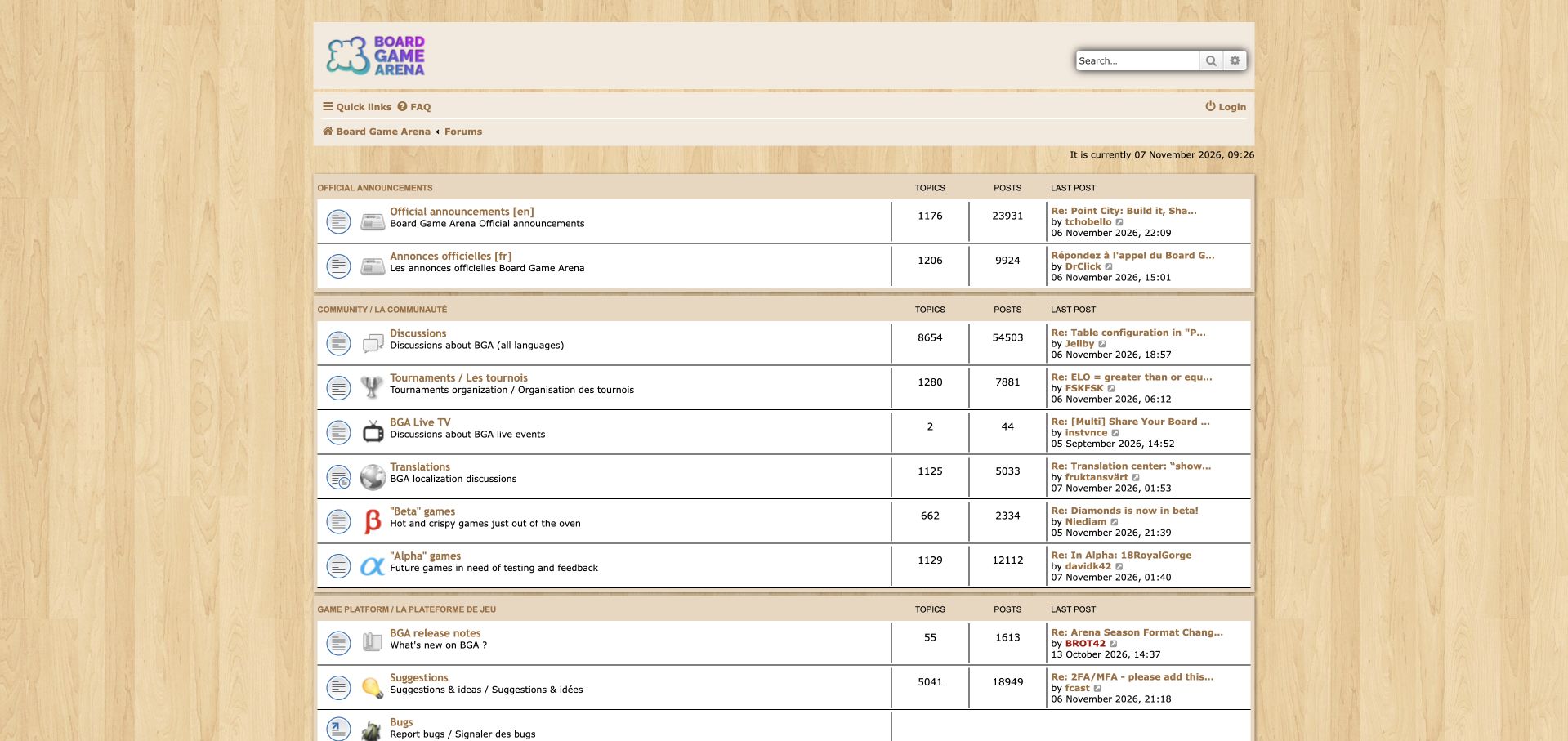
Board Game Arena frames its forum with a woodgrain background and a centered cream discussion table. Official announcements are separated into English and French areas, while community sections cover general discussion, tournaments, live broadcasts and translations. Alpha and beta destinations give testing participants a clearer route than a single catch-all feedback board. Small category illustrations reinforce the playful identity without turning the page into the game interface itself. Platform changes, suggestions and bugs continue the practical structure below. The index accommodates several kinds of participation, but mixed-language headings and varying description lengths make the rows visually uneven. Older announcement metadata also sits alongside community activity, so visitors must read dates rather than assume position alone indicates freshness.
What you can learn
A multilingual product forum needs more than one generic community category. Separate official communication, player activity and testing stages so visitors can identify both the language and kind of participation expected before entering a discussion.
Pros
English and French announcement areas make communication scope clear.
Testing stages and translation work have explicit participation routes.
Cons & considerations
Mixed-language labels and uneven descriptions reduce visual consistency.
Older announcement metadata requires careful interpretation alongside active discussions.
Visible tech stack
Earlier / documented evidence
phpBB
Platform source: Public page platform evidence. The public page links its phpBB platform credit or official phpBB community resources. Platform evidence is separate from the direct website screenshot and is not a complete current infrastructure audit.
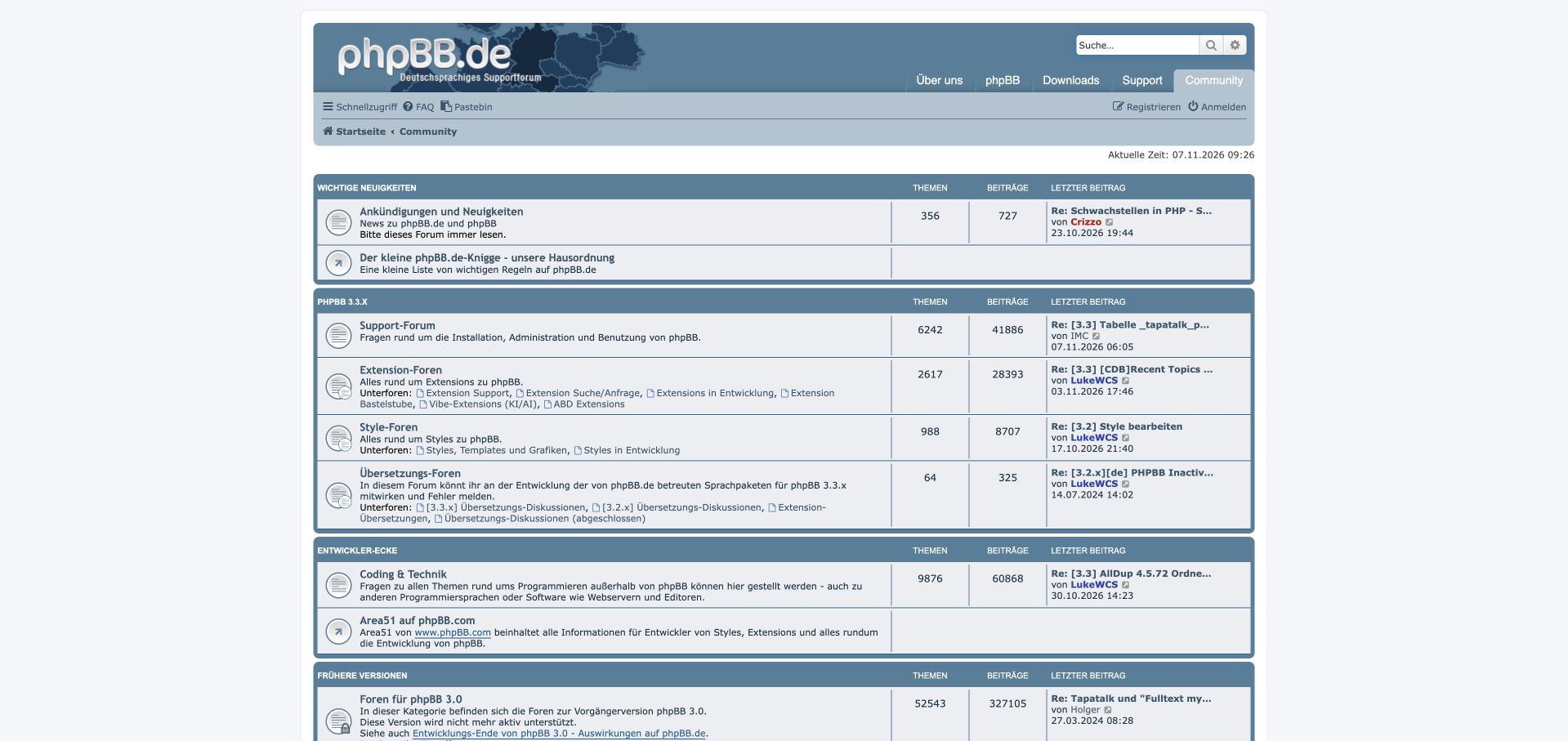
phpBB.de combines a blue-gray project masthead with German navigation to downloads, support and community resources. Its forum index names the current 3.3.x support family and separates general support, extensions, styles and translations. Developer discussions have their own section, while earlier versions are retained with an explicit warning that they are no longer actively supported. This preserves historical knowledge without presenting every archive as an equivalent place to seek current help. Links to documentation and a pastebin connect the directory with support resources. The main weakness is density: long lists of extension-related subforums and specialist terminology create a substantial reading burden. The site is most instructive where it explains the status and purpose of each support area rather than where it merely lists more destinations.
What you can learn
Keep older support material accessible while clearly labeling its lifecycle status. Version names, extension areas and developer discussions should help readers choose an appropriate destination, with plain explanations beside the technical vocabulary.
Pros
Current and unsupported historical versions are clearly distinguished.
Extensions, styles and translations receive separate support destinations.
Cons & considerations
Long inline subforum lists make several rows difficult to survey.
Specialist terminology assumes familiarity with the phpBB ecosystem.
Platform source: Public page platform evidence. The public page links its phpBB platform credit or official phpBB community resources. Platform evidence is separate from the direct website screenshot and is not a complete current infrastructure audit.
Kegan has 15+ years of experience working with small businesses, Fortune 500 companies, and everything in between. No development job is too big or too small: he brings the same hands-on attention to a focused improvement, a complete website, or a custom application.
For phpBB projects, he can help with content architecture, custom functionality, system integrations, testing, and maintainable handover. He works directly with clients on scope, design, implementation, testing, and handover, with an emphasis on clear communication and a system that remains practical to maintain after launch.
Show 3 other phpBB developersHide other phpBB developers
Choose the implementation around the operating model
Retain a conventional forum when it fits
A straightforward index can work well for an established specialist audience. Improve labels and spacing before assuming a new visual model is necessary.
Refresh the theme with real content
Test long category names, multilingual labels, images, and long posts. A clean sample row does not represent a mature archive.
Plan extensions as maintained dependencies
List the purpose and owner of each extension. Include compatibility and removal planning in the brief rather than accumulating features without an update process.
From references to requirements
Plan the content and everyday maintenance
Inventory the archive
Identify valuable topics, duplicate sections, retired products, and broken attachments. Preserve stable links where possible and document redirect decisions.
Clarify account and posting states
Explain whether visitors can read, search, register, or contribute in each area. A disabled-registration notice should not leave people guessing how to obtain help.
Rehearse maintenance
Plan backups, upgrades, theme changes, and moderation handoff with the operator. Test public reading separately from authorized administrative work.
A useful handover demonstration
Ask the actual team to carry out its routine job: publish a realistic update, correct a mistake, preview a narrow screen, and identify who owns an integration failure. For a library or frontend framework, also ask who maintains the content source and deployment. A polished screenshot does not answer those operational questions.
Beyond the screenshot
phpBB project checklist
Explain categories.
Expand unfamiliar abbreviations.
Preserve useful topic URLs.
Label old information.
Check registration status.
Review extension ownership.
Test long posts.
Check mobile tables.
Maintain support links.
Document upgrade responsibilities.
Test with real content, a keyboard, a small screen, slow or failed requests, and the people who will maintain the system. These are planning checks, not an accessibility, security, performance, or search-ranking certification.
Sources & editorial method
How this phpBB collection was reviewed
Twenty distinct public properties have direct website captures and original design reviews. The first five are explicitly identified recognizable organizations or established specialists. Platform evidence is scoped to each named property; documentary associations, dated observations, and narrower asset-only signals remain qualified. Captures and technology verification have independent dates. A bounded public stack audit was attempted for every source, preserving inaccessible and unknown results. No private administration or transactions were inspected.
Every image is an unmodified capture from the actual website, with its source and capture date. Some captures are reused from our shared catalog; their dates remain the original capture dates. None comes from a vendor gallery or a generated reconstruction. Moving imagery and live content can change.
Technology attribution uses public page assets or metadata, official platform documentation, or a cited first-party project case study. Documentary and framework-relationship evidence is identified where used; it is not a complete current backend inventory. A CMS image CDN alone does not establish a full CMS deployment. A library’s presence does not prove which individual controls use it, and a platform label does not establish AI authorship.
The composition notes, lessons, pros and tradeoffs are original editorial observations. We have not measured conversion, traffic, security, performance or accessibility conformance. Website owners retain their brands and imagery; these examples are not our client portfolio. Written, Edited and Curated are independent records, not dates advanced by a build. See our editorial standards or suggest a correction.
Questions worth asking
phpBB website development FAQs
Is an older-looking forum automatically ineffective?
No. Familiar structure can be useful when titles, categories, and activity information remain readable and accurate.
Do phpBB assets prove every feature is active?
No. Resource paths support a platform association, but do not establish how each extension is configured or used.
How should closed registration be handled?
Explain the current access policy and an appropriate public help route instead of leaving an unexplained disabled action.
Should all archived topics be removed?
No. Assess their value and currency, retain useful history, and label obsolete guidance clearly.