Google Tag Manager helps organize website tags, but the quality of a measurement system begins with clear questions. These examples pair genuine website captures with recorded Tag Manager bootstrap evidence and original reviews of the visitor journeys a team might choose to measure.
A useful event describes a decision or outcome that matters to the people maintaining the website. Opening an exhibition, requesting a demo, and completing a booking are different actions. Give each one a definition before choosing triggers, variables, or destination tags. A large event count is not a substitute for an understandable report.
This collection spans institutions, museums, retail, software, and hospitality. The examples show visible interfaces and source associations. They do not reveal private containers, configured destinations, consent behavior, or server-side tagging. Use the designs to build your own measurement brief, then verify the implementation in an environment you control.
Before the examples
What makes good Google Tag Manager website development in 2026?
Define the question before the event
Write down what a team needs to learn and what action would answer that question. Separate discovery, intent, and completed outcomes. For a booking flow, a search is a useful signal but does not establish a reservation. Name the authoritative source for any completion metric and agree on who maintains it.
Use a deliberate data layer
Google’s data layer documentation describes passing events and variables to tags. Define a small, documented vocabulary with stable content or product identifiers. Keep placement information separate from identity so a homepage redesign does not erase the meaning of historical comparisons. Include only the context the measurement purpose requires.
Keep a register of purpose, destination, trigger, required consent, and responsible team. Review tags when campaigns end or vendors change. A tag manager makes changes easier to distribute, so the review and release process should become clearer rather than informal.
The collection · 20 examples
20 Google Tag Manager website examples worth studying
The collection opens with the United Nations, WHO, MIT, Spotify’s For the Record newsroom, and Tate. Each named property has recorded executable Tag Manager bootstrap evidence. The reviews focus on the visible task structure and the questions it raises for a measurement plan.
We start with five recognizable brands or organizations: United Nations, World Health Organization, Massachusetts Institute of Technology, Spotify — For the Record, Tate. Each attribution applies to the named website property, not every product or website belonging to its organization. This is a curated reading sequence, not a measured ranking.
The United Nations homepage gives a current news story a large photograph and a compact text column, while language choices, search, and an A–Z index remain available above it. That combination makes the page an entrance to many distinct public tasks. In a Tag Manager plan, reading a campaign story should have a different meaning from opening institutional information or switching languages. The restrained story treatment also offers a useful reminder that measurement should follow editorial structure, rather than the position of a card that may change tomorrow.
What you can learn
Define durable content identifiers and destination categories before creating click triggers. For a site with this breadth, validate translated navigation and external handoffs separately, then review which events answer a concrete editorial question without collecting visitor search text unnecessarily.
Pros
Language and index utilities give different visitor tasks explicit starting points.
A clearly bounded lead story provides a stable editorial measurement unit.
Cons & considerations
A homepage click alone cannot establish whether someone found the information needed.
Translated labels and changing news positions can make brittle text triggers unreliable.
Platform source: Exact public source-page evidence. The sampled page contains a Google Tag Manager bootstrap. This supports a source-code integration association at the original observation date; it does not prove tag execution, configured destinations, consent behavior, or server-side tagging. Platform evidence is separate from the direct website screenshot and is not a complete current infrastructure audit.
WHO places health topics, countries, emergencies, and data in a strong blue navigation band. The photographed vaccination story gives the homepage an immediate public health focus, while a small donation button occupies a separate utility area. These are different reasons to visit, with different measures of usefulness. For a Tag Manager implementation, the design suggests tracking the route into relevant information instead of treating every prominent action as a generic conversion. The public source association does not reveal WHO’s actual event naming or the destinations receiving those events.
What you can learn
Keep emergency information, country navigation, and donation handoffs in separate event families. Use public content categories rather than inferred health interests, and test the same navigation in the languages and viewport sizes your own audience needs.
Pros
Distinct navigation categories support meaningful intent groups in a measurement plan.
The donation action remains identifiable without replacing the public information hierarchy.
Cons & considerations
A dramatic lead image can concentrate attention on one changing editorial topic.
Reading health information should not be equated with a visitor’s medical condition.
Platform source: Exact public source-page evidence. The sampled page contains a Google Tag Manager bootstrap. This supports a source-code integration association at the original observation date; it does not prove tag execution, configured destinations, consent behavior, or server-side tagging. Platform evidence is separate from the direct website screenshot and is not a complete current infrastructure audit.
MIT pairs a vivid research feature with a persistent side rail for search and common audience resources. The top navigation covers institutional subjects, while the sidebar recognizes that students, staff, alumni, and families often arrive with a narrower task. This creates several sensible boundaries for a Tag Manager specification. A search opening, an audience shortcut, and a research article visit should not collapse into one navigation metric. The page also shows why shared components need dependable identifiers: editorial imagery changes, but the purpose of the utility rail remains consistent.
What you can learn
Describe each navigation area in the data layer and distinguish internal university destinations from external services. Review search instrumentation for sensitive input, and test that duplicate desktop and mobile navigation do not produce duplicate events for one action.
Pros
Audience shortcuts make common tasks visible without hiding the research identity.
The separate utility rail offers a clear component boundary for event design.
Cons & considerations
A university’s many subdomains require explicit measurement ownership and handoff rules.
A link to a resource does not prove completion of the underlying task.
Platform source: Exact public source-page evidence. The sampled page contains a Google Tag Manager bootstrap. This supports a source-code integration association at the original observation date; it does not prove tag execution, configured destinations, consent behavior, or server-side tagging. Platform evidence is separate from the direct website screenshot and is not a complete current infrastructure audit.
Spotify’s For the Record capture uses a black background, large condensed lettering, and an artist portrait to promote a specific editorial story. A visible slide position and arrows reveal that the lead area can contain several promotions. That is a useful Tag Manager planning problem: a slide impression, a deliberate advance, and a story click describe different behavior. The newsroom is also a specific property with its own editorial purpose. Evidence from this page should not become a claim about the Spotify listening application or all of its marketing sites.
What you can learn
Assign each promotion a persistent story identifier and record its placement separately. In your own carousel, define what counts as a visible impression, prevent repeated firing during rotation, and distinguish an editorial exit from a product signup.
Pros
The strong split layout makes the promoted story and its artwork easy to identify.
Visible carousel controls expose a distinct interaction worth testing intentionally.
Cons & considerations
Automatic movement can inflate impression counts unless visibility rules are explicit.
Newsroom engagement is not evidence of listening activity or subscription revenue.
Platform source: Exact public source-page evidence. The sampled page contains a Google Tag Manager bootstrap. This supports a source-code integration association at the original observation date; it does not prove tag execution, configured destinations, consent behavior, or server-side tagging. Platform evidence is separate from the direct website screenshot and is not a complete current infrastructure audit.
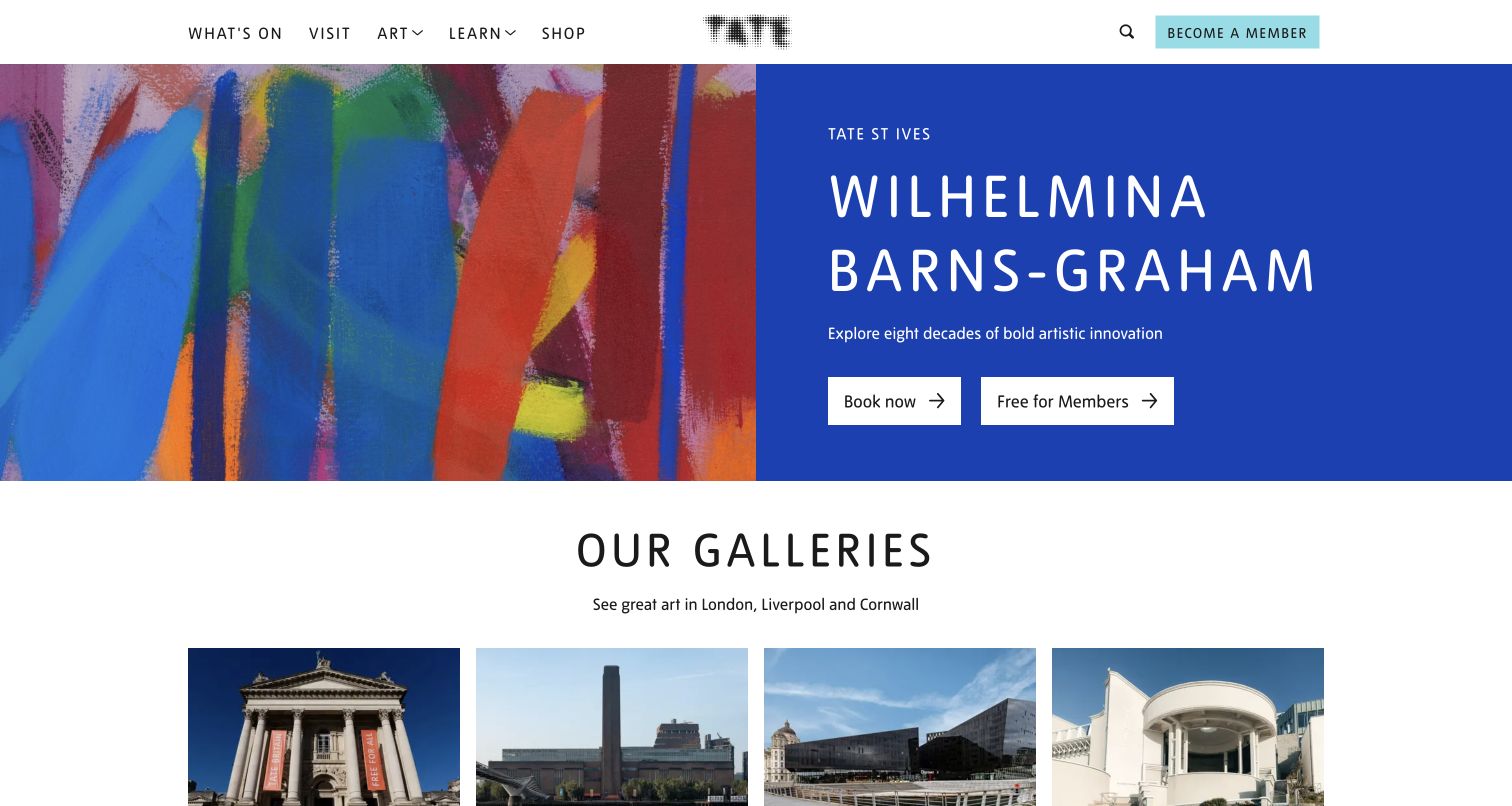
Tate’s exhibition banner places artwork beside a blue information panel with separate booking and member actions. Beneath it, a gallery section introduces the organization’s physical locations. The visual hierarchy makes cultural discovery and visit planning feel related without making them identical. A Tag Manager implementation inspired by this pattern should preserve those distinctions. Someone opening an exhibition may be researching art, while someone choosing a gallery is resolving a practical visit. The sampled bootstrap establishes a page integration, not the event definitions or ticketing arrangements used by Tate.
What you can learn
Build an event vocabulary around exhibition, venue, and action type. Carry only necessary context into ticketing handoffs, and reconcile a booking-link click with completed purchases only when the destination system and consent choices support that interpretation.
Pros
Adjacent booking and member actions make alternative visitor routes easy to compare.
Venue cards provide another clear level of context beyond the featured exhibition.
Cons & considerations
External ticketing can break attribution if a handoff is treated as a finished sale.
Platform source: Exact public source-page evidence. The sampled page contains a Google Tag Manager bootstrap. This supports a source-code integration association at the original observation date; it does not prove tag execution, configured destinations, consent behavior, or server-side tagging. Platform evidence is separate from the direct website screenshot and is not a complete current infrastructure audit.
Allbirds puts footwear and a lifestyle photograph across a broad campaign area, with compact shopping actions layered near the lower edge. Category navigation stays in a narrow white bar, allowing the campaign to dominate the first view. For Tag Manager planning, this is an example of why campaign exploration and transaction events need different levels of certainty. A visitor can open a category, inspect a product, choose a size, and abandon the journey. None of those stages should be silently promoted to a purchase simply because the homepage encourages shopping.
What you can learn
Use stable product and campaign identifiers from the commerce system where available. Validate one event at each meaningful stage, check duplicate tags after theme changes, and keep a purchase event tied to an authoritative transaction result rather than a button label.
Pros
Strong product photography establishes the merchandise before visitors choose a route.
Compact category actions offer concrete points for a discovery measurement plan.
Cons & considerations
Promotional overlays may change independently from the underlying product catalog.
A source bootstrap does not expose checkout tracking or revenue reconciliation.
Platform source: Exact public source-page evidence. The sampled page contains a Google Tag Manager bootstrap. This supports a source-code integration association at the original observation date; it does not prove tag execution, configured destinations, consent behavior, or server-side tagging. Platform evidence is separate from the direct website screenshot and is not a complete current infrastructure audit.
Cloudflare centers a short promise on a large orange field and gives a free building path a prominent button. The white navigation above it retains pricing, product areas, login, and contact sales. The page therefore combines education, self service adoption, and assisted purchasing in a relatively quiet composition. Tag Manager planning should respect that difference in commitment. A developer exploring documentation is not equivalent to a buyer contacting sales, and a login click may belong to an existing customer. The public page is the scope of this example, rather than Cloudflare’s customer dashboard.
What you can learn
Define visitor actions by destination purpose and use explicit component identifiers. Test signup and sales handoffs independently, exclude authenticated customer behavior unless intentionally covered, and document which team owns every tag before broadening a shared marketing container.
Pros
A single central action gives the first view a clear adoption route.
Pricing and contact sales remain available for visitors needing a different path.
Cons & considerations
One corporate homepage can mix existing customers with prospective users.
Account creation occurs beyond the visible first view and needs separate verification.
Platform source: Exact public source-page evidence. The sampled page contains a Google Tag Manager bootstrap. This supports a source-code integration association at the original observation date; it does not prove tag execution, configured destinations, consent behavior, or server-side tagging. Platform evidence is separate from the direct website screenshot and is not a complete current infrastructure audit.
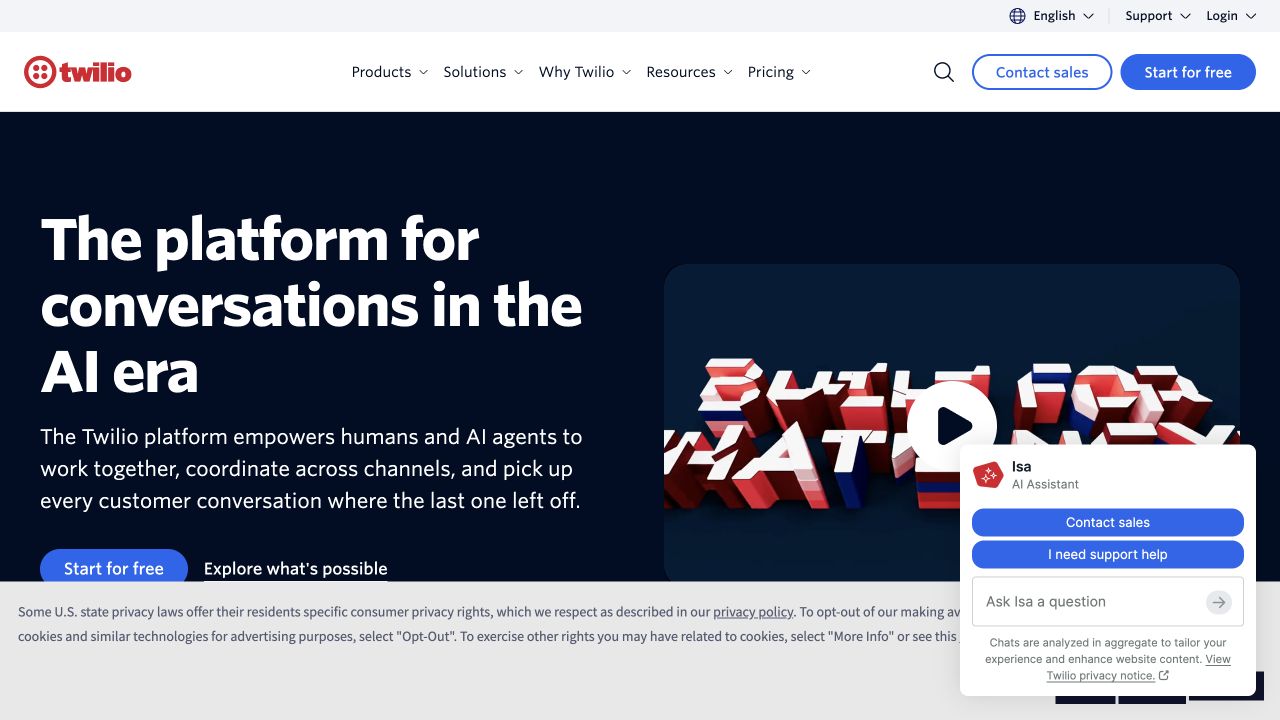
Twilio’s dark hero combines a broad platform message, a product video, a free starting action, and a sales route. A conversation widget adds its own sales and support choices, while a privacy notice occupies the lower edge. Several interfaces can therefore compete for attention in the same viewport. A Tag Manager specification needs to identify where an action happened, not merely repeat its text. Contacting sales through a navigation button and opening the same intent inside a widget can represent different interaction stages and may have different technical ownership.
What you can learn
Document navigation, video, and widget events as separate components. Confirm what the embedded provider exposes, test consent states before adding marketing tags, and avoid collecting free text from a chat interface as convenient event metadata.
Pros
Free adoption and assisted sales are both visible for different visitor needs.
The widget explicitly distinguishes sales from support before further interaction.
Cons & considerations
Overlapping notices and widgets can hide actions on smaller screens.
Opening a conversation is not proof that a useful sales or support exchange occurred.
Platform source: Exact public source-page evidence. The sampled page contains a Google Tag Manager bootstrap. This supports a source-code integration association at the original observation date; it does not prove tag execution, configured destinations, consent behavior, or server-side tagging. Platform evidence is separate from the direct website screenshot and is not a complete current infrastructure audit.
IDEO’s dark page gives a colorful project photograph substantial room and follows it with a concise statement about human centered growth. A small contact action sits beside the menu instead of competing with the work. The composition makes portfolio exploration the first persuasive step. For Tag Manager planning, the useful unit is a project or topic, rather than the exact headline or image position. Those visual details will change as new work is published. The source evidence identifies a Tag Manager bootstrap on this public page, not how IDEO evaluates the business value of its portfolio.
What you can learn
Attach persistent project identifiers to case study links and separate menu exploration from contact intent. For your own portfolio, define a small number of useful milestones and review them with the editorial team before adding scroll or animation events.
Pros
The work establishes context before the visitor reaches a contact decision.
A restrained contact control stays available without overwhelming project imagery.
Cons & considerations
Image driven interfaces can lack stable visible text for naive click triggers.
More scrolling through creative work does not necessarily mean greater purchase intent.
Platform source: Exact public source-page evidence. The sampled page contains a Google Tag Manager bootstrap. This supports a source-code integration association at the original observation date; it does not prove tag execution, configured destinations, consent behavior, or server-side tagging. Platform evidence is separate from the direct website screenshot and is not a complete current infrastructure audit.
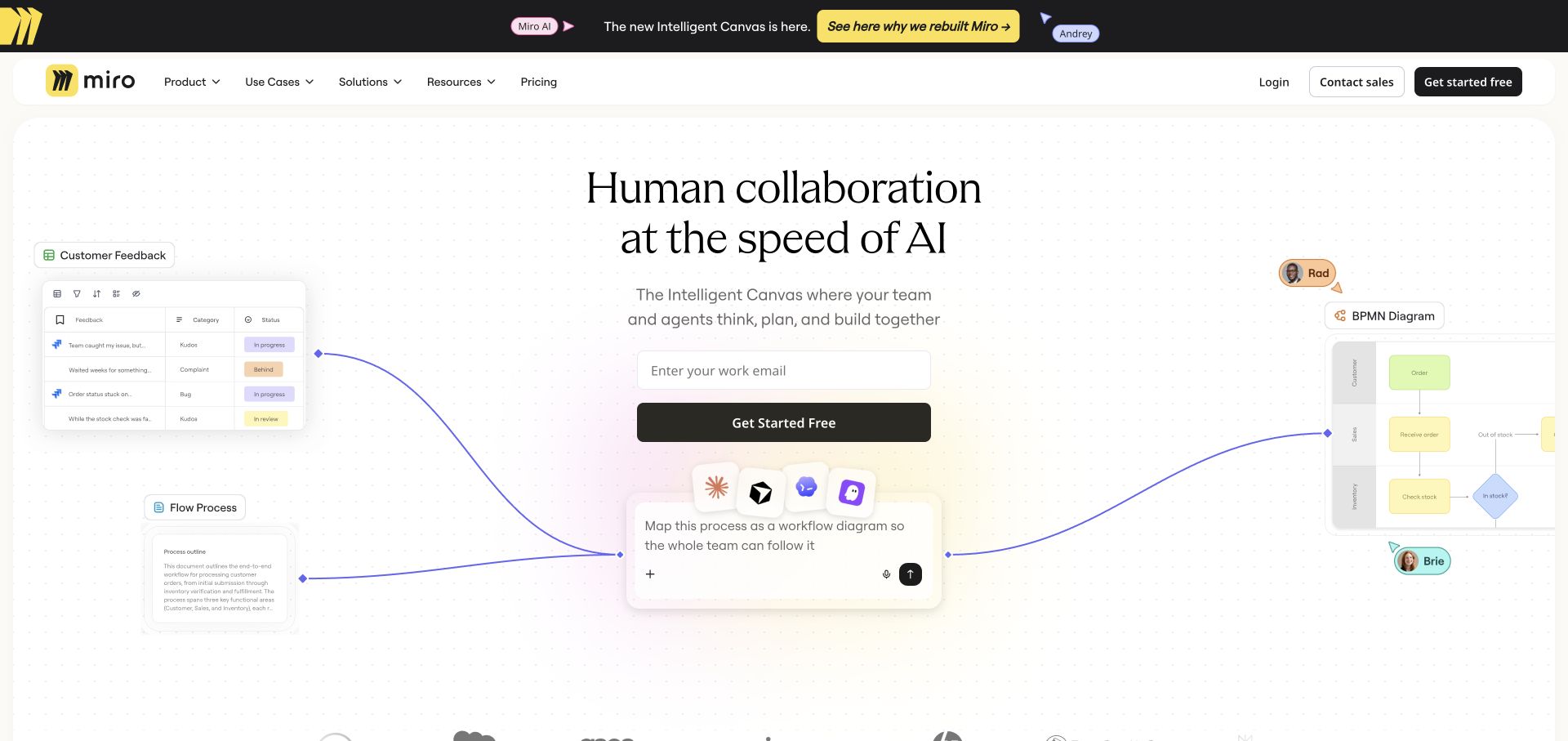
Miro surrounds a centered signup form with small interface illustrations and connecting lines. The page presents an imagined collaborative workspace while the actual action remains a work email field and a free starting button. That difference matters for Tag Manager: decorative product scenes should not be measured as if visitors were using the application. The public marketing page can support an adoption funnel, but it cannot reveal collaboration inside private boards. A concise event design would prioritize the real form state and meaningful navigation over every animated or illustrated object.
What you can learn
Specify the signup sequence with validated form states and an authoritative success condition. Keep email addresses out of analytics payloads, distinguish marketing from application domains, and test whether a component rerender creates duplicate listeners or events.
Pros
The central form provides a clear action within an expansive visual explanation.
Product illustrations communicate possible workflows without requiring a lengthy feature list.
Cons & considerations
Decorative interface elements can be mistaken for meaningful interaction targets.
A form click is weaker evidence than a confirmed account creation response.
Platform source: Exact public source-page evidence. The sampled page contains a Google Tag Manager bootstrap. This supports a source-code integration association at the original observation date; it does not prove tag execution, configured destinations, consent behavior, or server-side tagging. Platform evidence is separate from the direct website screenshot and is not a complete current infrastructure audit.
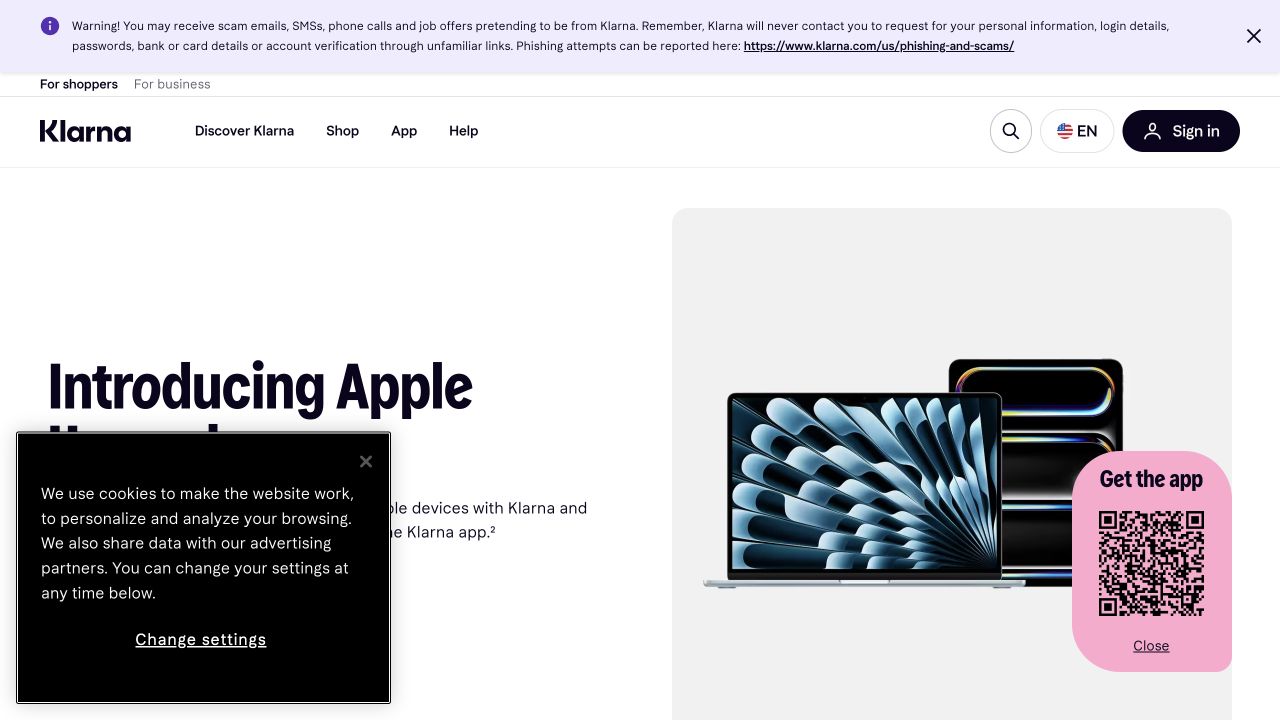
Klarna’s US page combines an Apple product promotion with shopping navigation, app acquisition, and sign in. A fraud warning, cookie panel, and app QR code add layers around the central offer. This is a useful example of a marketing page where measurement boundaries matter as much as button placement. A Tag Manager plan should distinguish browsing a promotion from entering an account or taking a financial action. The captured page and bootstrap provide no basis for claims about approval decisions, customer balances, or the tracking configuration inside private account screens.
What you can learn
Limit marketing events to necessary public interaction context. Label regional campaigns consistently, test the behavior of consent choices and app handoffs, and keep sensitive account or financial information out of event names, URLs, and custom parameters.
Pros
Regional navigation and a clear promotion give visitors recognizable starting context.
Sign in and app acquisition are visually distinguishable from general shopping links.
Cons & considerations
Several overlays compete with the primary offer in the captured viewport.
A marketing click cannot establish financial eligibility or a completed purchase.
Platform source: Exact public source-page evidence. The sampled page contains a Google Tag Manager bootstrap. This supports a source-code integration association at the original observation date; it does not prove tag execution, configured destinations, consent behavior, or server-side tagging. Platform evidence is separate from the direct website screenshot and is not a complete current infrastructure audit.
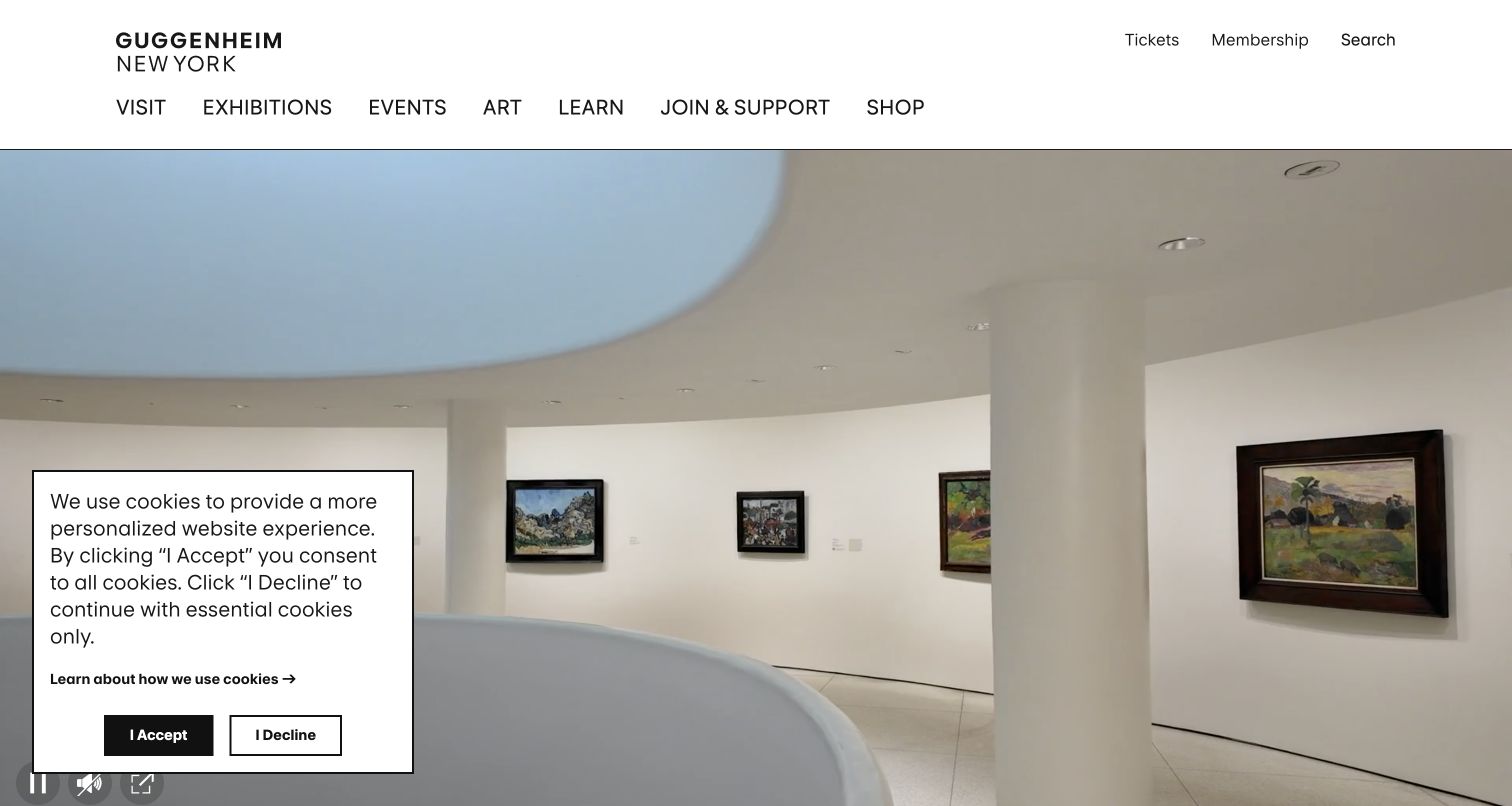
The Guggenheim homepage presents a wide interior gallery view below a clean institutional navigation. A consent panel sits directly over the scene, while small media controls remain visible near the lower edge. The composition can encourage visitors to explore the space before choosing a ticket or exhibition. From a Tag Manager perspective, that introduces separate questions about media engagement, information seeking, and transaction handoffs. The consent control is part of the actual experience, so any proposed measurement plan should be tested with its available choices rather than assuming one universal page state.
What you can learn
Define media start, deliberate interaction, and ticket intent separately. Validate tags before and after each supported consent choice, ensure controls remain reachable by keyboard, and record museum content identifiers without inferring personal interests from a single viewing action.
Pros
The architectural view provides immediate place recognition and a strong visual identity.
Tickets and membership remain named utility routes above the immersive media.
Cons & considerations
A consent panel can obscure media controls and alter first view interactions.
Background media exposure is not the same as deliberate attention to an exhibition.
Platform source: Exact public source-page evidence. The sampled page contains a Google Tag Manager bootstrap. This supports a source-code integration association at the original observation date; it does not prove tag execution, configured destinations, consent behavior, or server-side tagging. Platform evidence is separate from the direct website screenshot and is not a complete current infrastructure audit.
The World Food Programme capture leads with an organizational news item over a full width photograph. A compact header holds institutional routes and a contrasting donation action, followed by a mission statement below the hero. This combination gives public reporting and support a shared entrance. In a Tag Manager specification, the two should retain different meanings. Reading about leadership, learning where the organization works, and beginning a donation are distinct actions. The visible carousel controls also suggest that a news placement can change without changing the underlying story being measured.
What you can learn
Use persistent story and campaign keys, and distinguish donation handoffs from completed gifts. For your own organization, test outbound destinations and translated pages while collecting only the context needed to understand whether visitors reach useful information.
Pros
A contrasting donation control remains available alongside institutional navigation.
The mission statement connects the news promotion with the organization’s wider purpose.
Cons & considerations
Changing carousel placement can make position based reporting difficult to compare.
A donation click does not confirm payment completion or ongoing supporter consent.
Platform source: Exact public source-page evidence. The sampled page contains a Google Tag Manager bootstrap. This supports a source-code integration association at the original observation date; it does not prove tag execution, configured destinations, consent behavior, or server-side tagging. Platform evidence is separate from the direct website screenshot and is not a complete current infrastructure audit.
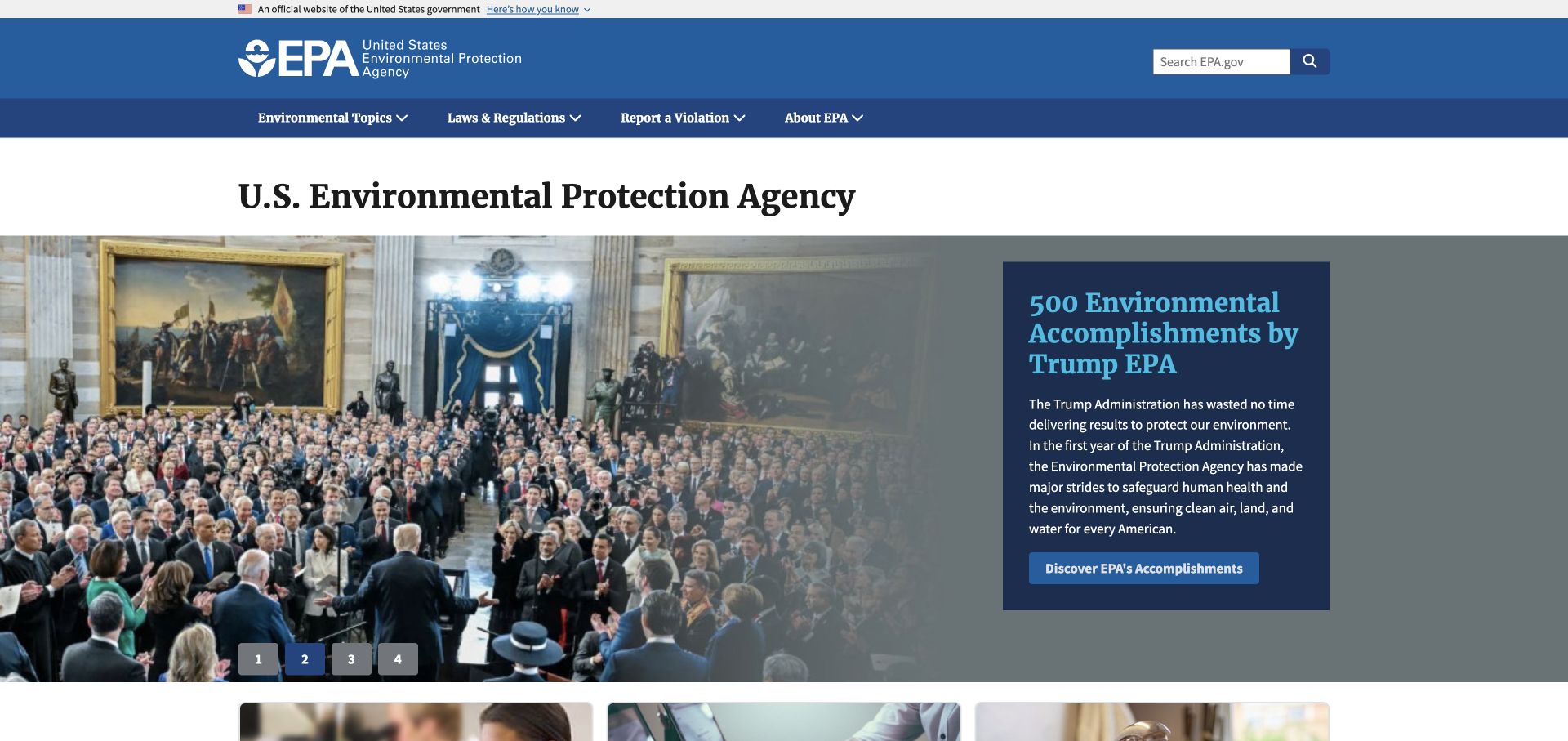
The EPA homepage combines an official identity strip, a strong blue header, search, and a prominent rotating feature. Its navigation groups environmental topics, regulations, reporting, and agency information. Those categories provide a useful foundation for a Tag Manager measurement plan because they describe the public tasks the website supports. A citizen opening a regulation and someone looking for an agency contact need different information. The design is less about one universal conversion than about helping several audiences reach the right destination without confusing promotional attention with successful service delivery.
What you can learn
Define a limited set of public task categories and document their owners. Evaluate navigation and download events separately, avoid sending sensitive report content or search queries into analytics, and verify cross agency links before treating them as completed tasks.
Pros
The official identity and topic navigation establish a clear public information context.
Search provides an alternative to the featured story for visitors with specific needs.
Cons & considerations
A rotating promotional feature can dominate attention over less visible practical tasks.
Source code evidence does not reveal the agency’s privacy or analytics configuration.
Platform source: Exact public source-page evidence. The sampled page contains a Google Tag Manager bootstrap. This supports a source-code integration association at the original observation date; it does not prove tag execution, configured destinations, consent behavior, or server-side tagging. Platform evidence is separate from the direct website screenshot and is not a complete current infrastructure audit.
Berkeley’s homepage uses an aerial campus view beneath two distinct navigation rows. A slim utility row recognizes students, staff, parents, and alumni, while the main row covers admissions, academics, research, and campus life. These overlapping ways into the university are useful design choices and useful measurement boundaries. Tag Manager events should identify the component and destination purpose, otherwise the same page reached through two menus becomes difficult to interpret. The visual campus introduction supplies atmosphere, but a meaningful measurement plan still needs to focus on the tasks visitors can actually complete.
What you can learn
Assign stable identifiers to both menu systems and verify their mobile equivalents. Treat movement into departmental sites as a handoff with explicit ownership, and decide whether campus media interactions help answer a real question before instrumenting them.
Pros
Separate audience and subject menus accommodate different ways of finding university resources.
The campus image gives the institution a recognizable physical setting immediately.
Cons & considerations
Repeated destinations across menus can produce ambiguous reports without component context.
A departmental handoff requires separate evidence before claiming successful task completion.
Platform source: Exact public source-page evidence. The sampled page contains a Google Tag Manager bootstrap. This supports a source-code integration association at the original observation date; it does not prove tag execution, configured destinations, consent behavior, or server-side tagging. Platform evidence is separate from the direct website screenshot and is not a complete current infrastructure audit.
UCLA’s captured homepage arranges a large lead story beside smaller editorial cards, under two rows of institutional links. A consent banner spans the lower portion of the screen with explicit acceptance, rejection, and settings choices. This is a practical Tag Manager example because content selection and privacy state can both affect the observed journey. A useful event scheme would retain story identity and card placement separately, while recognizing that admissions, research, careers, and giving are different navigation purposes. The source bootstrap alone cannot establish whether any particular tag runs after rejection.
What you can learn
Test each supported consent state and each editorial card template in your own implementation. Keep story identifiers independent from homepage order, and distinguish public editorial navigation from authenticated campus services or application processes that require their own governance.
Pros
A lead story and supporting cards provide several clear editorial entry points.
The consent interface exposes multiple choices that can be included in a test plan.
Cons & considerations
Dense navigation can mix current community tasks with prospective student exploration.
Consent behavior must be observed separately from the presence of a Tag Manager bootstrap.
Platform source: Exact public source-page evidence. The sampled page contains a Google Tag Manager bootstrap. This supports a source-code integration association at the original observation date; it does not prove tag execution, configured destinations, consent behavior, or server-side tagging. Platform evidence is separate from the direct website screenshot and is not a complete current infrastructure audit.
The V&A uses exhibition artwork as the entire visual setting for its introductory message. A large title, a short explanation, and venue context sit over the image, while visit, collection, learning, support, and shopping routes remain in the header. The page makes an exhibition feel like a destination before it asks for further action. For Tag Manager planning, this suggests a content model with exhibition and venue identifiers, not an indiscriminate record of every text click. The cultural story and the practical visit journey should remain distinguishable in reports.
What you can learn
Define discovery, visit planning, and ticket handoff events as separate stages. Test text overlays and controls at narrow widths, use durable exhibition identifiers, and avoid assuming that a visitor interested in the artwork intends to purchase a ticket.
Pros
Artwork and title work together to establish the exhibition’s character immediately.
Named institutional routes offer alternatives beyond the featured campaign.
Cons & considerations
Text over detailed imagery needs contrast checks across every campaign asset.
Homepage interest does not demonstrate completion of a booking or museum visit.
Platform source: Exact public source-page evidence. The sampled page contains a Google Tag Manager bootstrap. This supports a source-code integration association at the original observation date; it does not prove tag execution, configured destinations, consent behavior, or server-side tagging. Platform evidence is separate from the direct website screenshot and is not a complete current infrastructure audit.
UNESCO’s homepage places a substantial campaign headline over a photograph of children, with a translucent navigation layer above it. The header offers institutional sections, resources, news, search, and language selection. A short action beneath the campaign copy provides the next step. The design gives a changing issue a consistent institutional frame. In Tag Manager planning, that frame is valuable: campaign identity, language, and destination type can remain stable even when imagery and wording change. The sampled page evidence does not reveal whether UNESCO uses those dimensions in its own measurement.
What you can learn
Agree on nonpersonal campaign keys before translating or promoting a page. Test language changes, search, and campaign handoffs separately, and document which external destinations fall outside the website’s measurement responsibility instead of assuming uninterrupted attribution.
Pros
The campaign receives strong visual emphasis within a recognizable institutional header.
Language and search controls support visitors arriving with different information needs.
Cons & considerations
Overlay navigation needs careful contrast testing against changing photographs.
Cross language and cross organization journeys can fragment reporting without explicit boundaries.
Platform source: Exact public source-page evidence. The sampled page contains a Google Tag Manager bootstrap. This supports a source-code integration association at the original observation date; it does not prove tag execution, configured destinations, consent behavior, or server-side tagging. Platform evidence is separate from the direct website screenshot and is not a complete current infrastructure audit.
Ace Hotel keeps a compact booking strip above an atmospheric hospitality image. Location, arrival, departure, guest count, and a promotional code choice lead toward an orange booking button, while cultural and editorial links occupy another navigation row. The first view combines inspiration with a practical reservation task. For Tag Manager planning, the form sequence matters more than a single button click. A destination choice, a date search, and a confirmed reservation represent different levels of certainty, and the booking provider may control later stages outside the public homepage.
What you can learn
Specify booking search events with destination and nonpersonal availability context, then document the external reservation handoff. Test invalid or incomplete dates without submitting real bookings, and avoid reporting a search action as revenue or a confirmed stay.
Pros
The booking strip keeps practical controls available while imagery establishes atmosphere.
Location selection gives a multi property hotel group explicit context for later steps.
Cons & considerations
A dense booking strip can become difficult to operate on narrow screens.
External reservation systems need separate evidence before end to end attribution is claimed.
Platform source: Exact public source-page evidence. The sampled page contains a Google Tag Manager bootstrap. This supports a source-code integration association at the original observation date; it does not prove tag execution, configured destinations, consent behavior, or server-side tagging. Platform evidence is separate from the direct website screenshot and is not a complete current infrastructure audit.
The Calile Hotel opens with a large overhead pool image, a restrained identity, and a small booking action near the upper corner. The first impression is deliberately quiet and architectural. That restraint makes a useful Tag Manager lesson: the number of events should follow the number of meaningful decisions, not the size of the photograph. A visitor can enjoy the atmosphere without opening room information or beginning a reservation. The homepage integration evidence therefore supports discussion of possible measurement boundaries, rather than conclusions about how effectively this hotel converts interest into bookings.
What you can learn
For a similarly minimal hotel site, prioritize room discovery, availability searches, and reservation handoffs. Keep media exposure separate from intent, verify that the booking control has a stable accessible target, and reconcile revenue only with confirmed reservation data.
Pros
A focused visual composition conveys the property’s atmosphere without a crowded sales pitch.
The persistent booking action creates a clear transition into practical planning.
Cons & considerations
A small action against photography requires careful visibility and contrast checks.
An attractive first view provides no evidence about booking completion or occupancy.
Platform source: Exact public source-page evidence. The sampled page contains a Google Tag Manager bootstrap. This supports a source-code integration association at the original observation date; it does not prove tag execution, configured destinations, consent behavior, or server-side tagging. Platform evidence is separate from the direct website screenshot and is not a complete current infrastructure audit.
Choose an implementation around the website’s actual tasks
Begin with a small editorial measurement plan
For a content site, start with meaningful navigation, content discovery, and selected downloads. Avoid measuring every movement by default. Define how a story identifier, topic, and placement differ, and review the results with the people who make publishing decisions.
Map multi step commercial journeys
For demos, retail, or travel, draw the sequence from interest to authoritative completion. Mark external systems and account boundaries. Decide where a click is only a handoff, and verify duplicate prevention before connecting events to revenue or sales reports.
Use preview as a release check
Google’s preview mode connects a draft container to Tag Assistant for inspection before publication. Use it to examine firing order and unexpected duplicates, then check the relevant browser and consent states. Keep a record of the tested version and a clear rollback path.
List direct tags, CMS plugins, embedded vendors, and existing containers before adding another installation. Identify overlapping destinations and ownership. A second copy of a script can make a plausible report wrong without creating an obvious visual error.
Write a representative test matrix
Include desktop and mobile navigation, changing content, invalid form states, consent choices, external links, and application transitions. Use a small number of realistic paths with expected results, rather than assuming the homepage represents the entire website.
Make reports understandable
Document what each event means, when it should occur, and what it cannot establish. Review whether the resulting information changes a decision. Remove obsolete events and keep content identifiers consistent as campaigns and site templates evolve.
A useful handover demonstration
Ask the actual team to carry out its routine job: publish a realistic update, correct a mistake, preview a narrow screen, and identify who owns an integration failure. For a library or frontend framework, also ask who maintains the content source and deployment. A polished screenshot does not answer those operational questions.
Beyond the screenshot
Google Tag Manager planning checklist
State the business or editorial question behind each event.
Identify direct tags and plugins before adding a container.
Use stable content identifiers and explicit component context.
Keep personal or sensitive data out of event payloads.
Test supported consent choices and blocked resource states.
Distinguish clicks, validated submissions, and authoritative completions.
Preview firing order and check for duplicate events.
Record the release owner, version, review date, and rollback path.
Test with real content, a keyboard, a small screen, slow or failed requests, and the people who will maintain the system. These are planning checks, not an accessibility, security, performance, or search-ranking certification.
Sources & editorial method
How this Google Tag Manager collection was reviewed
Each example combines a genuine direct browser capture with an exact-source public audit record. The Tag Manager evidence is an executable inline bootstrap referencing gtm.js and gtm.start, retained at its original observation date. A generic Google tag or gtag.js reference alone was not accepted as Tag Manager evidence. No private container was inspected and no forms were submitted.
Every image is an unmodified capture from the actual website, with its source and capture date. Some captures are reused from our shared catalog; their dates remain the original capture dates. None comes from a vendor gallery or a generated reconstruction. Moving imagery and live content can change.
Technology attribution uses public page assets or metadata, official platform documentation, or a cited first-party project case study. Documentary and framework-relationship evidence is identified where used; it is not a complete current backend inventory. A CMS image CDN alone does not establish a full CMS deployment. A library’s presence does not prove which individual controls use it, and a platform label does not establish AI authorship.
The composition notes, lessons, pros and tradeoffs are original editorial observations. We have not measured conversion, traffic, security, performance or accessibility conformance. Website owners retain their brands and imagery; these examples are not our client portfolio. Written, Edited and Curated are independent records, not dates advanced by a build. See our editorial standards or suggest a correction.
Questions worth asking
Google Tag Manager website development FAQs
Is Google Tag Manager the same as Google Analytics?
No. Tag Manager organizes and deploys tags. Analytics is a measurement destination with its own configuration and reporting. A website may use both, but evidence for one should not automatically be treated as evidence for the other.
Does a Tag Manager bootstrap prove that tags fired?
No. It establishes a source association at the observation date. Consent, browser settings, resource failures, and configuration can change execution. Confirm behavior in an authorized test environment rather than inferring it from the snippet.
Should every button click become an event?
Only when it answers a useful question. Prefer a small set of well defined actions with stable identifiers and clear owners. Too many weakly defined events make maintenance and interpretation harder.
Can these examples reveal server-side tagging?
No. The public bootstrap evidence used here does not establish server-side tagging or a private container configuration. Those require separate, appropriately scoped evidence.