PHP works behind the page. These examples connect visible design choices to documented PHP-based content systems—not to a guessed server version or an audit of every application an organization operates.
A browser receives the result of a server's work, not necessarily the language that produced it. A page may also arrive from a cache or a separate frontend. This collection therefore uses a deliberately narrow association: evidence for the named WordPress or Drupal property, paired with the CMS's official PHP requirements. It does not treat a visual style, a filename, or the organization's reputation as runtime proof.
The useful comparison is how each public site organizes changing content, stable navigation, practical utilities, and editorial ownership. Your own PHP project may use a CMS, a framework, or a small custom application. Choose that architecture after defining the records, workflows, and operational responsibilities the website actually needs.
Before the examples
What makes good PHP website development in 2026?
Separate the public page from the underlying system
Start with an inventory of public pages, protected tools, external transactions, and content sources. A university's public CMS, an admissions application, and a payment service may have entirely different owners and implementations. Do not turn one detected WordPress asset into a statement about the whole organization.
For your project, draw those boundaries in the brief and assign an owner to each handoff. Confirm the actual runtime, supported CMS version, deployment process, and integrations from the project team. A reference screenshot can suggest an interface pattern; it cannot answer those infrastructure questions.
Build content models before elaborate page controls
Collect real articles, projects, events, or service records before approving a template. Include a long title, incomplete metadata, an unavailable image, and a resource that has moved. Define what each record means and which relationships should remain consistent when it appears in several places.
A homepage feature should usually refer to an existing record instead of copying its title and destination into unrelated fields. Ask editors to make a correction and check every affected listing. That exercise exposes an editing problem sooner than another polished mockup of ideal content.
Make maintenance part of the design decision
PHP, the CMS, extensions, custom code, and hosting all have their own support boundaries. Record the versions you actually operate and who reviews updates. Do not assume a familiar language eliminates maintenance, or that a visually simple site has no operational dependencies.
The acceptance plan should include staging, backups, a tested recovery procedure, access management, and a way to report errors. Agree how urgent fixes differ from ordinary content changes. Those responsibilities affect the practical suitability of a platform more than whether another brand uses it.
The opening five are NASA, UNICEF, Oxford, Meta Newsroom, and the Harvard Gazette. Each association is scoped to the named publishing property. The remaining references broaden the comparison across science, government, culture, hospitality, and architecture.
We start with five recognizable brands or organizations: NASA, UNICEF, University of Oxford, Meta Newsroom, The Harvard Gazette. Each attribution applies to the named website property, not every product or website belonging to its organization. This is a curated reading sequence, not a measured ranking.
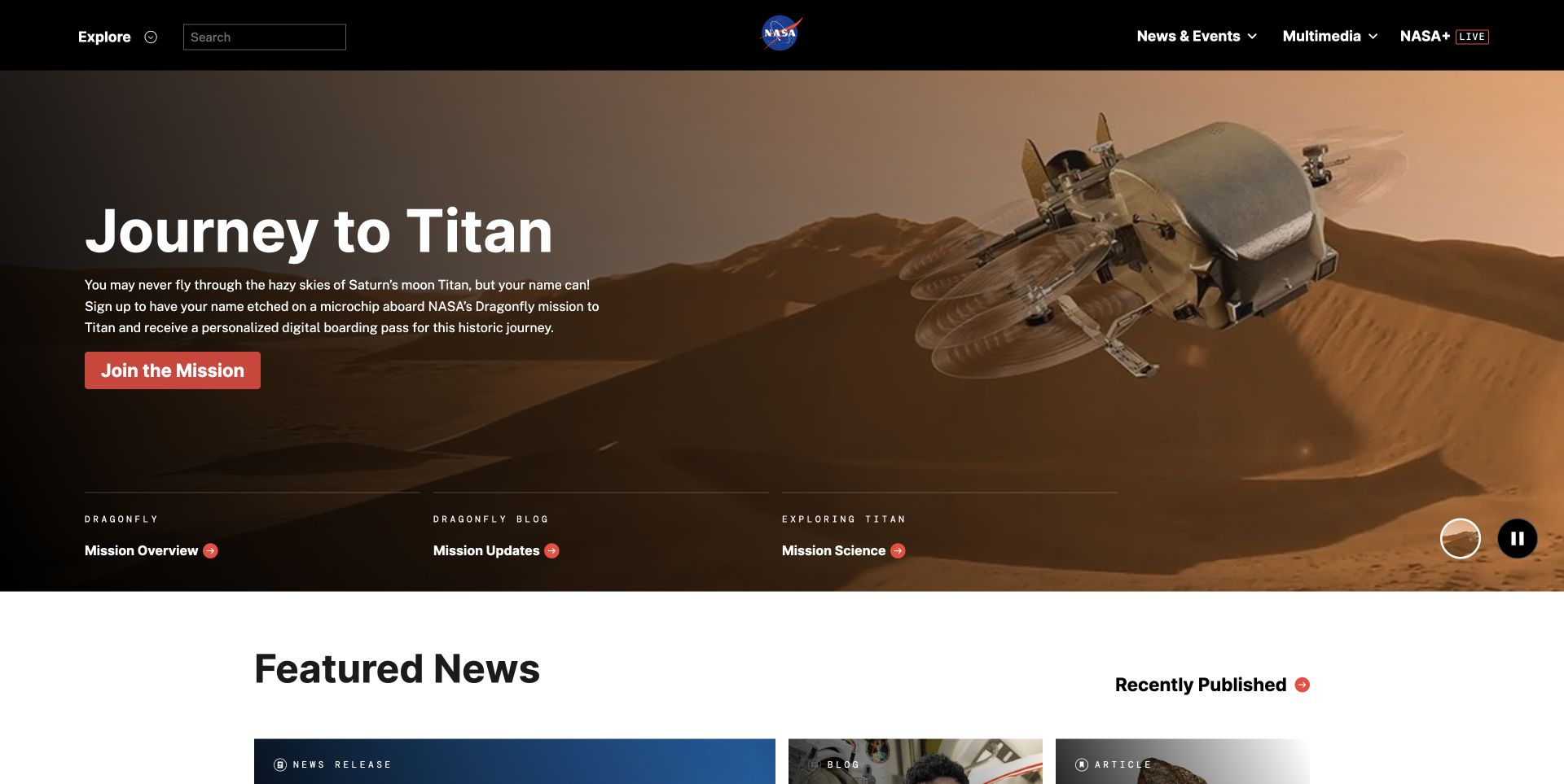
NASA's captured homepage pairs a dark navigation bar with a large mission image and a clear red action. Search, Explore, and mission-specific links remain available around the lead story; a quieter news section starts below. The relevant PHP relationship is its documented WordPress publishing system, not a claim that every NASA application runs on PHP. What matters visually is the separation between an editor's changing feature and the routes a returning visitor needs every day.
What you can learn
When briefing a PHP-backed CMS, describe those two responsibilities separately. Store a campaign's image, summary, and destination as controlled content, while preserving stable archive navigation. Ask how an editor previews a replacement and how an expired feature is removed without changing the underlying destination. The image demonstrates a publishing problem; it does not establish the actual caching or approval implementation.
Pros
Search and broad exploration remain visible beside the temporary featured story.
The shift into a lighter news section creates an unmistakable editorial hierarchy.
Cons & considerations
Large changing media needs reliable crops and a readable text fallback.
A broad archive needs maintained taxonomy, not simply an increasingly large menu.
Platform source: WordPress property evidence. https://wordpress.org/showcase/nasa/ PHP is associated through that CMS, not an independently audited server runtime. Platform evidence is separate from the direct website screenshot and is not a complete current infrastructure audit.
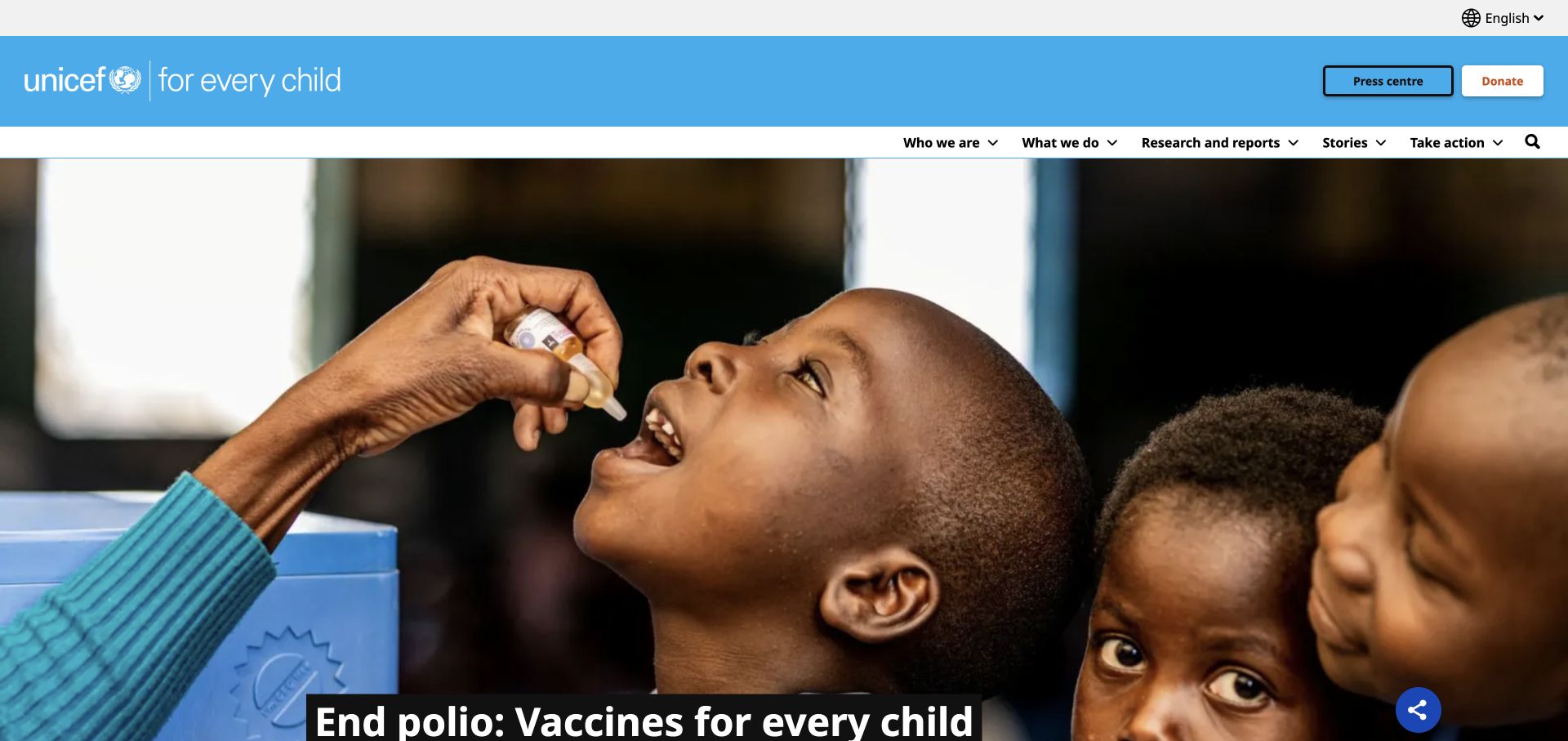
UNICEF's opening view gives a vaccination photograph nearly the entire screen beneath a bright blue identity band. Language selection, a press route, donation access, and subject navigation occupy distinct parts of the header. The visible campaign message sits on a strong contrasting strip near the image's lower edge. Drupal evidence supports the CMS association; PHP follows that platform's documented dependency, not a direct inspection of UNICEF's infrastructure or donation-processing systems.
What you can learn
Treat persistent utilities as structured requirements rather than optional homepage decoration. A PHP CMS brief should identify who controls language variants, campaign expiry, media descriptions, and the destination of a donation action. Keep those responsibilities testable without assuming the CMS also owns the external transaction. Preview several photographs before accepting one fixed overlay position as a reusable component.
Pros
Institutional identity and practical actions remain separate from changing campaign imagery.
The language choice has a consistent position outside the main story navigation.
Cons & considerations
The very large photograph delays deeper information on a short viewport.
A headline close to the crop boundary needs testing across alternate image sizes.
Platform source: Drupal property evidence. The public page contains a Drupal settings JSON script and loads /core/assets/vendor/jquery/jquery.min.js. PHP is associated through that CMS, not an independently audited server runtime. Platform evidence is separate from the direct website screenshot and is not a complete current infrastructure audit.
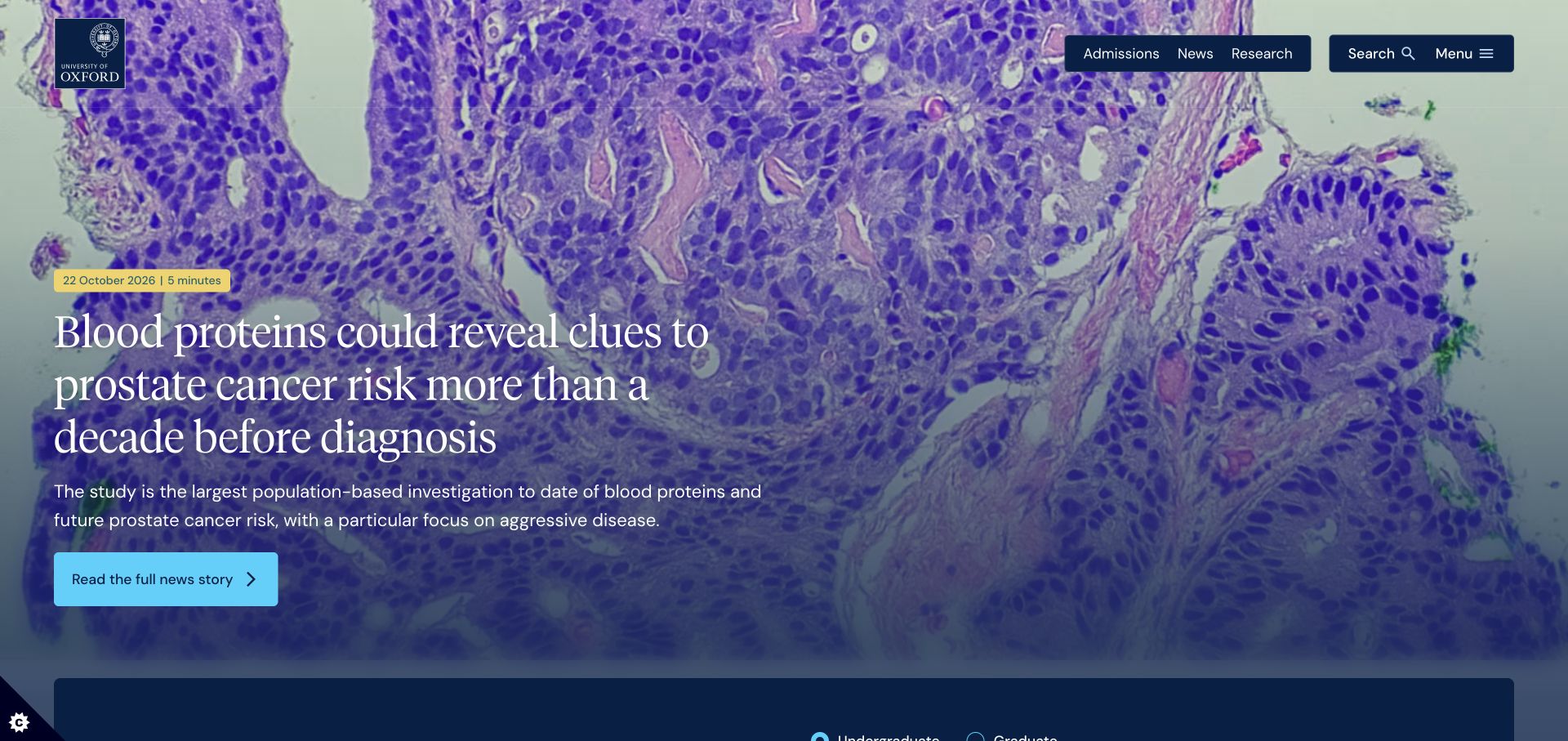
Oxford places its crest and compact admissions, news, research, and search controls over a full-width scientific image. A date and reading-time badge distinguish the featured research story from permanent institutional information. The large serif title and cyan reading action create a clear entry into the article, while audience destinations begin below. Its Drupal signals establish a CMS relationship with PHP, not the language of every departmental application linked from the university's domain.
What you can learn
Model the research article independently from the homepage feature that promotes it. Give editors dedicated fields for dates, summaries, authors, imagery, and related institutional routes. For a PHP implementation, ask how a corrected source article updates every place it appears, including cached listings. That is a useful acceptance test even though the screenshot cannot reveal the university's actual invalidation strategy.
Pros
The article date and reading cue help identify a changing editorial feature.
Admissions and research remain visible as distinct purposes in the top navigation.
Cons & considerations
Long research titles place substantial demands on overlay contrast and wrapping.
A full-screen lead can push audience-specific tasks below the opening view.
Platform source: Drupal property evidence. The reviewed public page explicitly identifies Drupal in generator metadata. PHP is associated through that CMS, not an independently audited server runtime. Platform evidence is separate from the direct website screenshot and is not a complete current infrastructure audit.
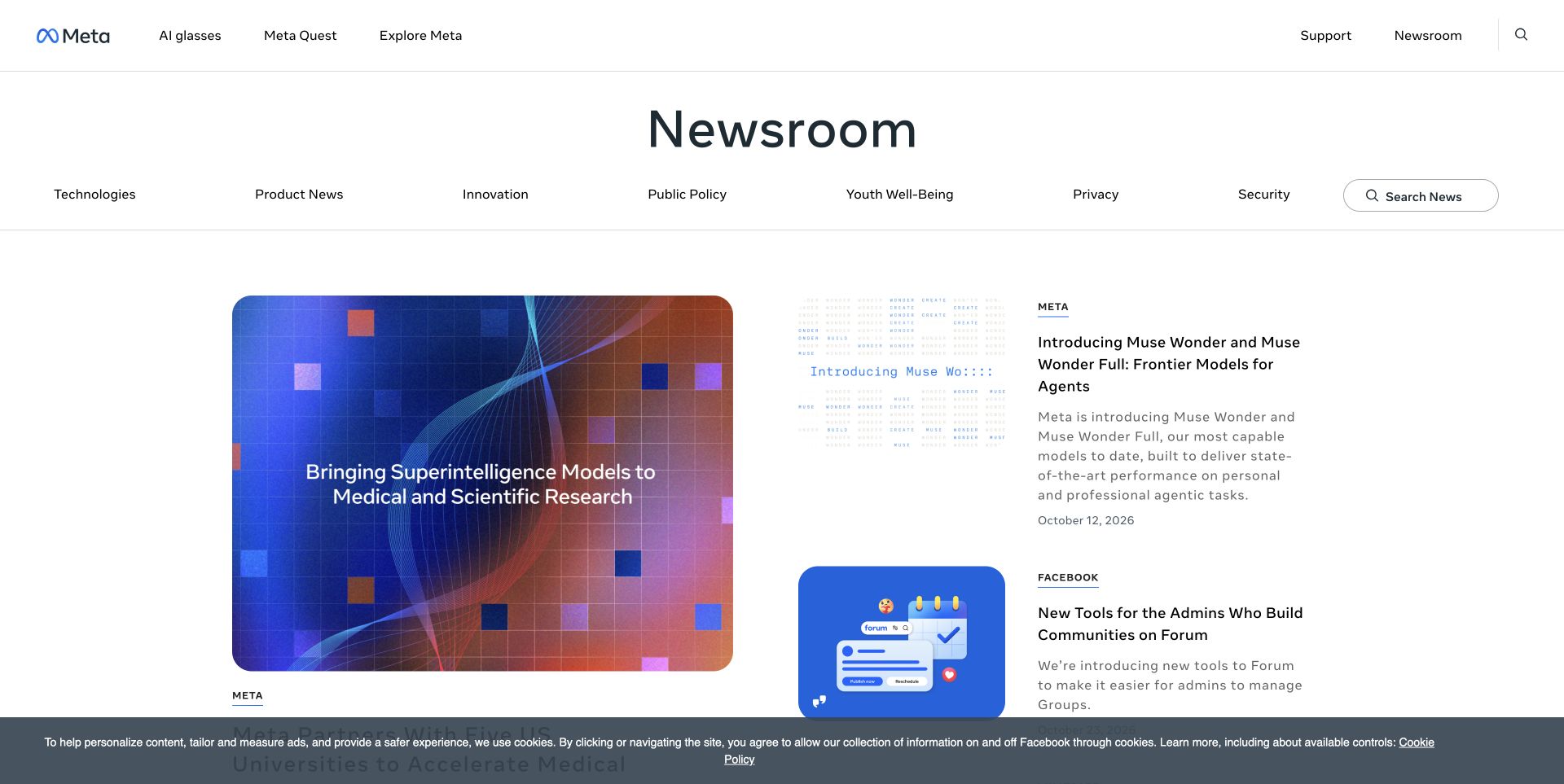
Meta Newsroom uses a large publication title, a horizontal subject taxonomy, and a visible news search before its story grid begins. A large lead image sits beside smaller stories with product labels, summaries, and dates. The corporate header remains separate above the publication's own navigation. The PHP association applies through this property's WordPress CMS; it should not be stretched into a description of Facebook, Instagram, or every system behind Meta's products.
What you can learn
Separate company-wide navigation from newsroom content rules in the brief. Ask how taxonomy changes are reviewed, how a story appears under more than one subject, and how older product names retain useful archive links. A PHP-backed publication benefits from explicit relationships rather than repeated manual category menus. Confirm the actual CMS controls and ownership during handover instead of inferring them from the orderly grid.
Pros
Publication search is distinct from the surrounding corporate navigation.
Labels and dates make smaller updates understandable without opening each story.
Cons & considerations
Two navigation layers can consume substantial space on smaller displays.
A growing subject taxonomy needs editorial rules to prevent overlapping categories.
Platform source: WordPress property evidence. https://wordpress.org/showcase/meta-newsroom/ PHP is associated through that CMS, not an independently audited server runtime. Platform evidence is separate from the direct website screenshot and is not a complete current infrastructure audit.
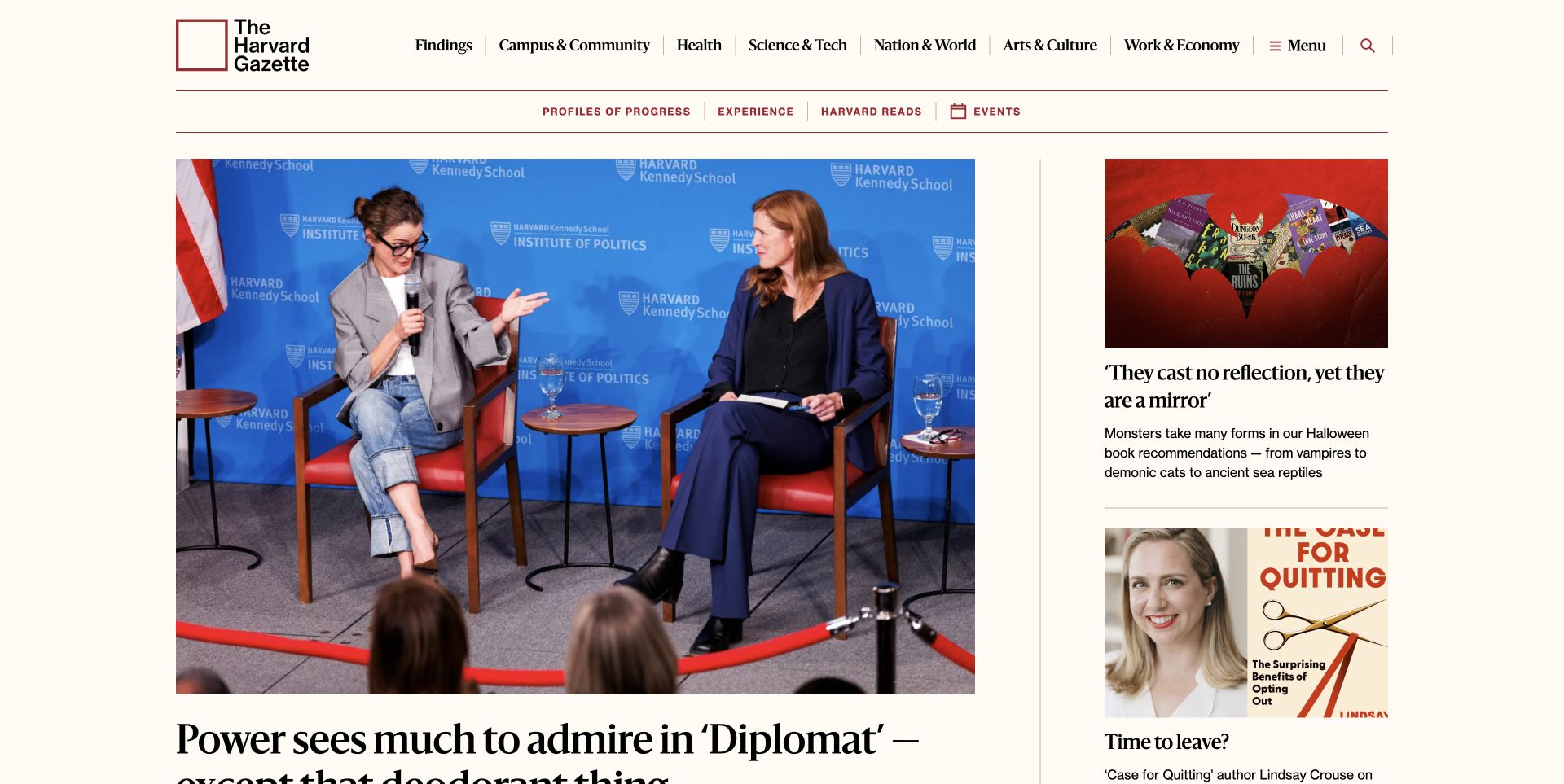
The Harvard Gazette combines an oversized lead photograph with a narrower column of supporting stories. Warm paper tones, restrained red rules, serif headlines, and explicit subject navigation hold together material from different university areas. A second resource row distinguishes recurring publication features from broad topics. WordPress documents this property's publishing system, giving a scoped PHP CMS relationship. The visible design does not identify its hosting arrangement, custom backend services, or current PHP version.
What you can learn
A useful PHP CMS specification starts with representative story types and image shapes, not a screenshot of one successful front page. Define which fields are required and what happens when a headline is unusually long or a supporting image is unavailable. Ask editors to assemble a lead and several smaller stories using real content before treating the template library as complete.
Pros
The lead and supporting column have distinct, repeatable levels of emphasis.
Subject labels and secondary resources communicate different ways to explore the publication.
Cons & considerations
Large editorial images require consistent preparation and meaningful alternatives.
Several header rows need careful prioritization when the layout becomes narrow.
Platform source: WordPress property evidence. https://wordpress.org/showcase/the-harvard-gazette/ PHP is associated through that CMS, not an independently audited server runtime. Platform evidence is separate from the direct website screenshot and is not a complete current infrastructure audit.
Princeton's captured page centers its institutional wordmark over a large financial-aid feature image. A compact menu and search control sit at opposite edges, while a short headline and summary explain the feature near the lower left. Smaller university updates begin in a dark band below the hero. The Drupal-based CMS association links this publishing surface to PHP; it says nothing about the programming languages of admissions, student records, or other separate university services.
What you can learn
Brief the hero as an editable content role with clear limits, not an invitation to produce a new layout for every announcement. A PHP CMS handover should demonstrate replacing the media, setting a destination, correcting a summary, and retiring the feature. Include the next news row in that exercise so changes preserve the relationship between the lead and the supporting editorial content.
Pros
Institutional identity remains prominent without competing with a dense top-level menu.
The darker supporting-news band makes the end of the main feature clear.
Cons & considerations
A collapsed main menu can hide important audience routes from first-time visitors.
Image-led introductions need predictable fallback behavior when media cannot load.
Platform source: Drupal property evidence. The reviewed public page explicitly identifies Drupal in generator metadata. PHP is associated through that CMS, not an independently audited server runtime. Platform evidence is separate from the direct website screenshot and is not a complete current infrastructure audit.
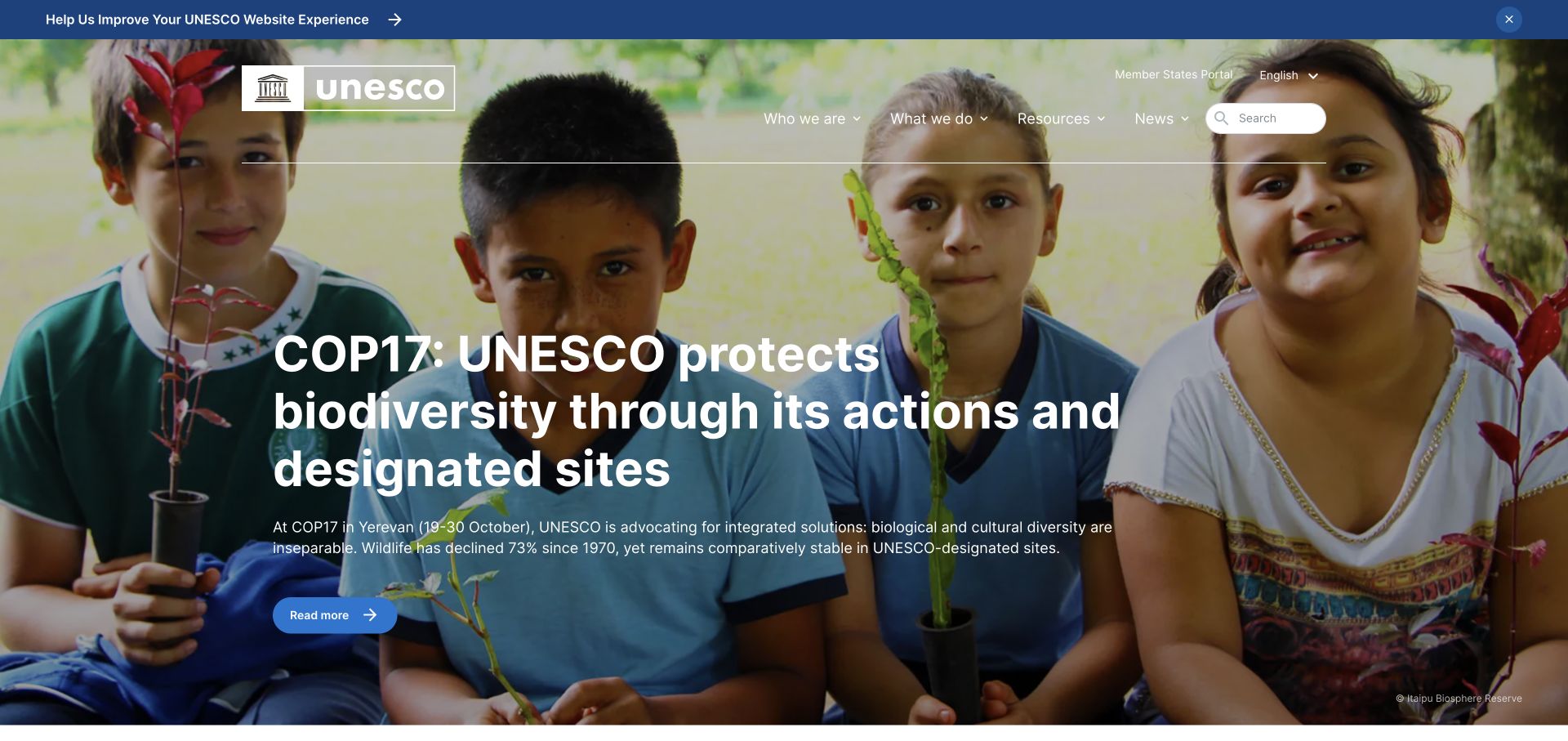
UNESCO overlays its logo, language selection, subject navigation, and search on a large campaign photograph. The feature uses a substantial headline, supporting paragraph, and a separate reading action rather than leaving the image to explain the topic alone. A thin feedback banner sits above the main masthead. The observed Drupal association supports PHP as a CMS dependency, not an assertion that every UNESCO portal, translated property, or external service has the same implementation.
What you can learn
For an international PHP CMS, plan language relationships and ownership alongside the visual system. Specify what an editor should see when one translation is missing, a campaign expires, or a localized headline becomes much longer. Keep language switching attached to the relevant content where possible. Those are requirements to test, not behavior that can be established from a single English-language screenshot.
Pros
Supporting copy gives the campaign photograph a specific editorial purpose.
Language selection and search remain discoverable within the persistent masthead.
Cons & considerations
Large overlaid text depends on predictable photographic contrast and cropping.
A feedback banner adds another element above an already substantial header.
Platform source: Drupal property evidence. The public page contains a Drupal settings JSON script and loads /core/assets/vendor/jquery/jquery.min.js. PHP is associated through that CMS, not an independently audited server runtime. Platform evidence is separate from the direct website screenshot and is not a complete current infrastructure audit.
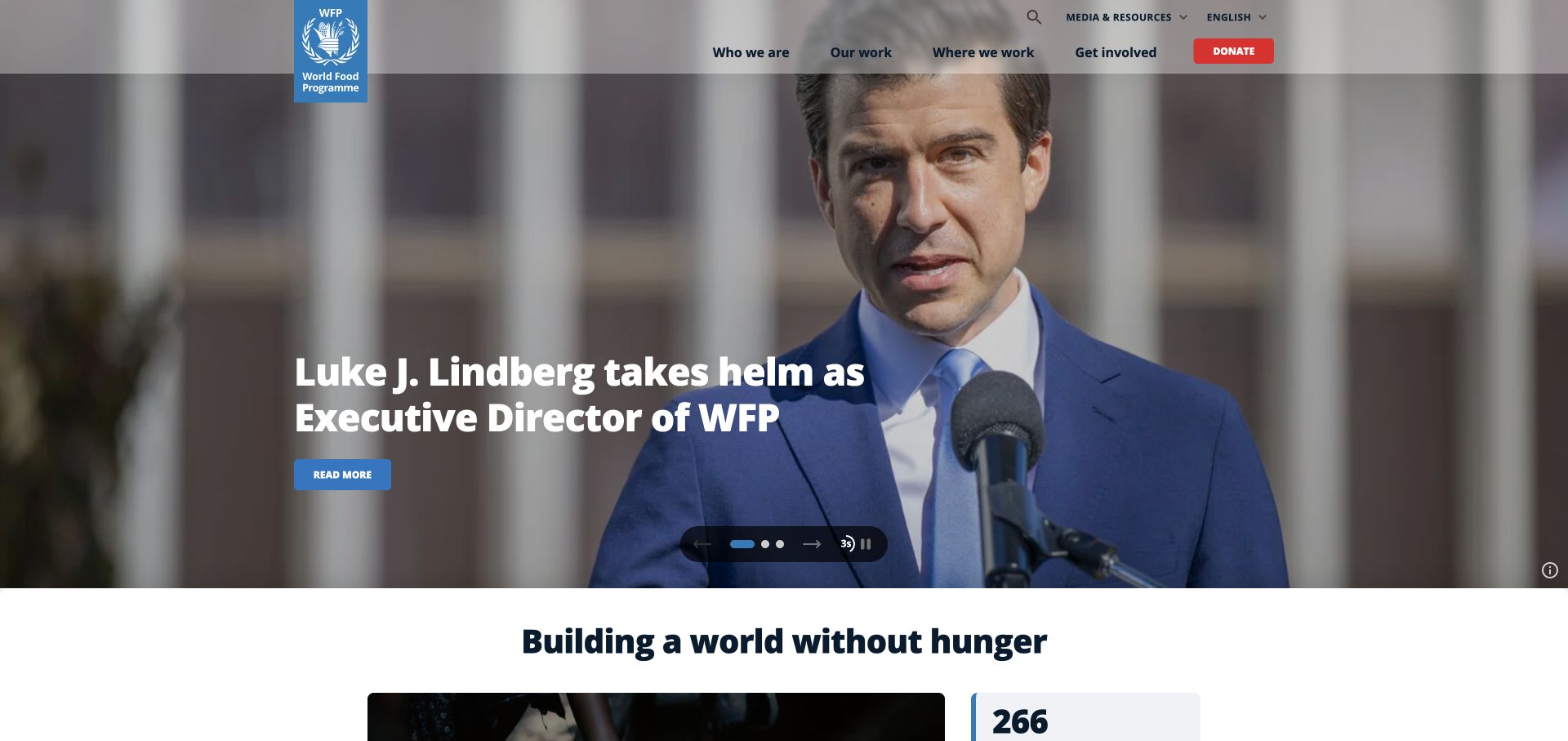
The World Food Programme opens with a large photographic news feature, a clearly separated logo block, and persistent organization, work, location, and involvement routes. A contrasting donation action remains in the header. Visible slide-position and pause controls appear near the feature's lower edge, followed by an enduring mission statement. Drupal assets support a scoped PHP CMS association; neither the screenshot nor that association audits fundraising providers, operational systems, or the behavior of every carousel state.
What you can learn
Specify campaign rotation and enduring organizational content as separate editing tasks. In a PHP-backed build, ask how editors schedule a lead, provide a stable default, and retain a plain route to the article when animation is unavailable. Make pause behavior and keyboard operation acceptance tests rather than assuming the presence of controls proves them. Keep external donation handoffs explicitly owned and documented.
Pros
Persistent work and location routes are not replaced by the current news feature.
The following mission statement reconnects a temporary story with the organization's wider purpose.
Cons & considerations
Rotating features need deliberate motion, focus, and editorial-expiry handling.
A prominent donation route still requires clarity about the separate transaction destination.
Platform source: Drupal property evidence. The public page declares WFP CMS, contains Drupal settings JSON, and loads the Drupal core jQuery asset at /core/assets/vendor/jquery/jquery.min.js. PHP is associated through that CMS, not an independently audited server runtime. Platform evidence is separate from the direct website screenshot and is not a complete current infrastructure audit.
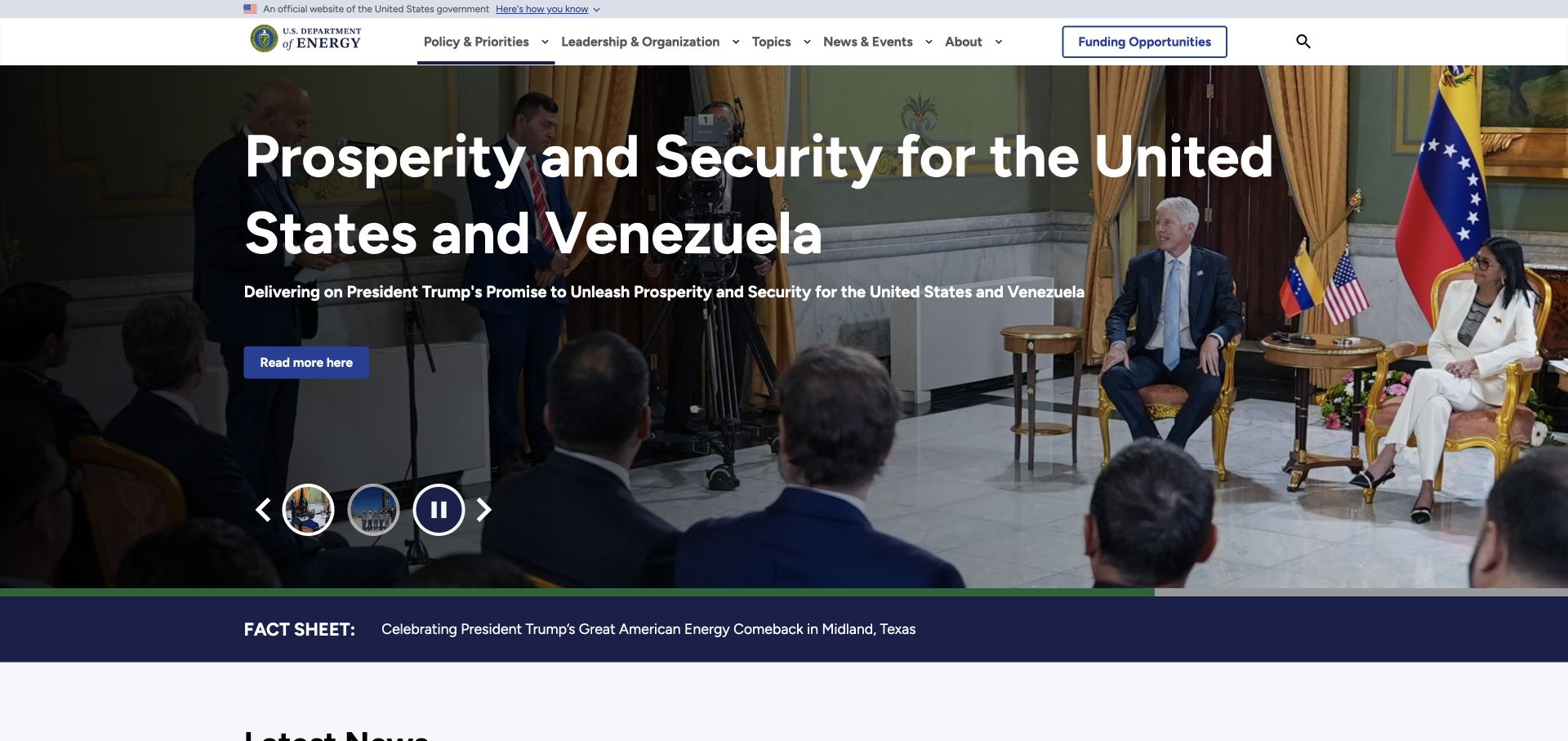
The Department of Energy page separates an official-government strip, agency identity, subject navigation, and funding access from a large photographic feature. Its carousel exposes thumbnails and a pause control, and a separate fact-sheet band begins directly below. This creates several distinct publishing zones within one opening view. Drupal evidence supplies a PHP CMS relationship for the public website, not a claim about grant administration, research databases, or the agency's internal applications.
What you can learn
Translate those zones into named content responsibilities before choosing implementation details. A PHP CMS should let the right team update an announcement without altering persistent government identity or funding navigation. Include expired features, short summaries, and a missing thumbnail in acceptance tests. Decide which urgent messages can supersede a campaign and who is authorized to make that change, without assuming the reference already implements your preferred workflow.
Pros
Funding opportunities have a persistent route distinct from campaign storytelling.
The lower fact-sheet band introduces another information type with a clear visual boundary.
Cons & considerations
Several stacked navigation and announcement areas can dominate short screens.
A complex carousel adds content and interaction states that a static capture cannot verify.
Platform source: Drupal property evidence. The reviewed public page explicitly identifies Drupal in generator metadata. PHP is associated through that CMS, not an independently audited server runtime. Platform evidence is separate from the direct website screenshot and is not a complete current infrastructure audit.
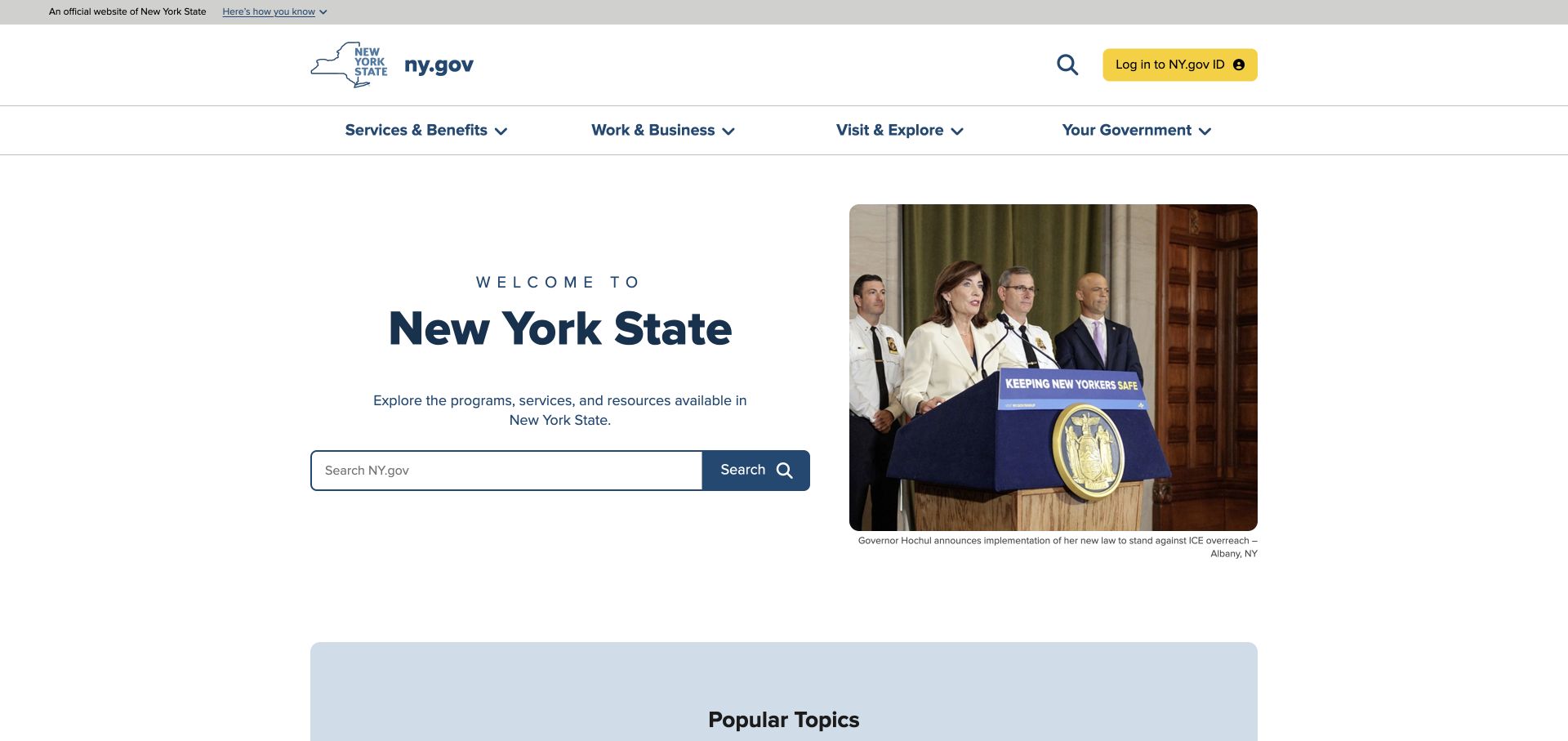
New York State places a plain welcome and a wide search field beside a current news photograph. Above it, service, business, visiting, and government categories describe recognizable visitor purposes. The identity login is visually distinct from browsing and searching public information, while the government verification strip stays at the very top. Its Drupal association provides a PHP CMS relationship for this public surface; it does not establish the implementation or protection of the separately linked identity and benefits systems.
What you can learn
A PHP website brief should distinguish public content discovery from authenticated service delivery. Define search scope, synonyms, empty results, and a useful fallback directory before selecting a search integration. Document every handoff to another service and preserve explanatory information before the visitor leaves. The visible search prominence is a design observation, not evidence that search quality or transaction completion has been tested.
Pros
Search has a clear visual role rather than being limited to a small header icon.
Task-oriented navigation helps visitors start without knowing the government's organization chart.
Cons & considerations
A broad search needs maintained relevance rules and understandable empty states.
Distinct login and service destinations require explicit ownership outside the public CMS.
Platform source: Drupal property evidence. The reviewed public page explicitly identifies Drupal in generator metadata. PHP is associated through that CMS, not an independently audited server runtime. Platform evidence is separate from the direct website screenshot and is not a complete current infrastructure audit.
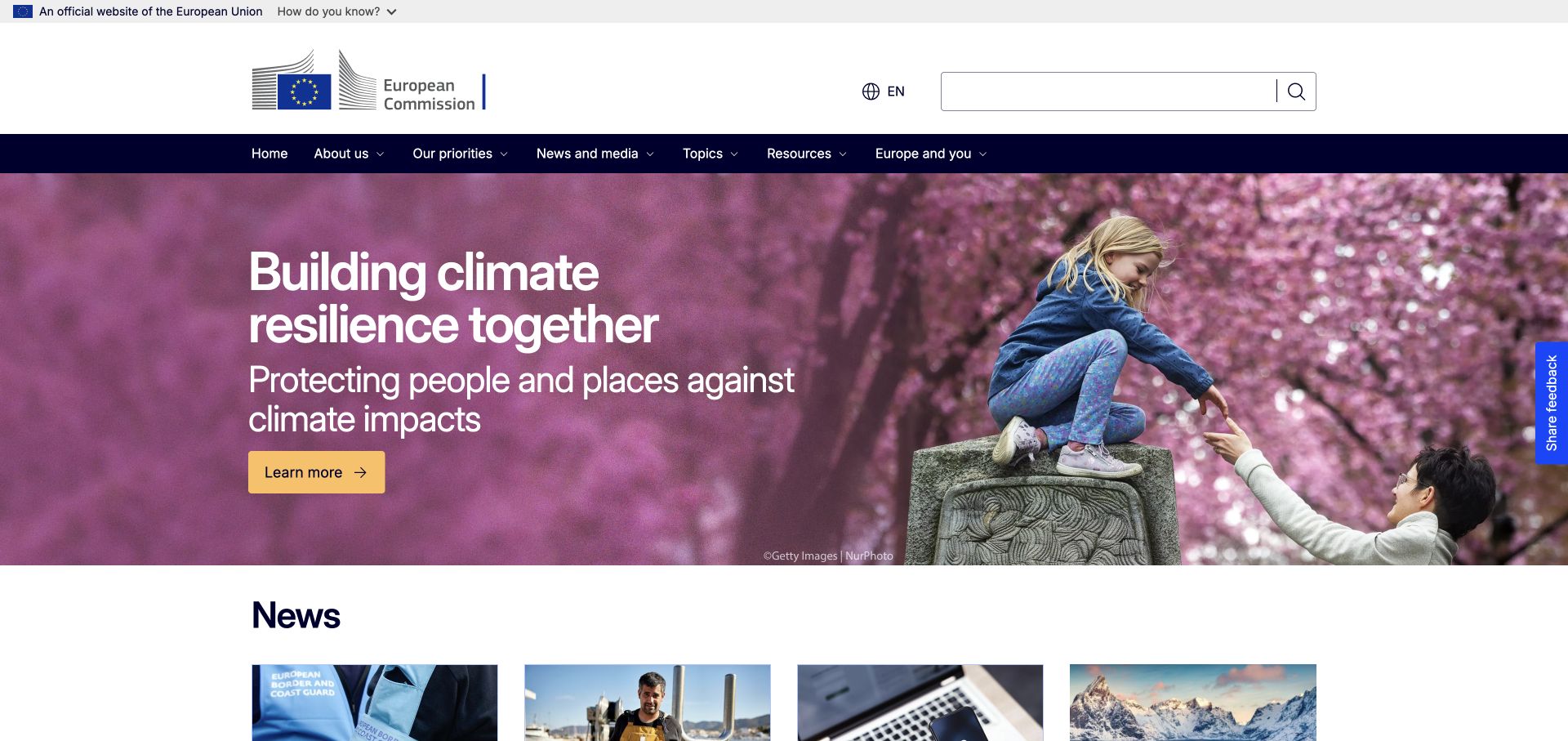
The European Commission's captured homepage uses an official-institution strip, a prominent identity and search area, and a dark subject-navigation band before the main campaign begins. The feature combines a photograph, headline, supporting statement, and a high-contrast reading action. A news section then establishes the next level of content. Drupal evidence links this public property to a PHP-based CMS, not to every service or application operated by European institutions.
What you can learn
Treat the institution's identity, content language, and editorial promotion as separate layers in a PHP CMS specification. Map which team owns each layer and what should happen when a resource changes location or receives a corrected translation. Preview long titles and multiple media crops before approving reusable campaign templates. The photograph and text demonstrate a layout pattern, not a certification of the underlying publishing process.
Pros
Institutional identity remains stable while the featured campaign can change.
Search is large and explicit, separate from the subject-navigation band.
Cons & considerations
Several full-width header layers consume space before the main content begins.
International publishing needs translation and archive rules beyond a language control alone.
Platform source: Drupal property evidence. The reviewed public page explicitly identifies Drupal in generator metadata. PHP is associated through that CMS, not an independently audited server runtime. Platform evidence is separate from the direct website screenshot and is not a complete current infrastructure audit.
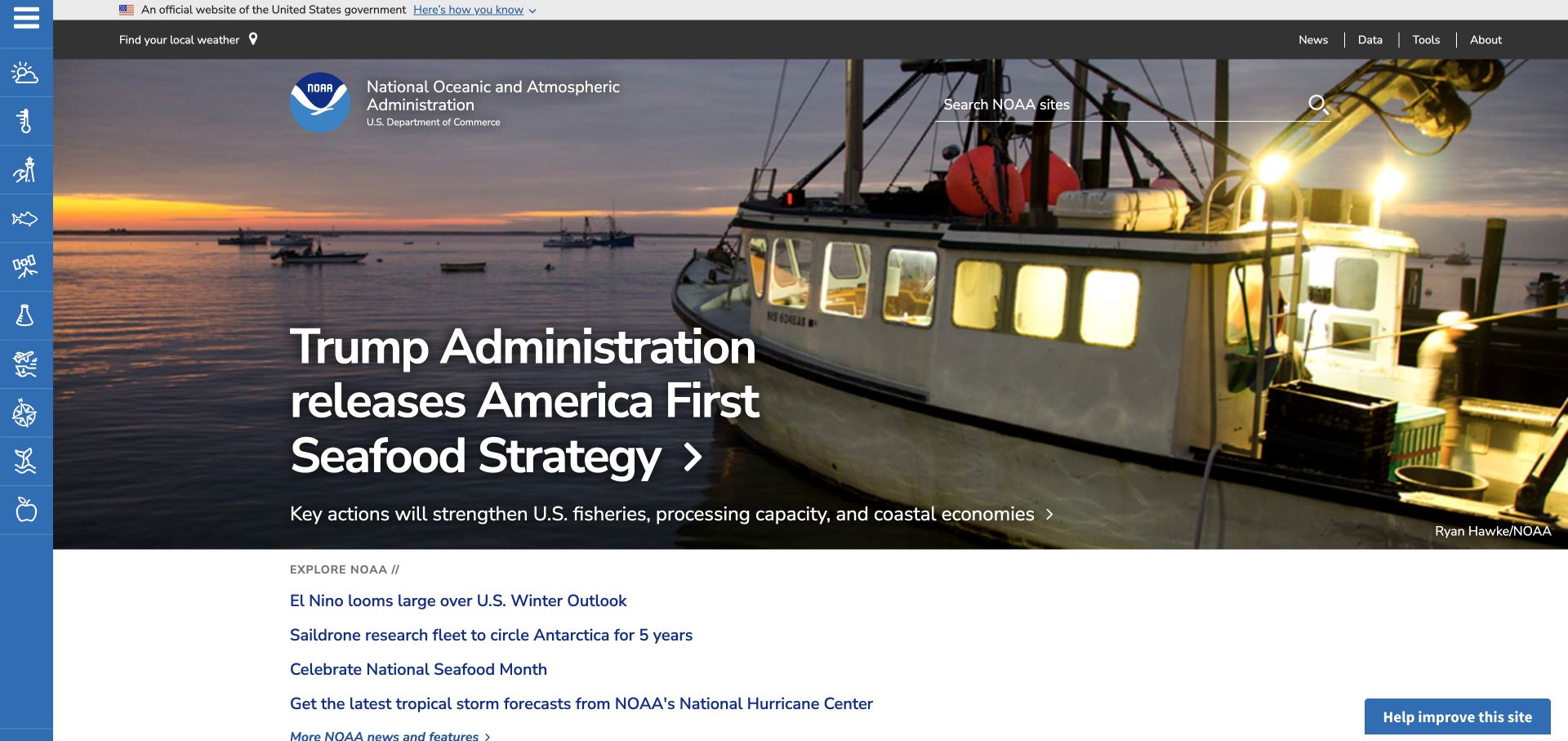
NOAA's homepage combines a persistent blue icon rail with a local-weather utility, agency identity, and a broad site search. A large photographic feature carries the current editorial story, while a compact list of other links begins below it. The contrast between repeat-use tools and changing news is especially visible. Drupal evidence associates the public publishing surface with PHP; it does not describe the infrastructure behind weather products, scientific datasets, or the external services reached from the rail.
What you can learn
Before building a similar PHP CMS, inventory which destinations are editorial pages and which are separately maintained tools. Give icons meaningful accessible names and provide understandable text routes rather than depending on visual recognition alone. Ask how corrections propagate to linked topic pages and how an unavailable external service is handled. Those are practical requirements suggested by the interface, not verified behavior of NOAA's production systems.
Pros
Repeat-use weather and search utilities remain distinct from the changing lead story.
The following link list offers alternatives to the featured photographic destination.
Cons & considerations
An icon-led side rail needs clear names and a careful narrow-screen treatment.
Editorial and scientific-service handoffs require more ownership mapping than one CMS diagram.
Platform source: Drupal property evidence. The reviewed public page explicitly identifies Drupal in generator metadata. PHP is associated through that CMS, not an independently audited server runtime. Platform evidence is separate from the direct website screenshot and is not a complete current infrastructure audit.
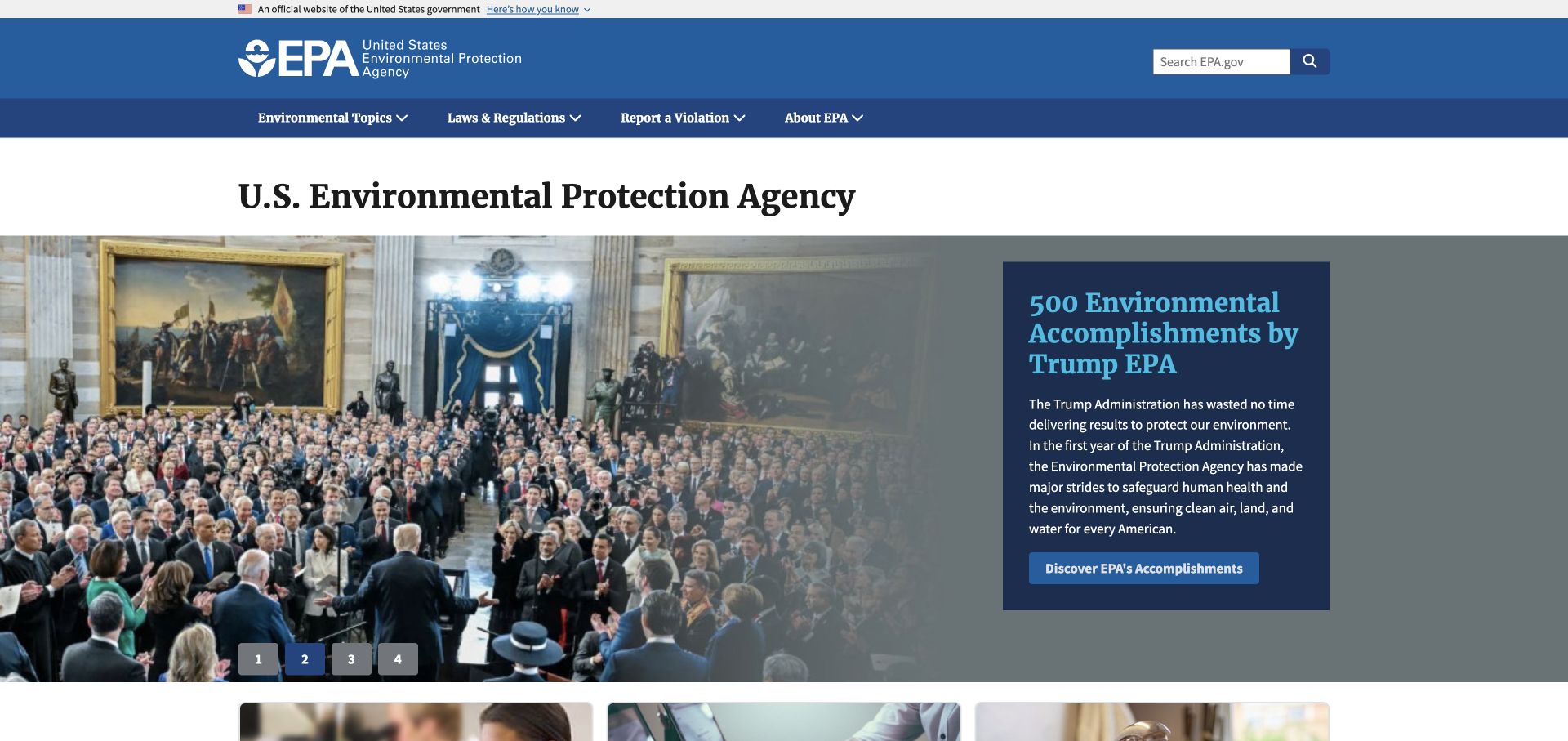
The Environmental Protection Agency pairs a broad blue identity area with visible search and a darker subject-navigation band. Its main feature places a substantial text panel beside an image, rather than relying on text directly over a complex photograph. Numbered controls identify alternate feature positions, with smaller content starting below. The property's Drupal evidence supports a PHP CMS relationship, not any claim about every database, reporting service, or agency application connected to the site.
What you can learn
A PHP content system can preserve the difference between a feature's text and its illustration. Give editors appropriate fields and constraints instead of requiring them to place every label by hand. Include a long summary, a missing image, and a retired destination in the preview exercise. Separately define the ownership of regulatory information and transaction links; a clear homepage composition does not establish their accuracy or operational behavior.
Pros
A separate text panel gives the feature description a predictable reading surface.
Search and broad subject navigation have stable positions outside the rotating content.
Cons & considerations
Large feature panels can postpone access to task-specific information.
Rotating content requires accessible controls and an equivalent useful default state.
Platform source: Drupal property evidence. The page exposes Drupal selectors and loads /core/misc/drupal.js, /core/misc/drupalSettingsLoader.js, and other Drupal core assets. PHP is associated through that CMS, not an independently audited server runtime. Platform evidence is separate from the direct website screenshot and is not a complete current infrastructure audit.
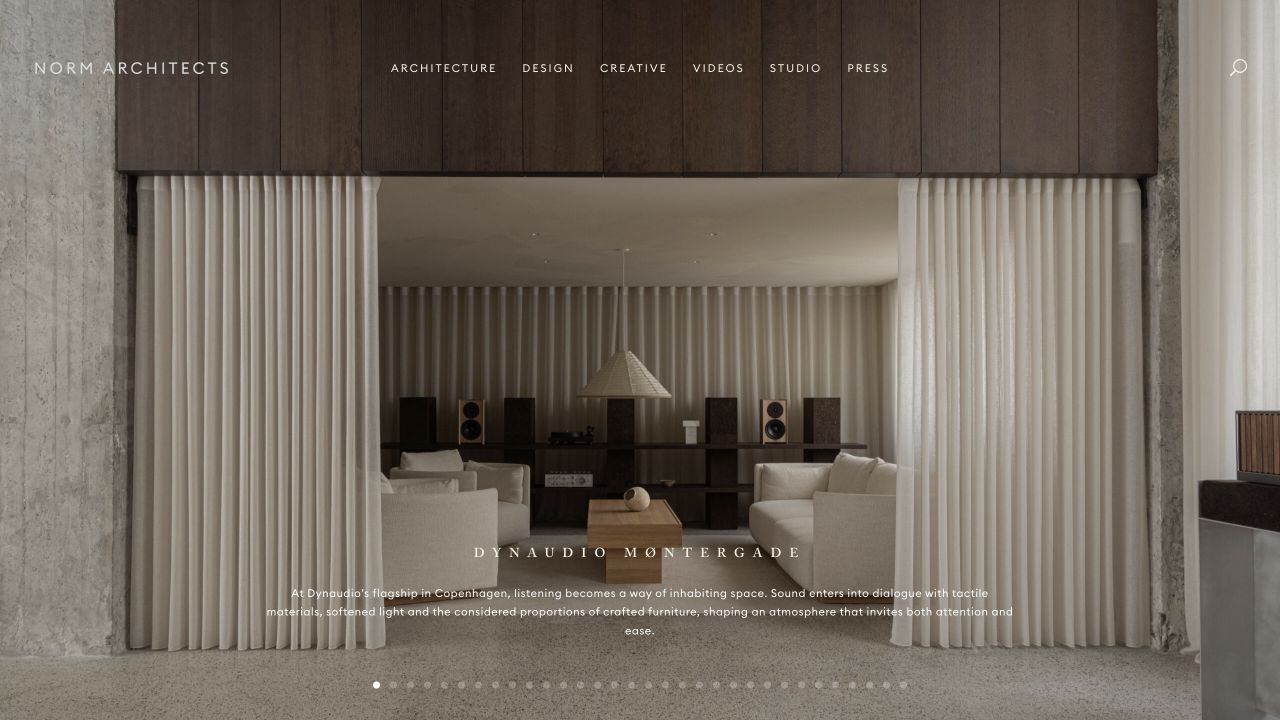
Norm Architects uses a full-screen interior photograph, quiet top navigation, and a compact project description near the lower edge. A line of slide indicators suggests a sequence of selected work, while the surrounding interface leaves most of the composition to materials, light, and proportions. WordPress and its theme-family evidence provide the CMS context for the PHP association. They do not show a PHP version or prove that every visual choice comes from a purchasable theme.
What you can learn
For a portfolio built around a PHP CMS, specify the project record before adding presentation controls. Define image crops, credits, project relationships, and the minimum text needed to understand a photograph. Give editors a way to preview a weak image or long title, not just the ideal opening slide. Keep any custom theme or builder extensions separately documented so future changes are not dependent on one undocumented implementation.
Pros
The interface leaves photographic composition enough room to establish the practice's identity.
Project captions add context without turning the opening into a dense feature grid.
Cons & considerations
Quiet overlaid navigation still needs reliable contrast across changing photographs.
A photographic sequence depends on disciplined editing and an accessible non-rotating alternative.
Platform source: WordPress property evidence. The homepage declares WordPress and a Divi Child Theme; styles load from /wp-content/themes/divi-child/ and /wp-content/themes/Divi/. PHP is associated through that CMS, not an independently audited server runtime. Platform evidence is separate from the direct website screenshot and is not a complete current infrastructure audit.
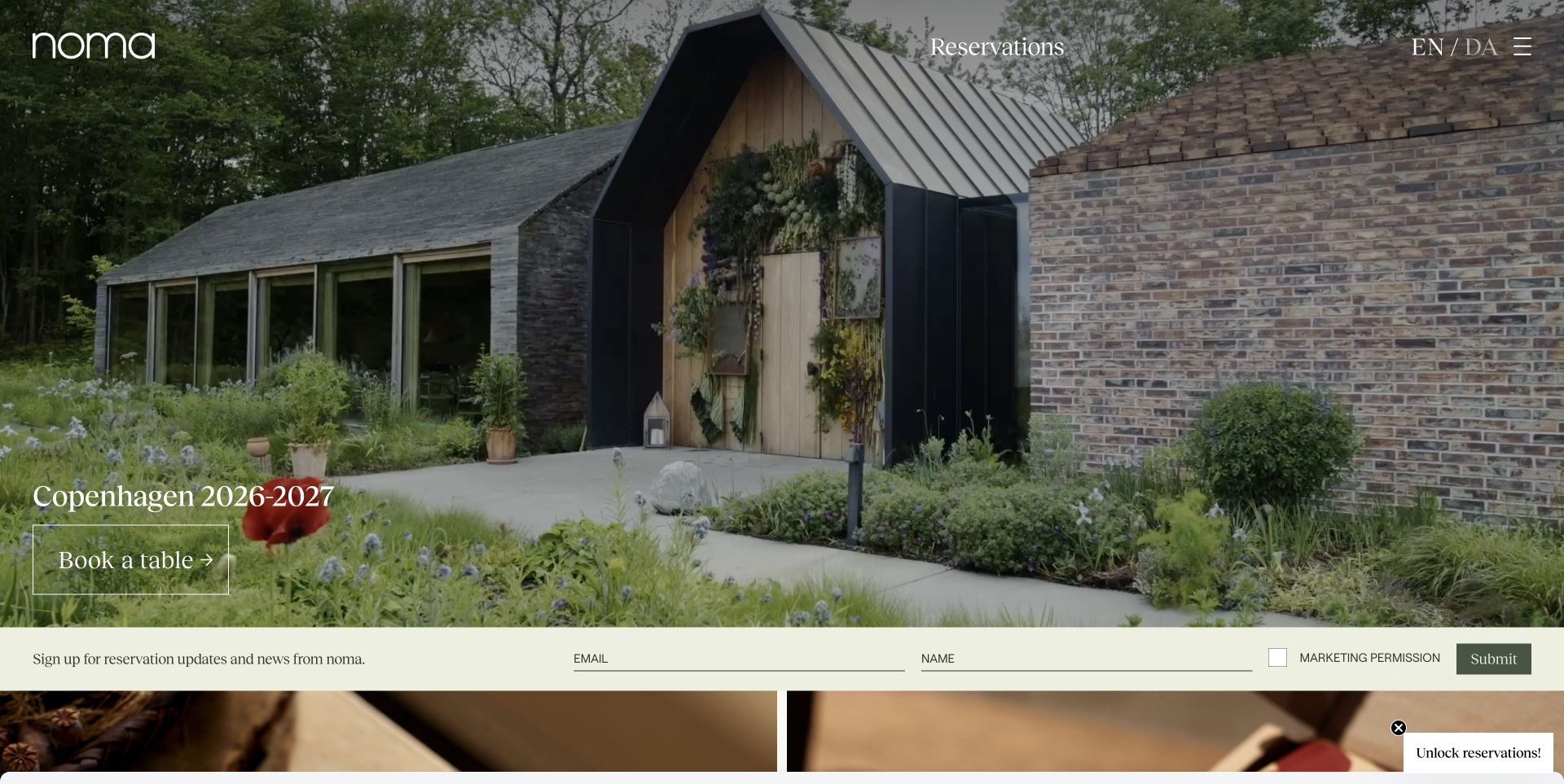
Noma's opening places a restaurant photograph behind a short seasonal introduction and a booking action. A persistent reservation label and language choices sit near the top, while a separate signup band begins below the feature. The contrast between atmosphere and practical next steps is clear. The documented WordPress property creates a scoped PHP CMS association; booking availability, mailing-list handling, and other external systems are not established by the visible homepage or that association.
What you can learn
Write down where each hospitality workflow leaves the publishing system. A PHP CMS should own the seasonal description and relevant destination, while the brief identifies who maintains the reservation and email integrations. Test an expired season, no available tables, a changed external URL, and the consent language of any signup. A beautiful opening photograph should not be the only specification for a restaurant's web operations.
Pros
The seasonal description gives the atmospheric image a practical, time-bound purpose.
Reservation access is visible without requiring the visitor to explore an extensive menu.
Cons & considerations
Several signup and booking prompts can compete with the main visitor task.
Photography and seasonal text need an explicit publishing and expiry routine.
Platform source: WordPress property evidence. https://wordpress.org/showcase/noma/ PHP is associated through that CMS, not an independently audited server runtime. Platform evidence is separate from the direct website screenshot and is not a complete current infrastructure audit.
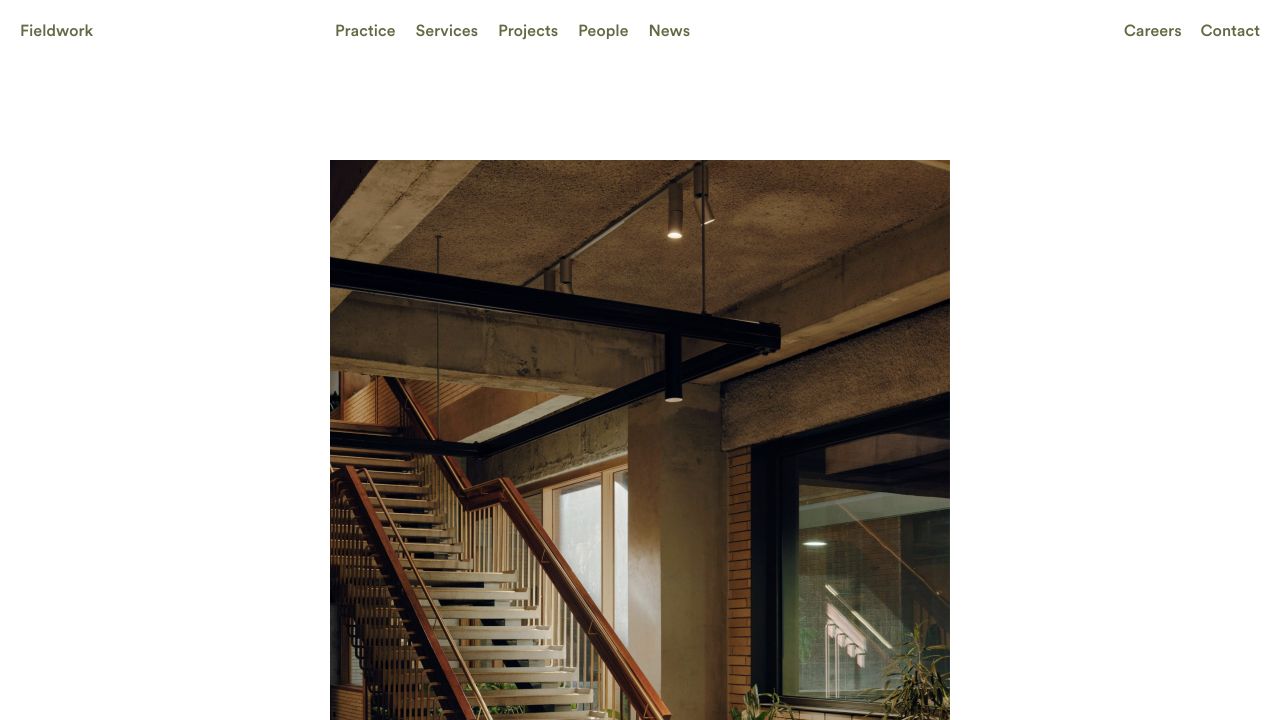
Fieldwork's captured homepage places a compact identity and clearly labeled practice, services, projects, people, and news links above a large architectural photograph. Generous white space separates navigation from the image, and careers and contact remain distinct at the right. The WordPress generator and theme evidence support the PHP CMS relationship for this property, not a recommendation to buy the same theme or an assertion about other business systems.
What you can learn
A PHP CMS brief for this kind of practice should connect projects, people, service areas, and news without making editors duplicate the same information. Define which relationships belong to the content model and which are simply homepage selections. Ask an editor to add a project, associate a team member, and update an image credit during handover. The spare presentation makes content quality more visible, so test ordinary material as well as the strongest photograph.
Pros
Plain navigation labels distinguish the practice, its work, and its people.
A deliberate photographic frame creates emphasis without a large promotional text overlay.
Cons & considerations
Substantial white space can leave little explanatory content in the opening viewport.
A restrained portfolio still needs understandable project labels and accessible contact routes.
Platform source: WordPress property evidence. <meta name="generator" content="WordPress 7.1.4" />; /wp-content/themes/EMPATHY/style.css PHP is associated through that CMS, not an independently audited server runtime. Platform evidence is separate from the direct website screenshot and is not a complete current infrastructure audit.
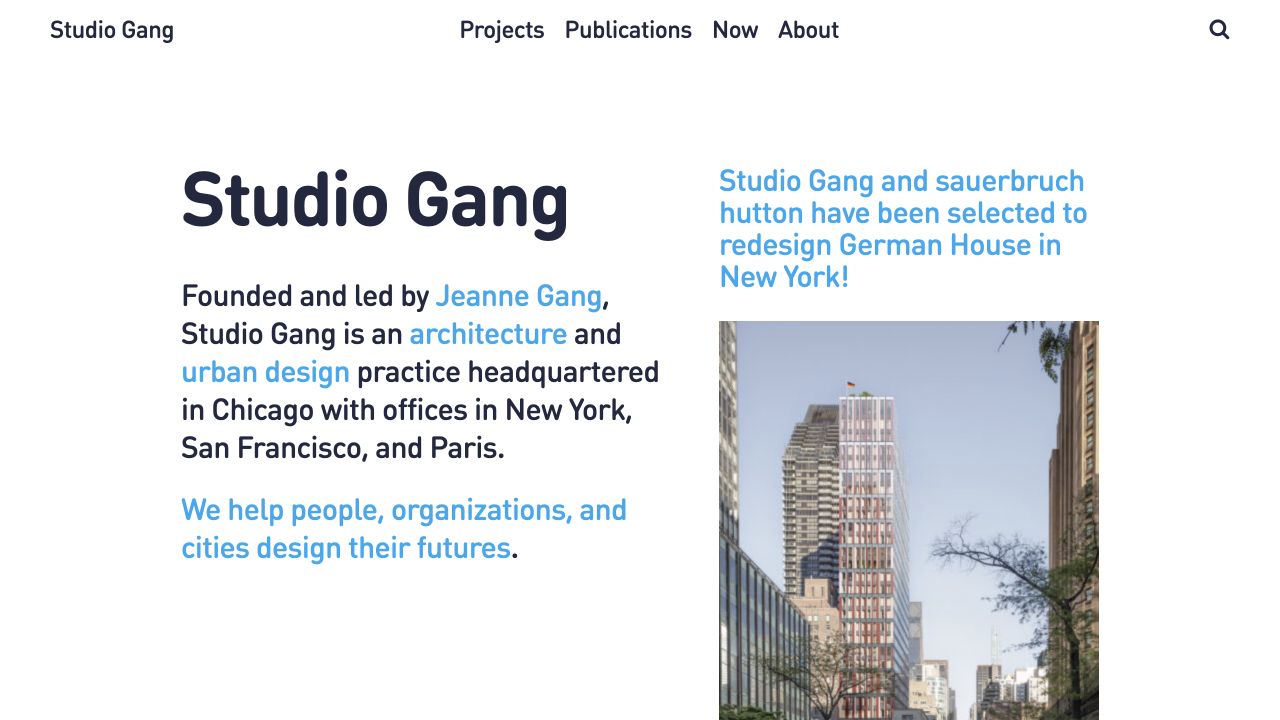
Studio Gang divides its opening into a substantial written introduction and a neighboring project announcement with an image. Blue emphasis links parts of the text to the site's wider subjects, while projects, publications, current activity, and about information remain distinct in the header. The observed WordPress relationship supplies the PHP CMS context. It does not reveal how the practice's internal project records, media production, or other business tools are implemented.
What you can learn
Model the enduring practice introduction separately from project updates in a PHP publishing brief. Define how a project can be connected to a publication or news item without copying its details into unrelated pages. During handover, ask the editor to replace the announcement while leaving the practice statement and navigation intact. That exercise checks the intended ownership boundaries without pretending the screenshot proves the reference's actual editing workflow.
Pros
The written introduction explains the practice without relying only on a project photograph.
Publications and current activity have separate destinations rather than one undifferentiated archive.
Cons & considerations
Two prominent text areas can compete when both contain unusually long copy.
Inline emphasis needs consistent link behavior and clear treatment on narrow screens.
Platform source: WordPress property evidence. Homepage uses /wp-content/themes/studiogang/, /wp-json/wp/v2/pages/6 and player.vimeo.com/api/player.js; response x-powered-by is WP Engine. PHP is associated through that CMS, not an independently audited server runtime. Platform evidence is separate from the direct website screenshot and is not a complete current infrastructure audit.
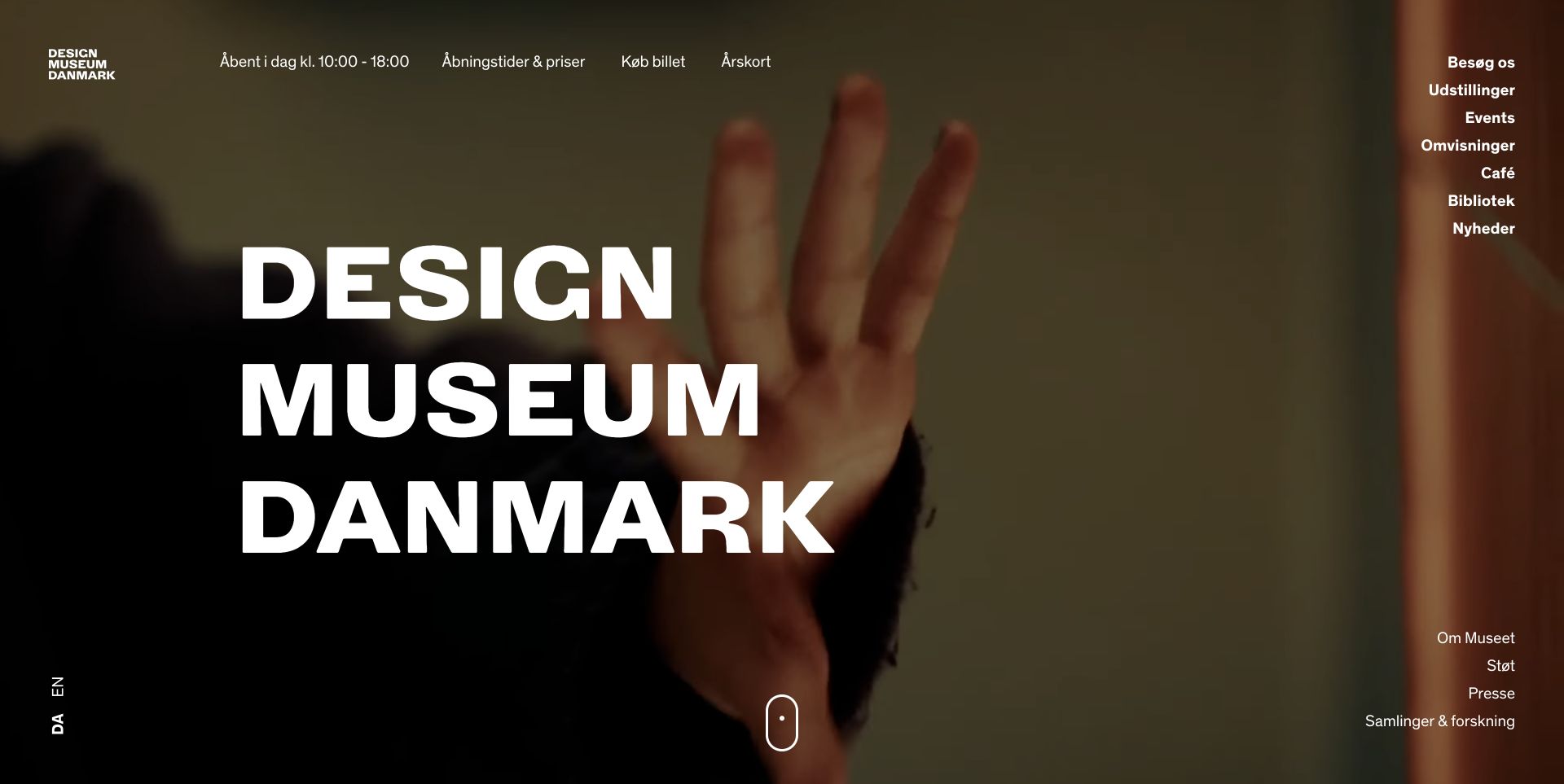
Designmuseum Danmark's captured page layers a very large typographic identity over a rich visual background. Opening information, price and ticket routes, membership, and language choices occupy recognizable positions around it. A separate right-hand menu organizes exhibitions, events, tours, and other visitor interests. Its WordPress and documented commerce association give context for PHP-based publishing, without establishing the actual ticket-provider integration, checkout flow, or any performance result.
What you can learn
For a museum PHP CMS, connect exhibitions, events, visit information, and commerce destinations through explicit content relationships. Decide how dates and opening exceptions are updated and how changes reach every relevant page. Keep ticketing ownership and failure handling separate from editorial presentation. Test a translated title, a sold-out event, and a temporary closure before accepting a beautiful exhibition image as a complete visitor experience.
Pros
Practical visit information remains near the top rather than being hidden beneath the visual feature.
Different cultural and visitor destinations receive distinct navigation labels.
Cons & considerations
Large typography and moving imagery need reliable readability at smaller widths.
Ticketing and programming information require coordination beyond the visible CMS layout.
Platform source: WordPress property evidence. https://wordpress.org/showcase/design-museum-danmark/ PHP is associated through that CMS, not an independently audited server runtime. Platform evidence is separate from the direct website screenshot and is not a complete current infrastructure audit.
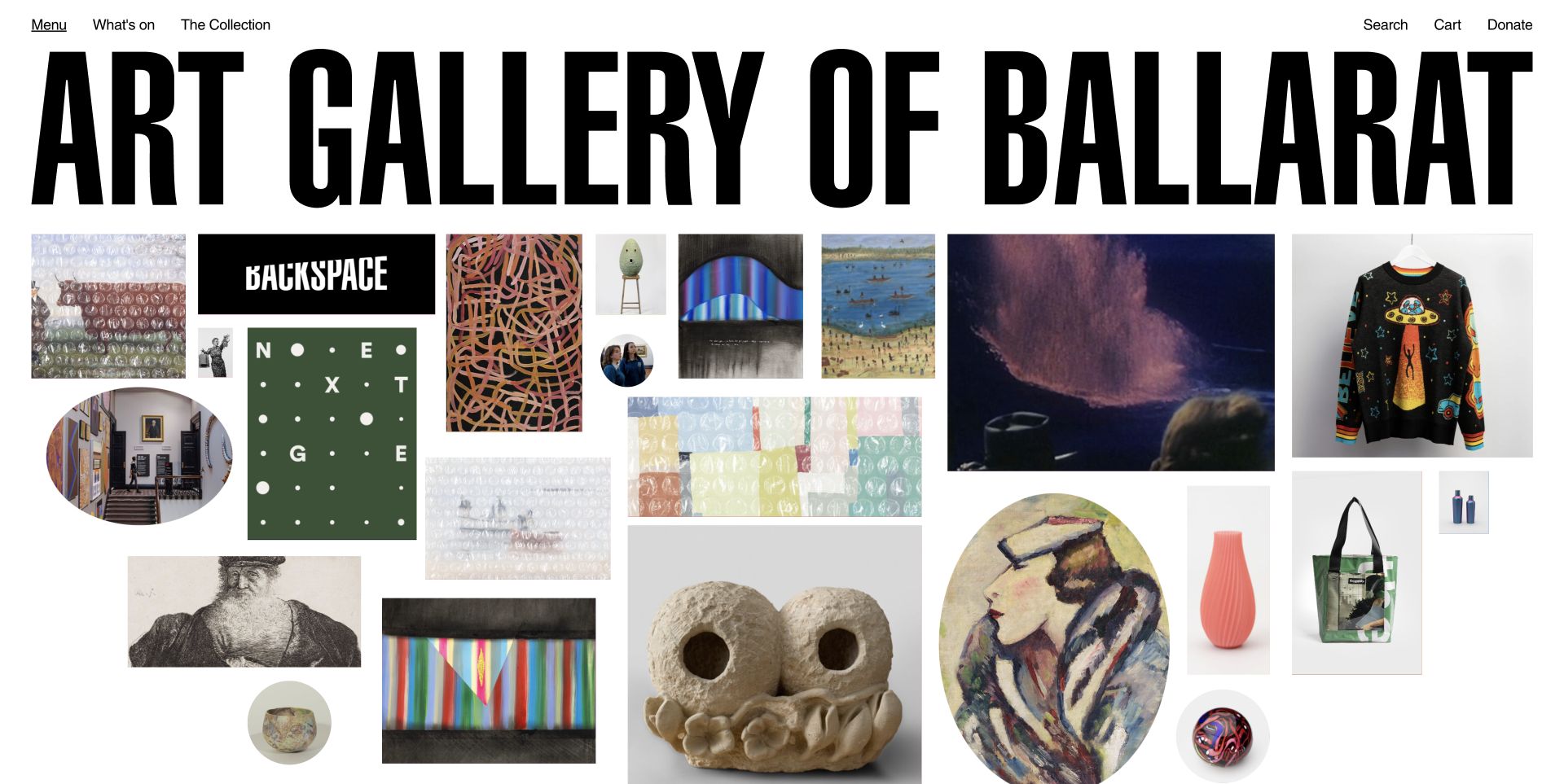
The Art Gallery of Ballarat places an exceptionally large wordmark above an irregular grid of artworks, activities, objects, and portraits. Simple navigation for current programming and the collection sits at the top, alongside search, cart, and donation utilities. The variety is organized through the image wall rather than repeated identical cards. WordPress documentation establishes the CMS association with PHP; the screenshot does not verify shop fulfillment, donations, or every interaction in the gallery.
What you can learn
A PHP CMS supporting mixed cultural content needs to distinguish the records even when the presentation combines them. Define artwork, event, article, and product fields separately, then decide how a curated homepage selects them. Every visual tile should retain an understandable title and destination without requiring hover. Ask editors to change an item's image and availability so the handover tests data relationships as well as the visual arrangement.
Pros
A varied image wall conveys the breadth of the institution's material immediately.
Search and practical utilities remain explicit above the expressive collection layout.
Cons & considerations
Irregular imagery needs clear destination labels for touch and keyboard users.
Mixing shop objects and editorial records requires a carefully defined content model.
Platform source: WordPress property evidence. https://wordpress.org/showcase/art-gallery-of-ballarat/ PHP is associated through that CMS, not an independently audited server runtime. Platform evidence is separate from the direct website screenshot and is not a complete current infrastructure audit.
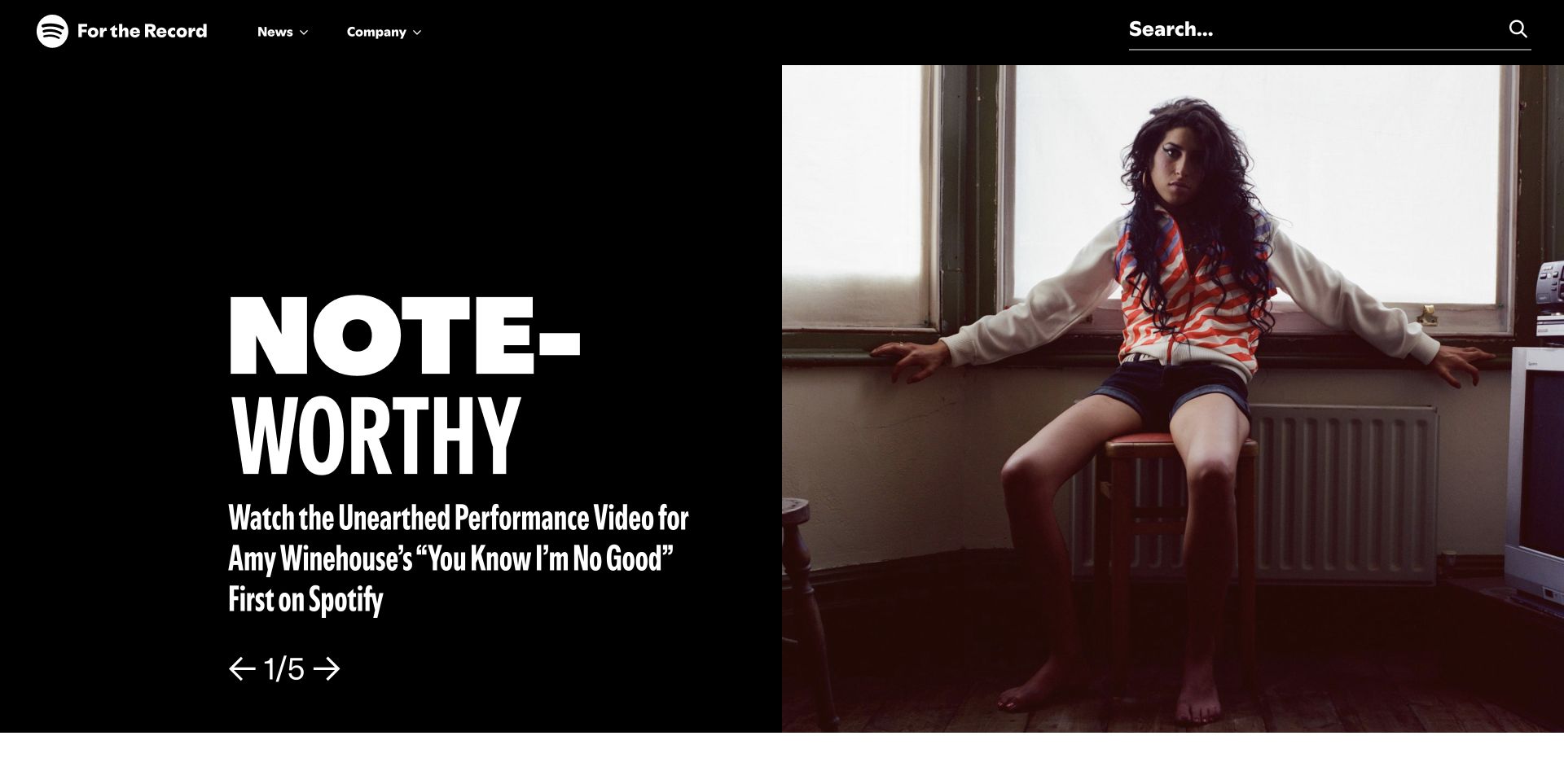
Spotify's For the Record uses a large artist photograph beside oversized display type on a dark opening panel. News and company routes remain compact, while a wide search field has substantial visual weight. Position indicators identify the featured story as part of a sequence. The documented WordPress newsroom relationship connects this property to a PHP CMS; it does not describe Spotify's streaming applications, recommendation systems, or account infrastructure.
What you can learn
In a PHP publishing brief, separate the newsroom's editorial records and featured-story selection from the company's product systems. Plan how an article can move out of the lead position while keeping its URL, metadata, and archive relationships intact. Test short and long titles, alternate media, and a useful default when a sequence cannot rotate. A dramatic opening is most reusable when its content rules are more stable than the current campaign.
Pros
Publication search remains prominent beside the featured editorial sequence.
The image and type establish clear emphasis without making every story equally large.
Cons & considerations
Oversized display text needs intentional wrapping and spacing on narrow screens.
A rotating lead introduces additional interaction states that this static view cannot validate.
Platform source: WordPress property evidence. https://wordpress.org/showcase/for-the-record-spotify/ PHP is associated through that CMS, not an independently audited server runtime. Platform evidence is separate from the direct website screenshot and is not a complete current infrastructure audit.
WordPress or Drupal can provide an established starting point when editors need reusable records, navigation, media, permissions, and a recognizable publishing workflow. Demonstrate the actual editing experience with your content before choosing between them. Document custom extensions and the boundary between CMS content and external services; the reference collection is not a recommendation to reproduce every site's tooling.
A custom application for a defined business process
If the main requirement is a bespoke workflow rather than publication, evaluate an application architecture on its own terms. Specify users, permissions, state changes, validation, and recovery. A CMS may still supply public content, but it should not become an accidental substitute for a carefully modeled business process. None of these screenshots establishes the best framework for your particular application.
A separate frontend when there is a concrete need
A PHP-based content system can publish through another presentation layer, but that adds a deployment and integration boundary. Define preview access, content freshness, redirects, and failure behavior before adopting it. Ask what the additional layer makes possible and who will maintain it. Do not choose separation merely because a large organization might use it, or assume a public page reveals its full architecture.
From references to requirements
Turn a reference into a buildable publishing brief
Specify the editor's ordinary day
Choose three routine tasks and one awkward exception: publish a story, update a service, replace a homepage feature, and withdraw an outdated resource. Record required fields, reviewer responsibilities, previews, and the behavior of existing links. Test those tasks with an actual editor before handover. Keep instructions alongside the system rather than relying on a developer's memory of how the page builder was configured.
Define freshness, search, and linked destinations
Identify which records must update immediately and which can tolerate a delay. Verify the chosen cache and publication process rather than inferring it from a fast reference page. Search needs agreed scope, useful terminology, empty states, and an owner for relevance changes. Treat external booking, donation, and account links as explicit integrations with understandable fallback routes, not decorative buttons that are forgotten after launch.
Budget for the complete ownership boundary
Separate implementation, hosting, licenses, editorial support, security updates, and future development in the estimate. Record who owns domains, credentials, repositories, media rights, and backup access. Rehearse a restore using a safe environment and agree where operational alerts go. A well-designed public site should remain manageable when the original developer is unavailable or the editorial team changes.
A useful handover demonstration
Ask the actual team to carry out its routine job: publish a realistic update, correct a mistake, preview a narrow screen, and identify who owns an integration failure. For a library or frontend framework, also ask who maintains the content source and deployment. A polished screenshot does not answer those operational questions.
Beyond the screenshot
A PHP CMS launch and maintenance checklist
Verify the actual PHP and CMS versions against their current official requirements.
Document public content, authenticated tools, and external transaction boundaries.
Test realistic long, incomplete, translated, and withdrawn content records.
Demonstrate editor permissions, review, preview, correction, and publication.
Check canonical URLs, metadata, redirects, search, and archive relationships.
Test keyboard use, readable contrast, narrow layouts, and meaningful image alternatives.
Confirm caching and publication freshness with the deployed implementation.
Inventory extensions, custom code, licenses, and responsible maintainers.
Rehearse backup restoration and the process for urgent operational changes.
Hand over accounts, documentation, monitoring, and a realistic update budget.
Test with real content, a keyboard, a small screen, slow or failed requests, and the people who will maintain the system. These are planning checks, not an accessibility, security, performance, or search-ranking certification.
Sources & editorial method
How this PHP collection was reviewed
Each example preserves an actual direct browser capture and property-specific WordPress or Drupal evidence. Official CMS requirements explain the PHP dependency separately. This is a qualified PHP CMS collection, not direct detection of an installed runtime, its version, the origin's execution path, or every backend belonging to the named organization. Observations describe the captured interface, not measured conversion, accessibility, or performance outcomes.
Every image is an unmodified capture from the actual website, with its source and capture date. Some captures are reused from our shared catalog; their dates remain the original capture dates. None comes from a vendor gallery or a generated reconstruction. Moving imagery and live content can change.
Technology attribution uses public page assets or metadata, official platform documentation, or a cited first-party project case study. Documentary and framework-relationship evidence is identified where used; it is not a complete current backend inventory. A CMS image CDN alone does not establish a full CMS deployment. A library’s presence does not prove which individual controls use it, and a platform label does not establish AI authorship.
The composition notes, lessons, pros and tradeoffs are original editorial observations. We have not measured conversion, traffic, security, performance or accessibility conformance. Website owners retain their brands and imagery; these examples are not our client portfolio. Written, Edited and Curated are independent records, not dates advanced by a build. See our editorial standards or suggest a correction.
Questions worth asking
PHP website development FAQs
Can a screenshot prove that a website uses PHP?
No. PHP normally executes server-side, and the visible page may be cached or presented by another frontend. This collection cites a specific PHP-based CMS relationship instead of pretending the screenshot is a runtime audit.
Does a WordPress or Drupal property mean every company application uses PHP?
No. The association is limited to the named publishing property. Accounts, payment processing, scientific tools, or product applications can use separate systems and infrastructure.
Should I choose PHP because a major organization uses a PHP CMS?
Not on that basis alone. Compare your content model, editing needs, integrations, maintenance capacity, and budget. A recognizable example is a useful design reference, not proof that its architecture is the right fit.
Can these examples identify a safe PHP version for my project?
No. They do not establish installed versions. Check current PHP support information, your CMS's version-specific requirements, extension compatibility, and hosting environment with the team responsible for the implementation.
Can a PHP CMS support a visually distinctive website?
Yes, presentation is not dictated by the language alone. These properties demonstrate varied visual approaches. The practical constraints come from the chosen CMS, theme or frontend, content model, and the team's implementation and maintenance choices.